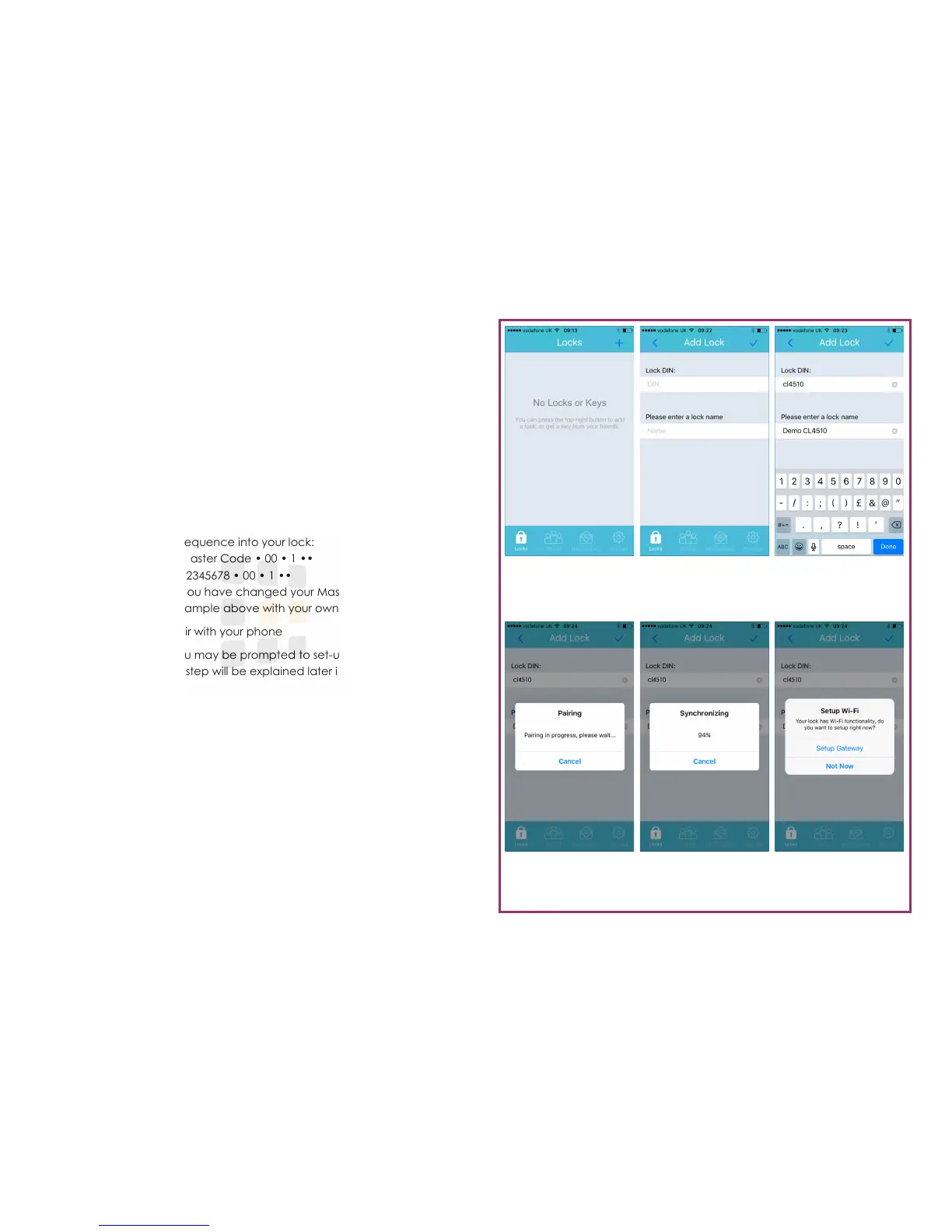
Figure 6
Line 2
Line 3
Register a Lock
1. Open the K3 Connect App (if not already open)
2. Touch the + button (top-right) of the screen
3. Enter the lock DIN
CL4510: cl4510
CL5510: cl5410
CL6510: cl6510
4. Enter a name for the lock (we recommend that you choose a meaningful
name)
5. Touch the icon (top-right) of the screen
6. Enter the following sequence into your lock:
Command: #Master Code • 00 • 1 ••
Example: #12345678 • 00 • 1 ••
Note: If you have changed your Master Code, substitute the
code used in the example above with your own code.
7. The lock will now pair with your phone
8. When complete, you may be prompted to set-up the WiFi Gateway—
touch Not Now. This step will be explained later in this guide
Pairing
Enter the pairing com-
mand into your lock
Lock DIN
Use the correct DIN for
your lock
Lock Details
Enter the lock DIN and
choose a name
Lock List
For new accounts, this
list will be empty
Synchronising
The phone and lock will
now synchronise
Page 2





 To Next Page