14
CATER
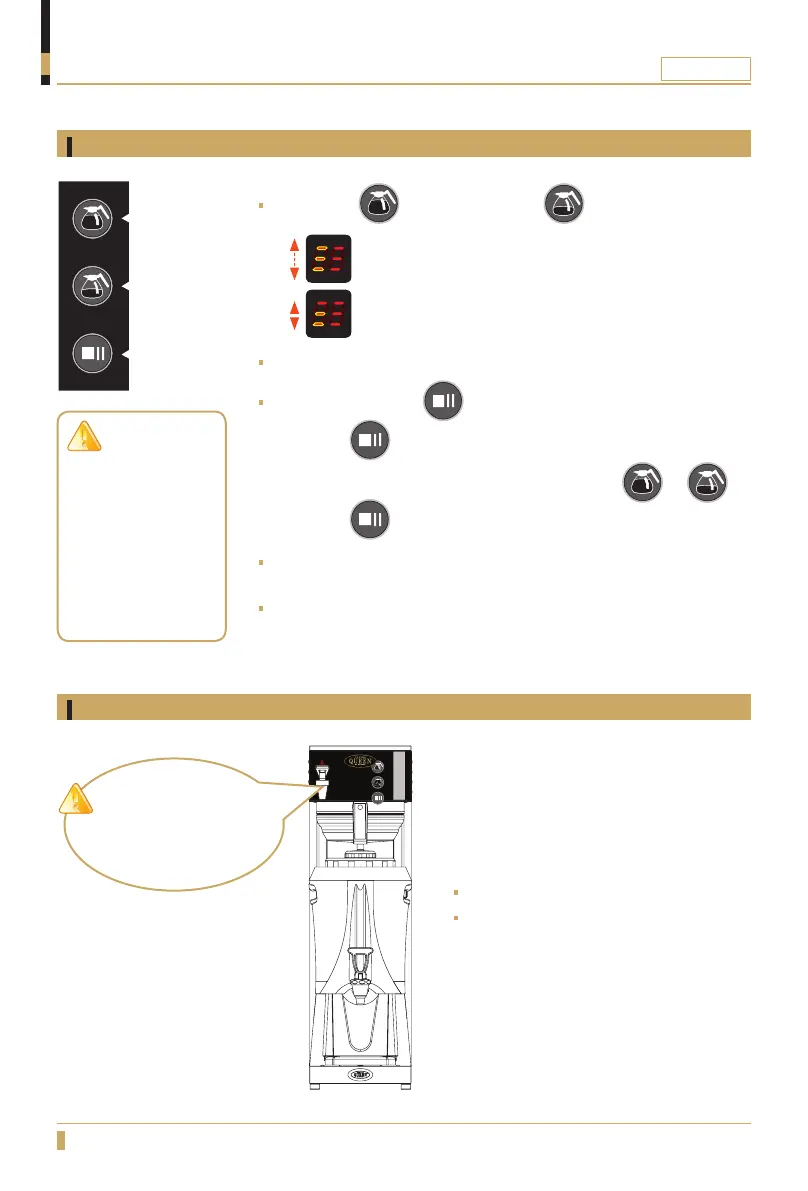
Start brewing
OPERATION
Brewing with coffee
CAUTION!
Do not dispense hot water
while machine is brewing.
Push button for 2,5L, push button for 1.25L
- 1/1 Full brew, display is blinking between all 3 lines.
-
1/2 Half brew, display is blinking between lower 2 lines.
When brewing starts, the brewing lamp will be lit up with a red light.
STOP / PAUSE button
- Press the button once for pause.
- To continue the brewing if it is in pause mode press or
- Press the button twice to stop brewing.
When brewing is completed a 3 second beep will be heard from the
machine, brewing lamp will be turned off.
It is now safe to remove the serving station.
1/1 Brewing
1/2 Brewing
Pause / Stop
Dispensing hot water
Hold a glass or jug under the water tap.
Lift the red handle to start dispensing
hot water.
CAUTION!
Do not remove
serving station
before display is lit
with a steady light
and the ready beep
has been heard, it
can cause serious
spill and burns.






 To Next Page