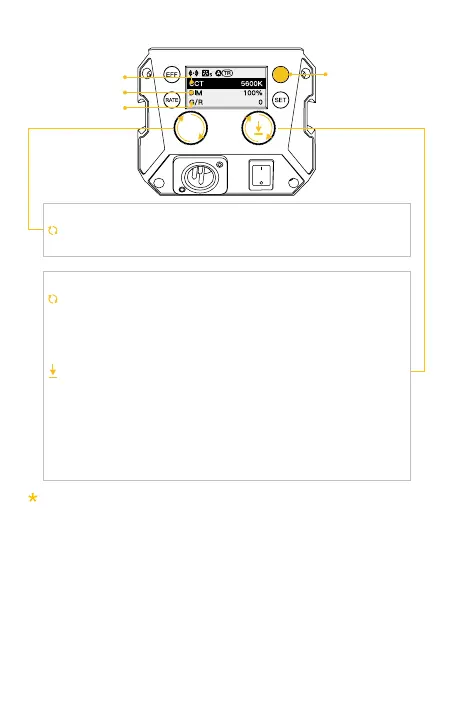
2. CCT Mode (Short press CCT Mode Button to enter)
Turn the knob clockwise or anti-clockwise to adjust options: color
temperature, brightness, Chromatic Aberration Compensation.
Turn the knob clockwise or anti-clockwise to adjust parameter
of color temperature, brightness and Chromatic Aberration
Compensation :
Brightness (DIM): 0%~100%
Color temperature: 2700-6500K
Chromatic Aberration Compensation: Green10~1-0-Red1~10
Press down the knob to quickly switch the preset parameter
of color temperature, brightness and Chromatic Aberration
Compensation :
Preset brightness:0%、25%、50%、75%、100%
Preset color temperature:2700K、3200K、4000K、5600K、
6500K
Chromatic Aberration Compensation: Short press return to zero
Option Adjustment Knob
Parameter Adjustment Knob/Parameter Preset
Rolling the knob will enlarge the current setting parameter value, and it will
automatically return to the main screen after 1.5 seconds of no operation.
Color Temperature
Brightness
G/R Compensation
CCT Mode Button



 To Next Page