32
Recipes
The following screens describe the recipe functions for the MicroClean 2. Recipes are useful
for saving optimal settings for the machine for dierent types of surfaces. This saves time when
switching from one type of surface to another. Below describes how to save recipes and how to
recall for use.
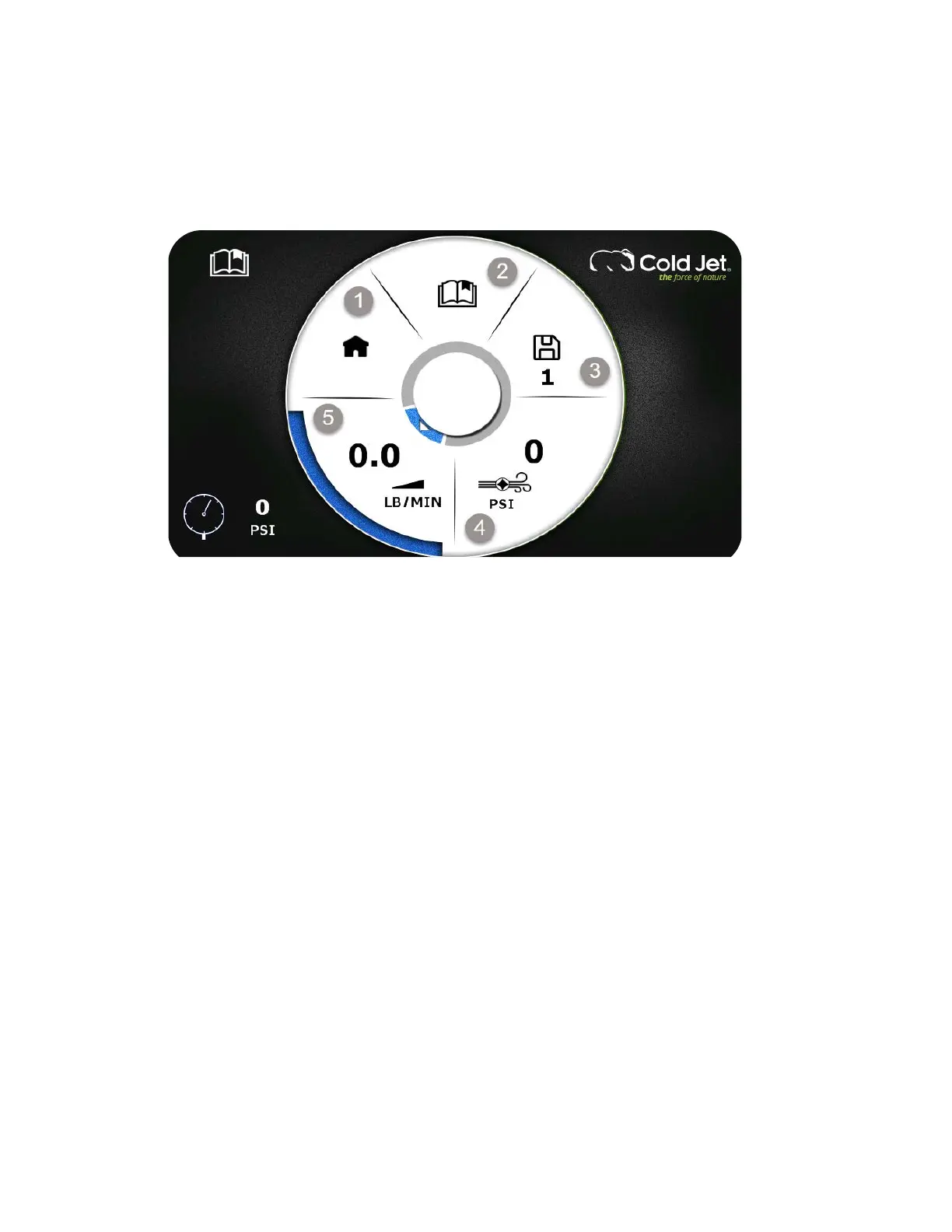
Figure 9: Recipe Screen
1. Home
2. Recipe Menu
3. Actibe Recipe
4. Recipe Blast Pressure
5. Recipe Feed Rate
a. To access the Recipe screen:
i. From the Home screen, use the rotary encoder dial to select settings then
recipes.
b. To select a recipe:
i. Using the rotary encoder dial, navigate to the Recipe Menu (2).
ii. Rotate the dial left or right to scroll through recipes 1-9.
iii. Press the dial to select the desired recipe.
c. To create a recipe:
i. Using the rotary encoder dial, navigate to and adjust the Blast Pressure (4),
and Feed Rate (5).
ii. Once settings are adjusted, navigate to numbered recipe (3) and press to save.
d. Using the rotary encoder dial, navigate to the home icon (1) and press to return to the
Home screen.



 To Next Page