3.3.7 SYSTEM STATUS LIGHT – Figure 3.3.1 Arrow G
Used only with DC Drive vehicles. The green system status LED will light when the power keyswitch is turned to the
“ON” position. This indicates the controller is powered up and should display a steady green light.
With the power keyswitch “ON”, if this green status light is not lit or is flashing refer to Section 5.11 CONTROLLER
TROUBLESHOOTING.
3.3.8 OPERATING INSTRUCTION - Figure 3.3.1 Arrow H
Rea
d carefully before operating the vehicle. Promptly replace if removed or damaged. Contact Columbia ParCar for
replacements if needed.
3.3.9 WARNING LABEL - Figure 3.3.1 Arrow I
Read carefully before operating the vehicle. Promptly replace if removed or damaged. Contact Columbia ParCar for
replacements if needed.
3.3.10 ACCELERATOR PEDAL – Figure 3.3.1 Arrow J
This pedal controls the speed of the vehicle in the same manner as a conventional automobile.
The pedal must be fully released when changing directions. If not fully released, a reset of the power system or
direction selector is required.
To avoid injury, speed in reverse should always be kept at a minimum.
3.3.11 BRAKE PEDAL – Figure 3.3.1 Arrow K
Pressing the brake pedal activates brake lights and will slow or stop the vehicle.
NOTICE: Never rest your foot on brake pedal while operating the vehicle. This wears brake pads, creates
drag and causes excess battery discharge.
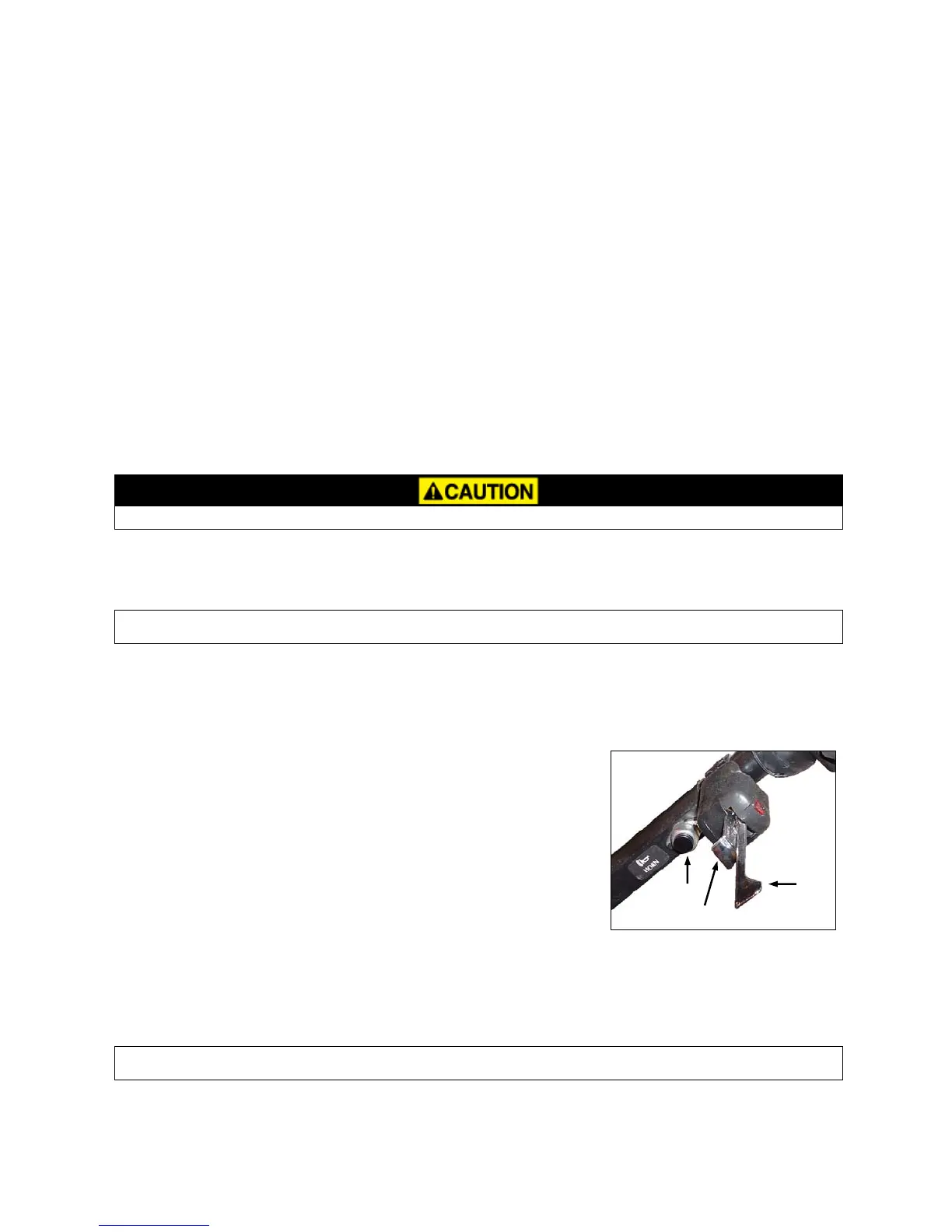
3.3.12 HORN BUTTON – Figure 3.3.3 Arrow L
The horn button (Arrow L) is located on the left side of the steering column, below the turn signals.
3.3.13 TURN SIGNAL/HAZARD WARNING SWITCH – Figure 3.3.3
L
N
M
The turn signal/hazard warning switch is located on the left side of the
steering column. When lever (Arrow M) is moved upward the right turn signal
turns on. When lever is moved downward the left turn signal turns on. To turn
off a signal move indicator lever back to center position. To operate the
hazard warning lights pull outward on hazard bar (Arrow N). Moving the signal
indicator lever to either of the turn signal positions will turn off the hazard
lights.
Figure 3.3.3
3.3.14 H
AND PARKING BRAKE – Figure 3.3.4 Arrow O
To lock the brake, pull the brake lever upward. To release, depress the button at the end of the handle and let the
handle down to the original position. Always apply parking brake when leaving the vehicle.
NOTICE: Do not operate the vehicle with the hand parking brake applied. Damage to the vehicle could
result.
2012 Summit
3-7


 To Next Page