EasyManua.ls Logo

Comb Communications MK II Plus - Page 14

Comb Communications MK II Plus
30 pages
Print Icon
To Next Page IconTo Next Page
To Previous Page IconTo Previous Page
Loading...
!
!
MK!II!Hardware!Installation!Manual:!Rev!1!
©2018!Comb!Communications!
!
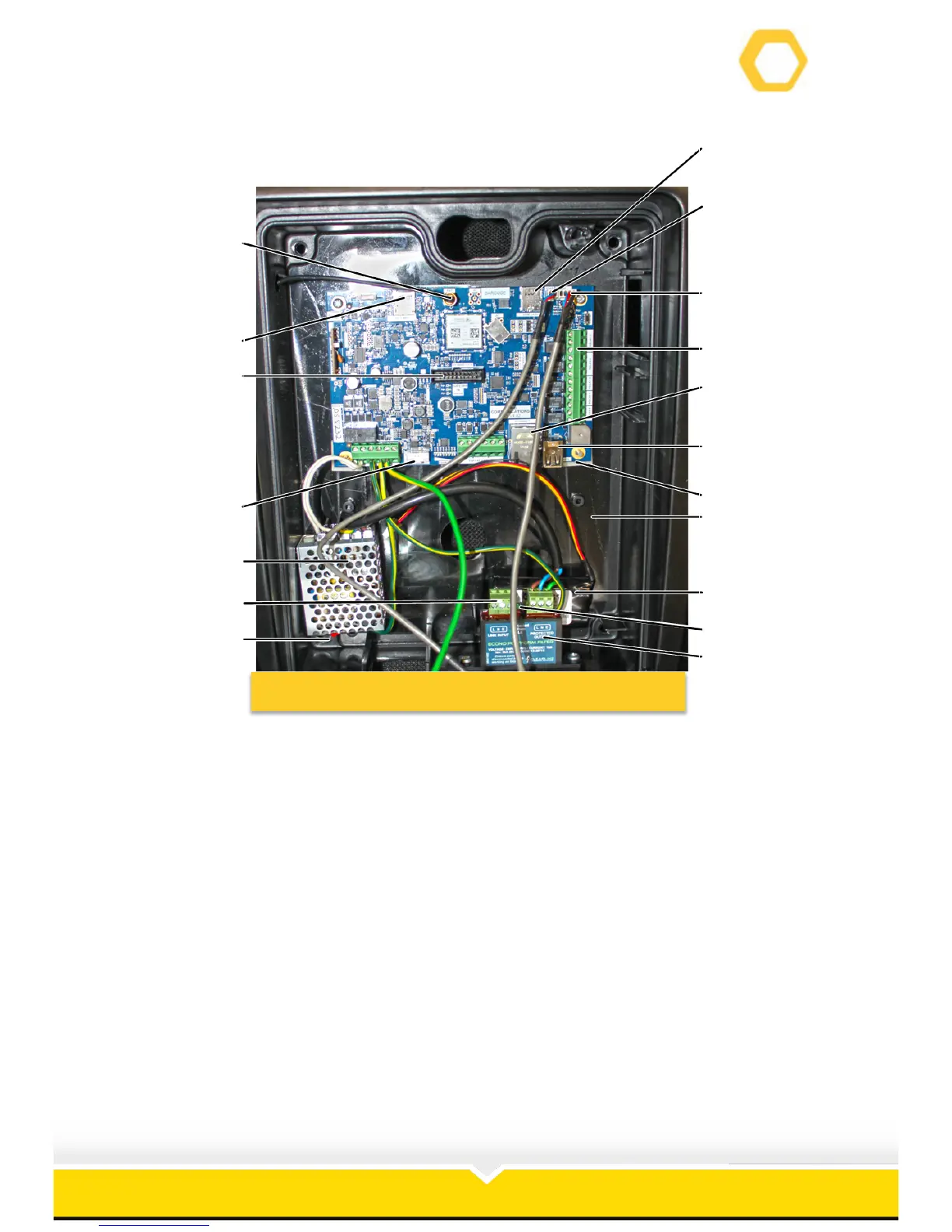
The MKII Plus interior layout is as follows (See):
Figure 4: MK II Plus Interior Layout
1. SIM Card Slot.
2. Microphone Connection.
3. Speaker Connection.
4. Relay Slots.
5. Ethernet Connection.
6. USB Connection.
7. PCB.
8. Robust Enclosure.
9. Battery.
10. LED Light on Surge Protector.
11. Surge Protector.
12. PCB Earth Wire.
13. 220V Installation Connection.
14. Switch Mode Power Supply.
15. Battery Slot on PCB.
16. Ribbon Slot on PCB.
17. SD Card Slot.
18. Antenna Connection
1!
2!
3!
4!
5!
6!
7!
8!
9!
10!
11!
12!
13!
14!
15!
16!
17!
18!

Related product manuals