MK!II!Hardware!Installation!Manual:!Rev!1!
©2018!Comb!Communications!
THE SYSTEM IS NOW POWERED UP. UNSAFE WORKING PRACTICES
AROUND ELECTRICITY CAN CAUSE SERIOUS INJURY OR DEATH.
28. Check that the LED flashes.
29. Check that the red LED stays lit.
30. Check signal strength.
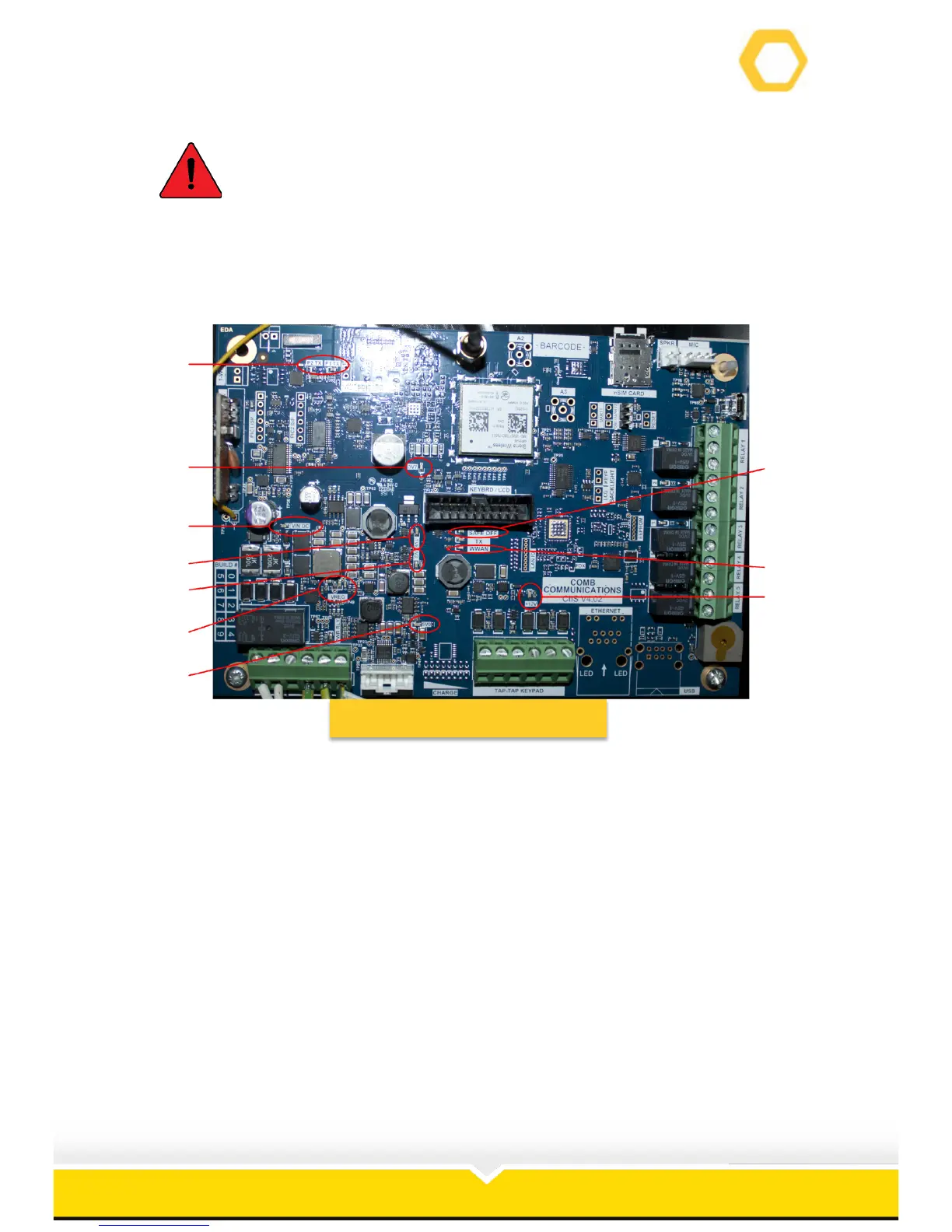
Figure 22: MK II PCB Lights
31. VIN DC – Confirms board is ON.
32. VREG – Registers voltage o0n the
PCB.
33. 5V0 – 5V circuit running.
34. 3V3 – 1.8V circuit running.
35. 1V8 – 3.3V circuit running.
36. 3V7 – 3.7V circuit running.
37. +12V – 12V circuit running.
38. WWAN – Web/GSM/3G services
running.
39. SAFE OFF – Shutdown mode.
40. PX1 & PX2 TX – Remote receiver.



 To Next Page