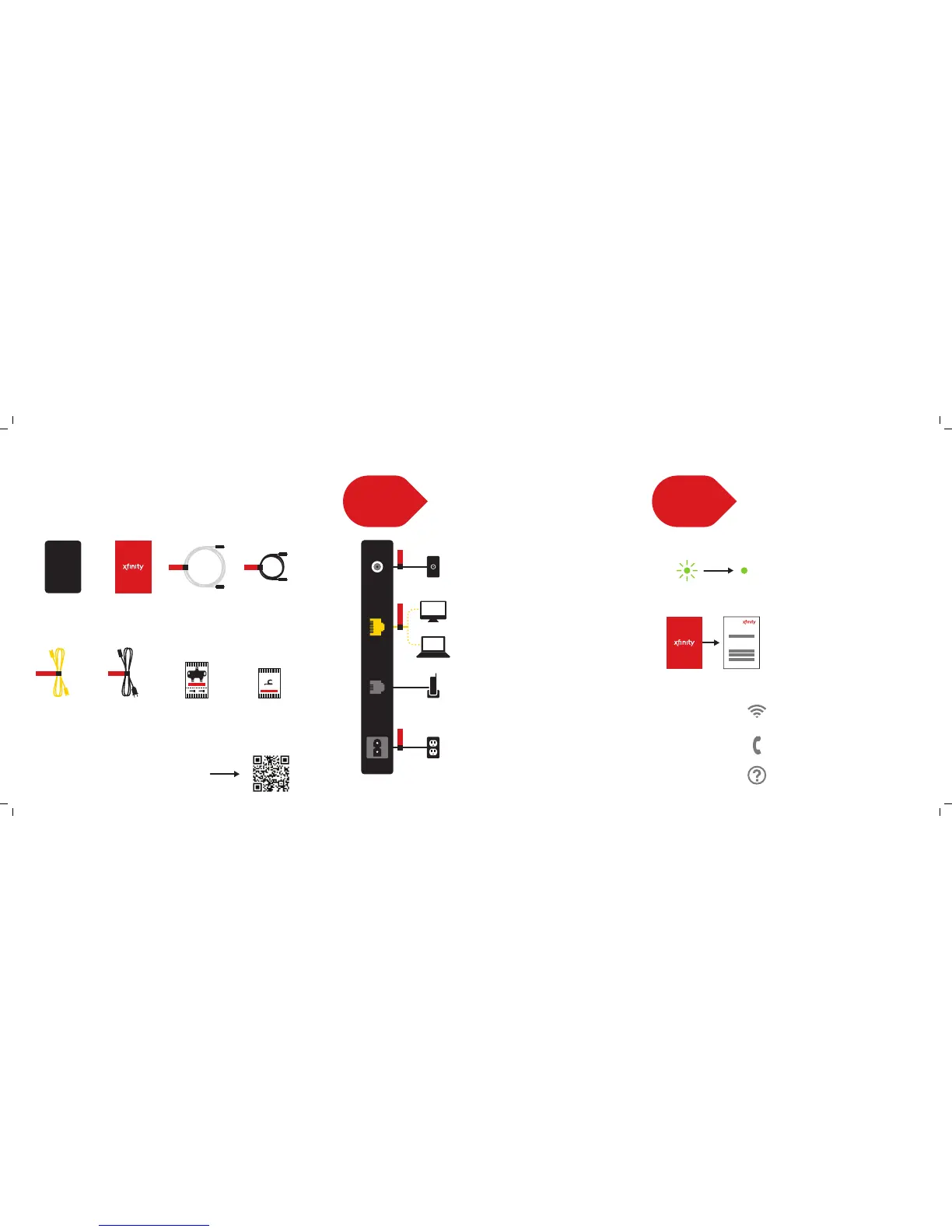
Plug the power cord into your modem, then into an
electrical outlet. If your modem has a Power button,
turn it on.
Refer to your XFINITY folder for alternate connection information.
Wait for the online connection light on the front
of your modem (may be labeled Online, Sync,
Cable or Ready) to stop ashing and remain lit.
This process may take up to 10 minutes.
Once the light is solid, open up your Web
browser.
To activate your service, you will need the
Activation Information card found in your
XFINITY folder.
If you have other XFINITY devices to connect,
complete those connections now so you can
activate all your devices at once.
To Activate:
comcast.com/activate
—or—
1-855-OK-BEGIN (1-855-652-3446)
If your XFINITY modem is WiFi-capable, you will
nd a Wireless Gateway Quick Start Guide in
your XFINITY folder that will walk you through
setting up your home network.
Information on how to set up XFINITY
®
Internet
and Voice features, such as online security and
XFINITY voicemail, is available in your XFINITY
folder.
Need help? For troubleshooting tips, go to
comcast.com/selfinstall or refer to your
XFINITY folder.
Connect a coax cable from your cable wall outlet to
the Cable/RF In connection on your modem. Make
sure this connection is nger tight.
You may only need one coax cable for your modem
connection, so select the length that suits your needs.
Connect the Ethernet cable from the Ethernet
connection on your computer to the Ethernet
connection on your modem.
Connect a telephone cord (not included) from your
telephone into the Tel 1 connection on your modem.
1
SET UP &
CONNECT
Connect.
2
POWER UP
& ACTIVATE
Activate.
comcast.com/activate
XFINITY
®
INTERNET & VOICE
Inside the Box.
For DIY Videos, Activation and FAQs:
Go to comcast.com/selfinstall —or— scan
XFINITY
MODEM
Coax
Coax
XFINITY
Digital Internet
& Voice Modem
XFINITY folder
Activation
Information
card
Coax cable Coax cable
Ethernet
Power
Ethernet
cable
Power
cord
Coax splitter
For use in alternate
connections
Cable tacks
10 pcs.
Optional






 To Previous Page