10
Programming call addresses other than the pre-programmed op-
tions
There are 2 programming methods:
• Smart programming of consecutive addresses: allows quick programming of buttons with consecutive addresses (e.g.:
5, 6, 7, 8)
• Programming of specific addresses: allows programming of specific addresses (e.g.: 25, 37, 70, 58)
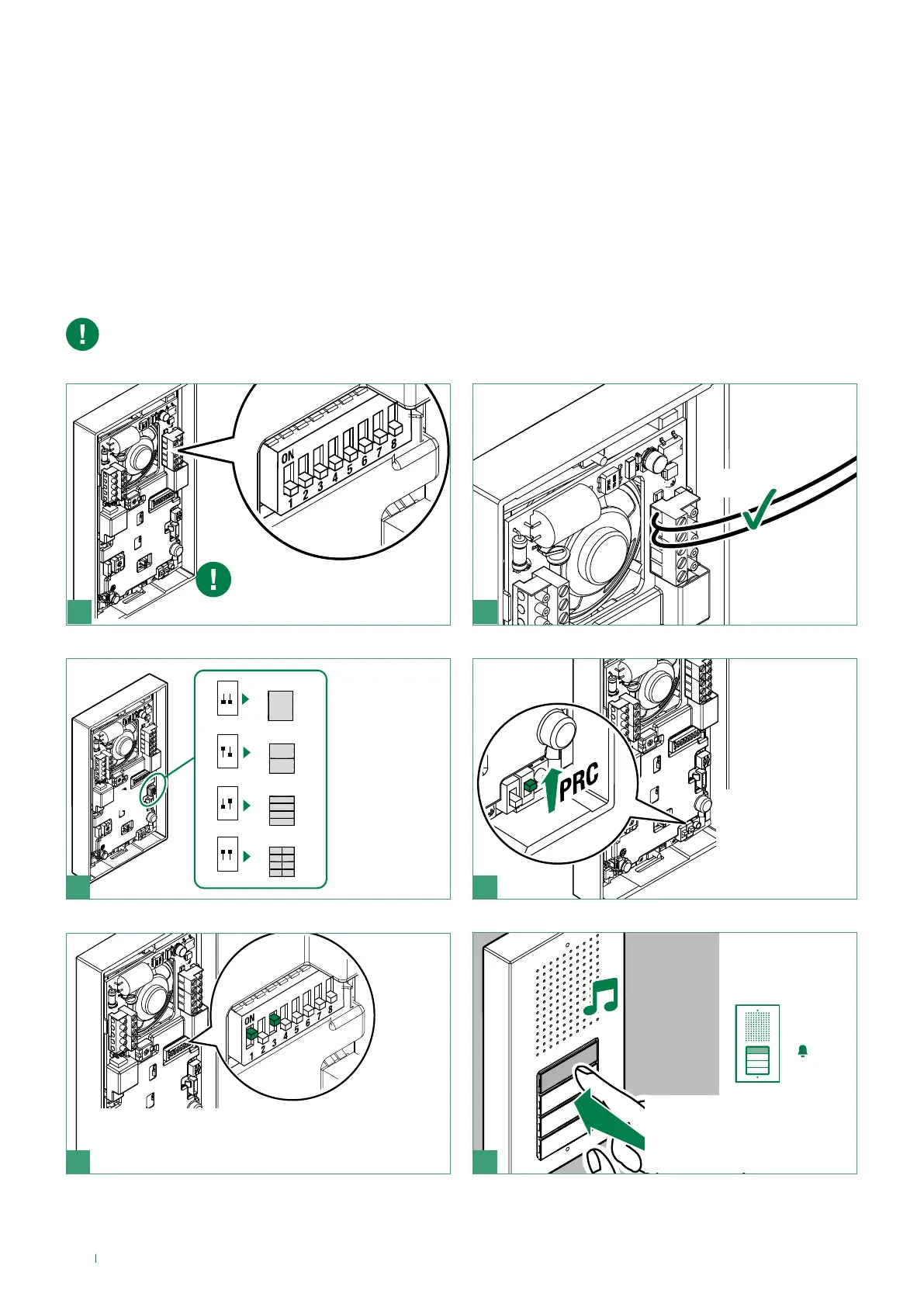
Smart programming of consecutive addresses
The programming procedures must be carried out in the specified order
LL
21
f Connect the
entrance panel
Take note of the S2 DIP-switch
settings
S1
Art. CA9213
ON
S1
1 2
Art. CA9210
ON
S1
1 2
Art. CA9211
ON
S1
1 2
Art. CA9212
ON
S1
1 2
3 4
f Set S1
according
to the
number of
buttons
f Enter
programming
mode by moving
PRC upwards
5
f Set the address of the apartment you wish to call
(for example: 5) using the DIP-switches (see table,
page 15)
6
f Press the button you want
to associate with the call
address set using the DIP-
switches



 To Next Page