EasyManua.ls Logo

Comelit Ciao CA2100A - Programming of Specific Addresses

Comelit Ciao CA2100A
16 pages
Print Icon
To Next Page IconTo Next Page
To Previous Page IconTo Previous Page
Loading...
11
+1
6
=
+1
7
=
+1
8
=
7
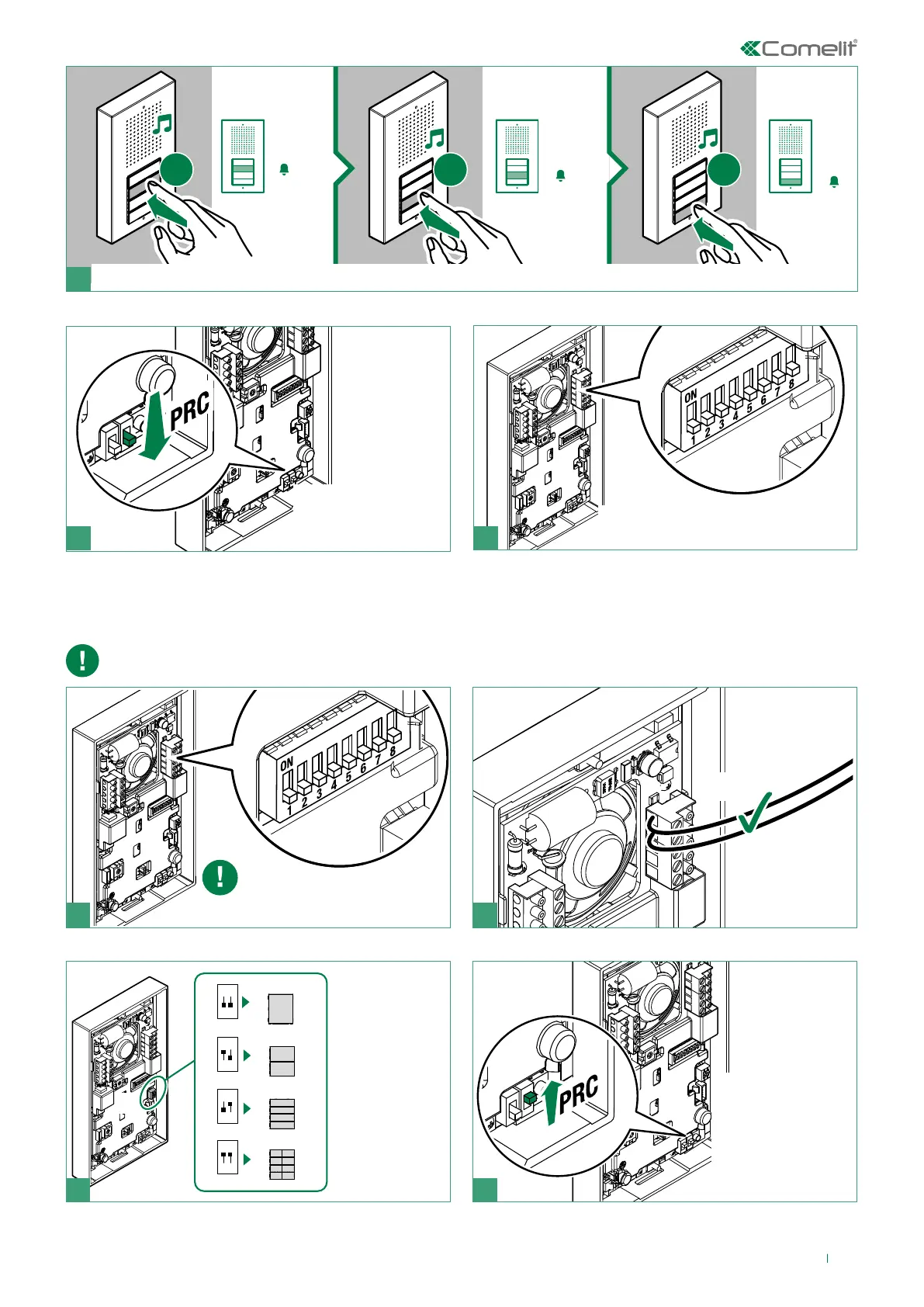
f Press the following buttons to assign consecutive addresses; every time a button is pressed the address will be increased by 1
8 9
f Exit programming
by moving PRC
downwards
f Restore the configuration of the DIP-
switches for S2
Programming of specific addresses
The programming procedures must be carried out in the specified order
LL
21
f Connect the
entrance panel
Take note of the S2 DIP-switch
settings
S1
Art. CA9213
ON
S1
1 2
Art. CA9210
ON
S1
1 2
Art. CA9211
ON
S1
1 2
Art. CA9212
ON
S1
1 2
3 4
f Set S1
according to
the number of
buttons
f Enter
programming
mode by moving
PRC upwards

Related product manuals