14
4.3.4. Format a new SD card
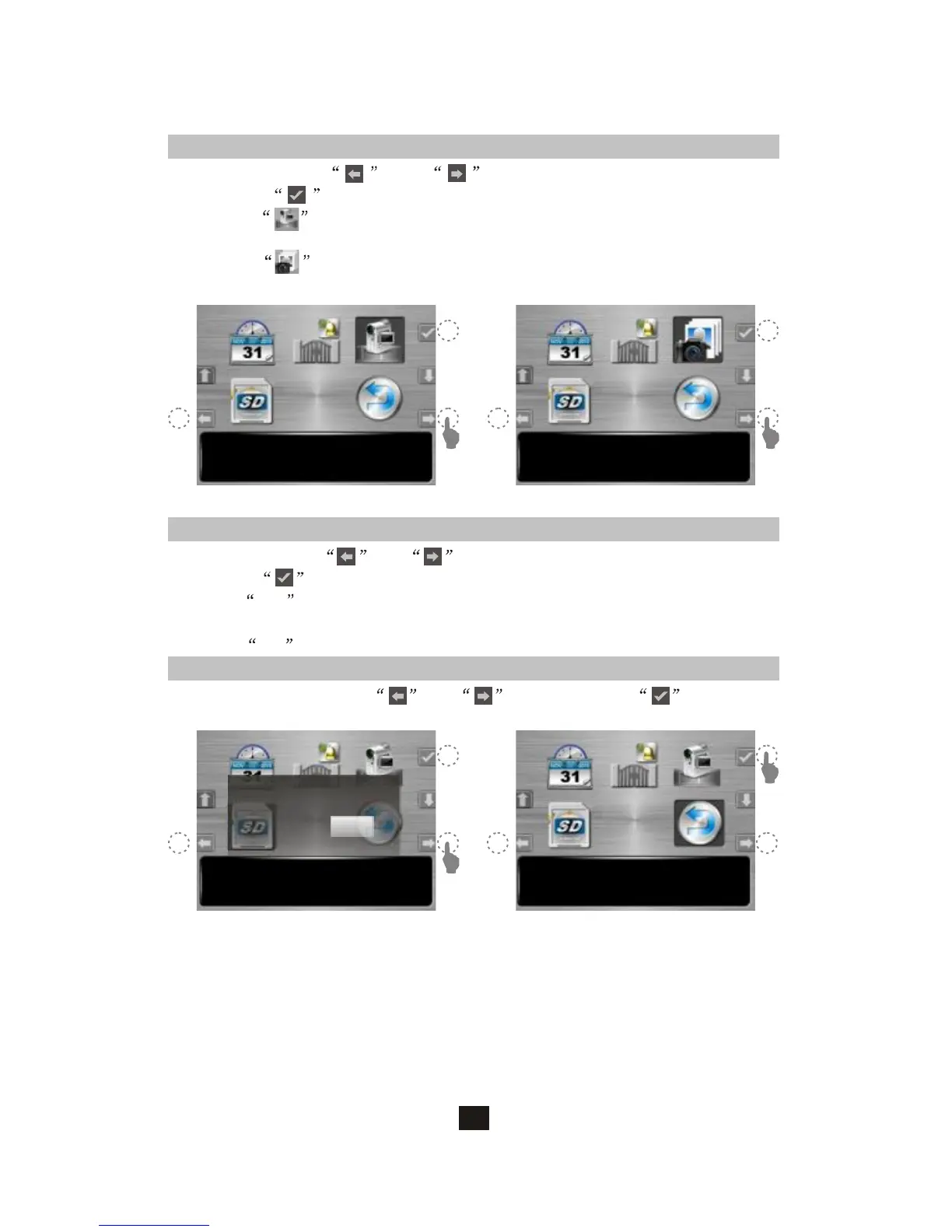
A. At setup menu, and can move the cursor to SD card format
option; to confirm (figure 1).
B. SelectYESto format your SD card, WARNING: Your previous memory
saving on the SD card will be erased.
C. SelectNO to skip format execution.
Format SD Card 15:30
V3.0.2(101206)
Format
YES NO
4.3.5. Exit setup menu
A. At setup menu, move and to EXIT option; to select.
(figure 2)
Exit 15:30
V3.0.2(101206)
(figure 1) (figure 2)
4.3.3 Video or photo recording
Video 15:30
V3.0.2(101206)
Photo 3 15:30
V3.0.2(101206)
(figure 1) (figure 2)
A. At setup menu, and can move the cursor to the mode
you like; can save your setup.
B. If select , enable automatic video recording mode, 20 seconds
a section, when visitor calls from doorbell camera.
C. If select , enable automatic photo recording mode, 3 shots per
action, when visitor calls from doorbell camera.



 To Next Page