35
PROGRAMMING VIA INSTALLER MENU
The function associated with the buttons can be changed via the installer menu.
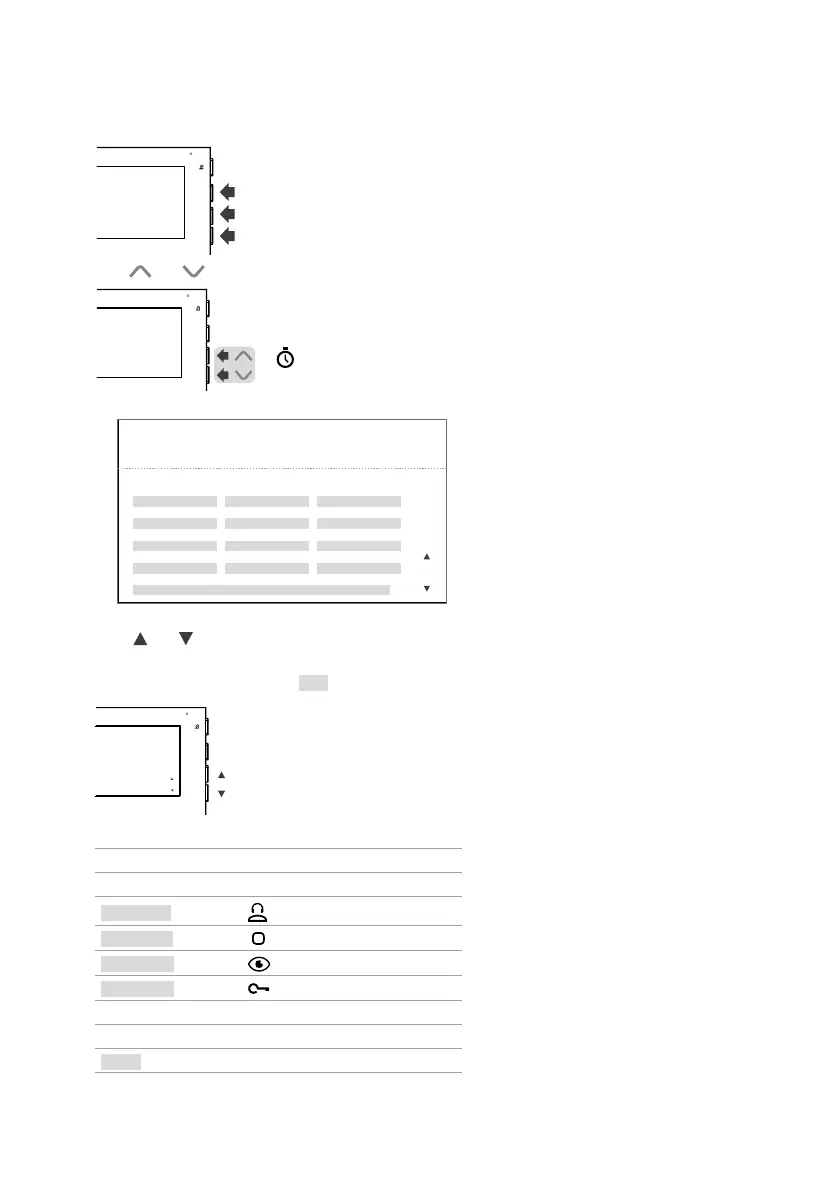
1. Press one of the following buttons to access the user menu.
2. Press and for 5 sec to access the installer menu.
5 sec
» A confirmation tone will sound and the following screen will appear.
CCSBUTTON 1
FUNCTION
VER: v1.0.0 ADDRESS: 001
OK
ADDRESS
ACTGBUTTON 2
AIBUTTON 3
APBUTTON 4
EXIT
3. Press OK to confirm the selection.
Press and to select the buttons, the functions and the addresses you want to program.
When the element is selected, the text will turn green.
4. To exit the installer menu, select EXIT or wait for 2 minutes (time-out period) without doing anything.
EXIT
EXIT
Description of the programming page
VER
Firmware version
ADDRESS
Programmed user code
BUTTON 1
Button
BUTTON 2
Button
BUTTON 3
Button
BUTTON 4
Button
FUNCTION
Function associated with the button
ADDRESS
Code required for some functions
EXIT
Exit programming











 To Next Page