36
OK
INT-IBUTTON 1
FUNCTION
VER: v1.0.0 ADDRESS: 001
OK
ADDRESS
ACTGBUTTON 2
AIBUTTON 3
APBUTTON 4
EXIT
OK
INT-EBUTTON 1
FUNCTION
VER: v1.0.0 ADDRESS: 001
OK
ADDRESS
ACTGBUTTON 2
AIBUTTON 3
APBUTTON 4
EXIT
003INT-EBUTTON 1
FUNCTION
VER: v1.0.0 ADDRESS: 001
OK
ADDRESS
ACTGBUTTON 2
AIBUTTON 3
APBUTTON 4
EXIT
001
5 sec
OK
CCSBUTTON 1
FUNCTION
VER: v1.0.0 ADDRESS: 001
OK
ADDRESS
ACTGBUTTON 2
AIBUTTON 3
APBUTTON 4
EXIT
INT-I
FUNCTION
ADDRESS: 001
OK
ADDRESS
ACTG
AI
AP
001
CCSBUTTON 1
FUNCTION
VER: v1.0.0 ADDRESS: 001
OK
ADDRESS
ACTGBUTTON 2
AIBUTTON 3
APBUTTON 4
EXIT
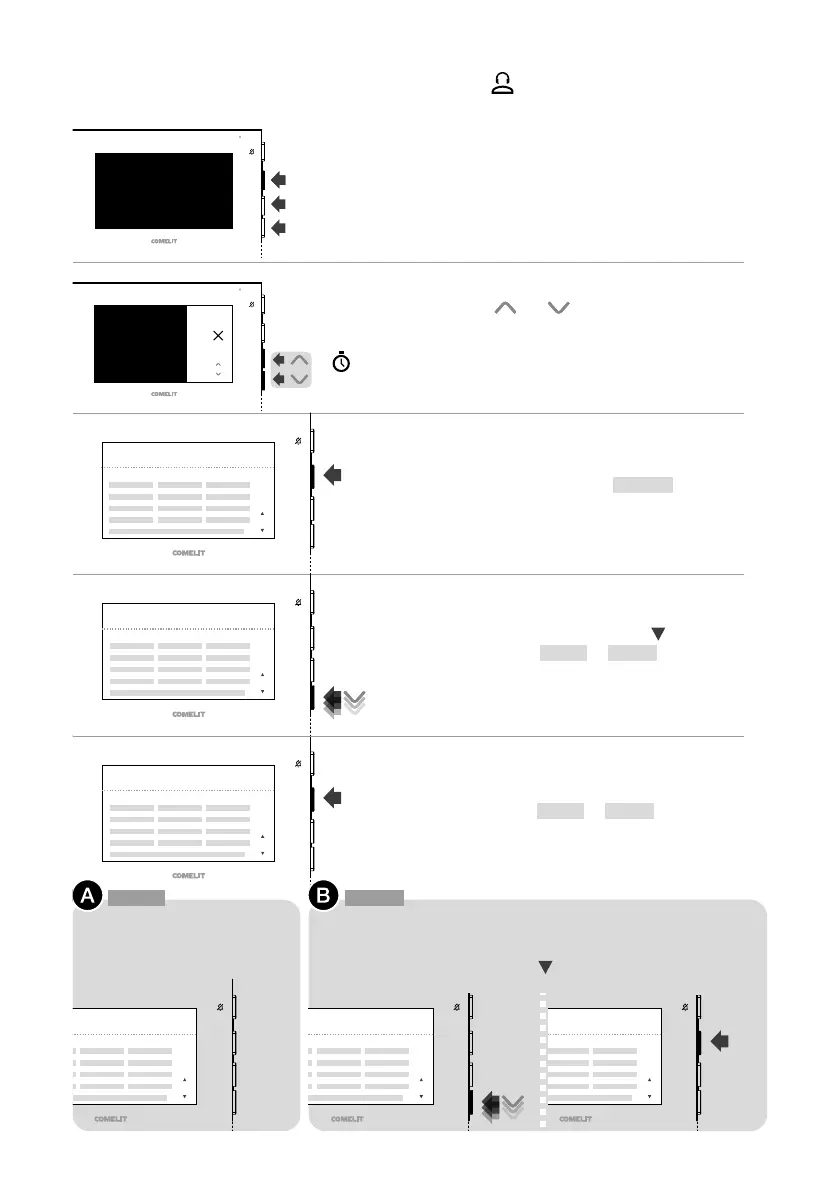
1. Press one of the following buttons to access the
user menu.
3. Confirm the selection of BUTTON 1 by pressing
OK.
4. Scroll through the menu using until you have
selected the [INT-I] or [INT-E] function.
5. Confirm the [INT-I] or [INT-E] function by
pressing OK.
To program an intercom call to
all devices in the apartment.
To program an intercom call to all devices in another apartment with
a dierent user code (for example, 3).
f Scroll through the menu using until the desired code is
selected (for example, 003) and confirm by pressing OK.
2. Press
and for 5 sec to access the
installer menu.
» A confirmation tone will sound and the
programming screen will appear.
EXAMPLE: PROGRAMMING THE INTERCOM FUNCTION ON THE
BUTTON
[INT-I] [INT-E]











 To Next Page