17
Description
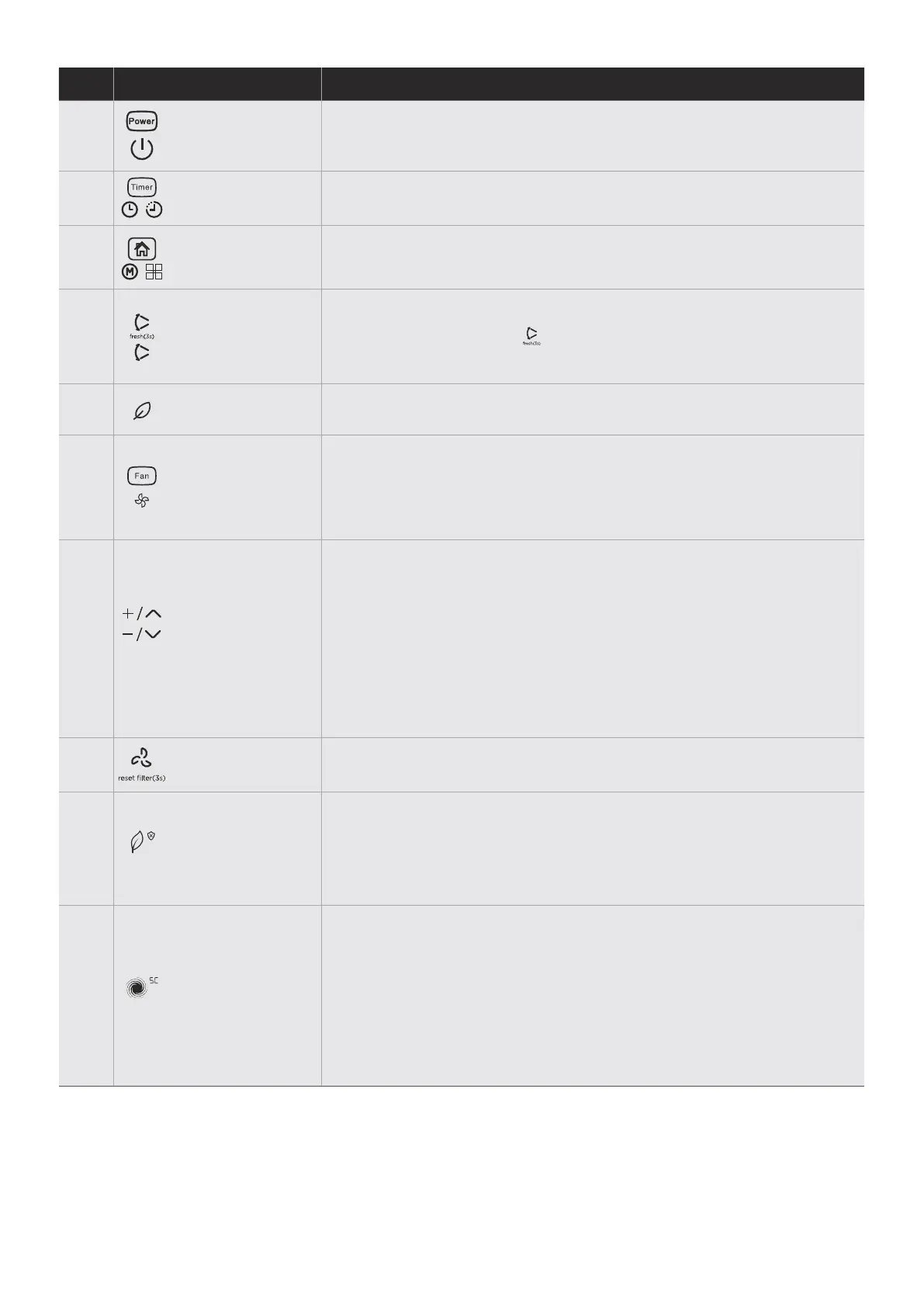
TIMER - Function
MODE - Function
SWING - Function
(some units)
1
2
3
4
FRESH - Function
(some units)
FAN - Function
(some units)
5
6
UP and DOWN
- Buttons
7
RESET FILTER
- Function
8
PURE/
ANTI-MOULD
- Function
TURBO - Function
(some units)
9
10
POWER ON/OFF
Press to turn the dehumidifier on and o.
NOTE: When the compressor startups or stops running, the unit may
make a loud voice, it is normal.
Press to initiate the Auto start and Auto stop feature, in conjuction
with the UP and DOWN buttons.
Press to select the desired operation mode from Dehumidifying,
Dryer, Continuous dehumidifying and Smart dehumidifying.
NOTE: Dryer and Smart dehumidifying modes are optional.
Press this button to start the louver auto swing function. press it
again to stop.
NOTE: Press this button( ) for 3 seconds to activate the ionizer and
UV-C lamp(if any). This function will help to purify the air inside. Press
it again to stop.
Press to activate the ionizer. The ion generator is energized and will
help to purify the air inside. Press it again to stop the function.
Control the fan speed.Press to select fan speed in three steps-low,
med and high. The fan speed indicator light illuminates under dierent
fan speed settings.
NOTE: when select high fan speed, both the low and med fan speed
lights illuminate(Not applicable to the Conrol panel A1,A2 & A3).
· Humidity Set Control buttons
· TIMER Set Control buttons
NOTE: Press + button for 3 seconds, the room temperture will display
for approximately 10 seconds. (for Control panel B4)
The humidity level can be set within a range of 35% RH(Relative
Humidity) to 85%RH(Relative Humidity) in 5% increments. For drier
air , press the DOWN button and set to a lower percent value(%).
For damper air, press the UP button and set a higher percent value(%).
Use the Up/Down buttons to set the Auton start and Auto stop time
from 0.0 to 24.
Press this button for 3 seconds, the “Filter” indicator light will be o.
PURE
Press this button to select the Air purifier function which uses the
included HEPA(High Eciency Particulate Air) filter to reduce the
dust, bacteria and allergen content in the room. Press the button for
3 seconds to enable the Anti-mould function. Press this button for 3
seconds again to cancle the Anti-mould function and the unit revents
previous state.
TURBO
Control the fan speed. Press to select fan speed in three steps-low,
med and high. The fan speed indicator light illuminates under dierent
fan speed settings. But when select high fan speed, both the low and
med fan speed lights illuminate.
NOTE: The turbo button is disabled in Dryer mode, the Self clean, Air
purifier or Anti-mould functions. When the unit is on, press the turbo
button for more than 3 seconds to active Self clean function and the
LED DISPLAY shows ‘SC’ for 5 seconds. Press this button for 3
seconds again to cancle the Self clean function, the LED DISPLAY
flashes ‘SC’ for 5 seconds.
EN


 To Next Page
 Loading...