19
Setting the Timer(With 2 indicator lights)
Wait 3 minutes before resuming operation
Self-clean(some units)
Smart dehumidifying mode (on some units)
Air Filter Cleaning Reminder (on some units)
· When the unit is on, first press the Timer button,
the Timer O indicator light illuminates. It indi-
cates the Auto Stop program is initiated. Press it
again the Timer On indicator light illuminates. It
indicates the Auto Start is initiated.
· When the unit is o, first press the Timer
button, the Timer On indicator light illuminates.
It indicates the Auto Start program is initiated.
Press it again the Timer O indicator light
illuminates. It indicates the Auto Stop is initiated.
· Press or hold the UP or DOWN button to
change the Auto time by 0.5 hour increments,
up to 10 hours, then at 1 hour increments, up
to 24 hours. The control will count down the
time remaining until start.
· The selected time will register in 5 seconds and
the system will automatically revert back to
display the previous humidity setting.
· When the Auto start & Auto stop times are set,
within the same program sequence, Timer On
O indicator lights illuminate identifying both
On and O times are now programmed.
· Turning the unit On or O at any time or
adjusting the timer setting to 0.0 will cancel
the Auto Start/Stop function.
· When LED display window is plays the code of
P2, the Auto Start/Stop function will also be
cancelled.
Press the Turbo pad for 3 seconds to enable this
function. This function initiates as soon as the
unit is switched o, and runs 15 minutes under
high fan speed.
At smart dehumidifying mode, the unit will
automatically control room humidity in a
comfortable range 45%~55% according to the
room temperature. The humidity setting function
will be invalid.
After 250 hours of use, the “Filter” indicator
light will illuminate. This is a reminder to clean
your filter. To reset the reminder, press the
fan speed button for 3 seconds, the “Filter”
indicator light will be o.
After the unit has stopped, it can not be restart
operation in the first 3 minutes.This is to protect
the unit. Operation will automatically start after
3 minutes.
Anti-mould function (on some models)
Air purifier function (Applicable to Control
panel B4&B5)
HEPA filter (Applicable to Control panel A1,
A2&A3)
Dryer mode (on some models)
while reducing the risk of mould and bacterial
growth. To disable the function, press the Pure
pad for 3 seconds or select an operating mode
with the Mode pad.
Press the Pure pad for 3 seconds to enable
this function. This maximises occupant comfort
This function significantly reduces the dust,
bacteral and allergen content of the room, using
the HEPA(High Eciency Particulate Air) filter
supplied with the unit.
Press the Pure pad to
activate the Air purifier
function, all other
modes and special
functions are inhibited
while it is running. Make
sure you have fitted the
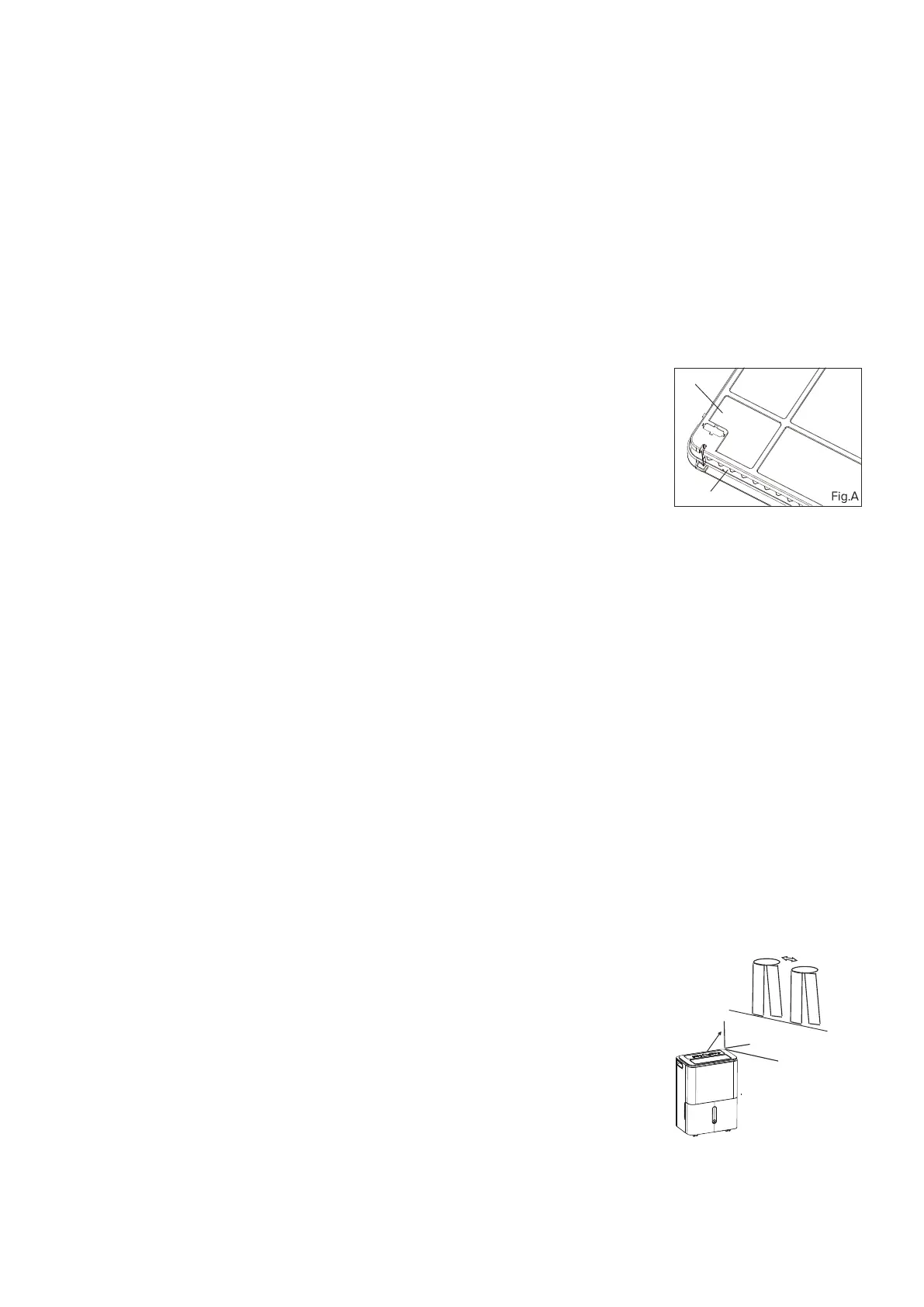
HEPA filter as indicated in Fig.A.
Install the HEPA(High Eciency Particulate Air) to
reduce the dust and allergen content in the room.
It may result in insucient dehumidfying capacity
due to the decreaseing of air intake. To restore the
normal dehumidfying operation, just take down
the HEPA filter.
Make sure you have fitted the HEPA filter as
indicated in Fig. A.
Air intake grill
HEPA filter
NOTE:
1. The dryer mode must
be operated in a close
room, do not open the
door and window.
2. To make the best
eective dehumi-
dification, please
first dehydrate the
wet clothes.
3. Make sure to direct
airflow at the
wet clothes.
4. For thick and heavy wet clothes may not get
the best eective dehumidification.
The unit can make the MAX dehumidification
function when it is under Dryer mode. The fan
speed is fixed at high fan speed.
For some models,The unit will quit dryer
mode after a maximum 10 hours’ operation.
30~50cm
Wet clothes
30~50cm
Airflow
Allow 30~50cm
of distance on the
top and right side
of the unit to the
wet clothes.
EN


 To Next Page
 Loading...