#20379_L
US customer support 1-888-622-2377 | www.commandaccess.com | CA customer support 1-855-823-3002
4
installation instructions
4
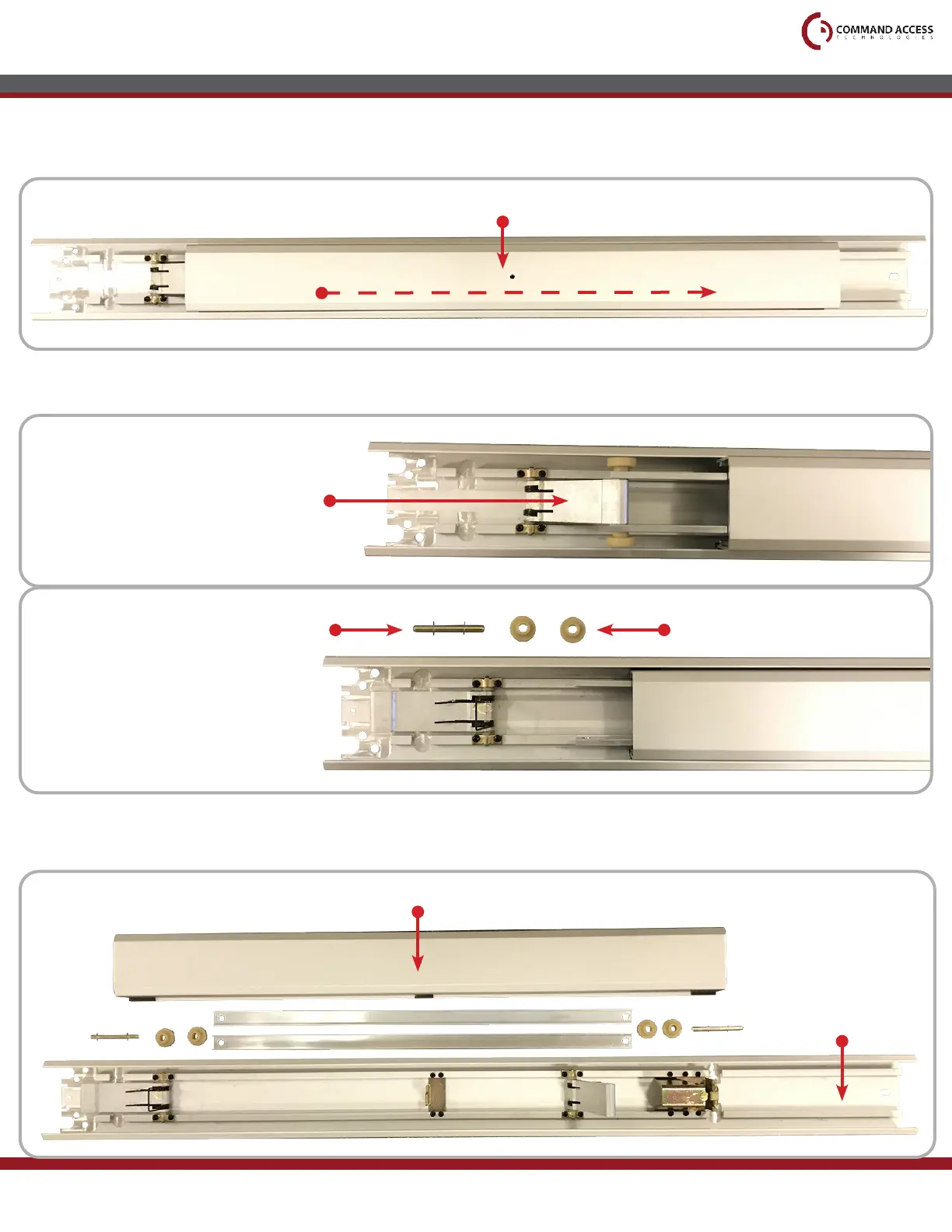
Flip the device back over and slide the Push Pad to the right, exposing the Front Activating Bracket.
*Move the Push Pad slowly as some Front Activating Bracket pieces are held in by the Push Pad and
tend to fall out when exposed.
5
With the Front Activating Bracket exposed, remove the Guides, Thin Clear Washers and Roll Pin.
6
Slide the Push Pad to the left to expose the Back Activating Bracket and remove its pieces as well.
Once removed, continue sliding the Push Pad to the left and remove it from the Base Rail.
Push Pad
Front Activating Bracket
Guides
Roll Pin with Thin Clear Washers
(Washers were placed Roll Pin to prevent losing them)
*Front Activating Bracket is
under spring pressure and will
snap back once Roll Pin is removed.
Push Pad
Base Rail
Head Assembly



 To Next Page