10
3) CONT Setting
① Press the COLOR button in the right in status of the screen on
② Power LED is blinked as fast (COLOR control mode)
③ Control the BRIGHT as the user wants by pressing UP/DOWN button
④ Hold "CONT"button for 2 seconds and release it to be saved
⑤ Power LED is blinked as normal
4) RESET (Video Status initialization)
① Press the Reset button in status of the screen on.
② Video status is initialized to the factory delivery conditions.
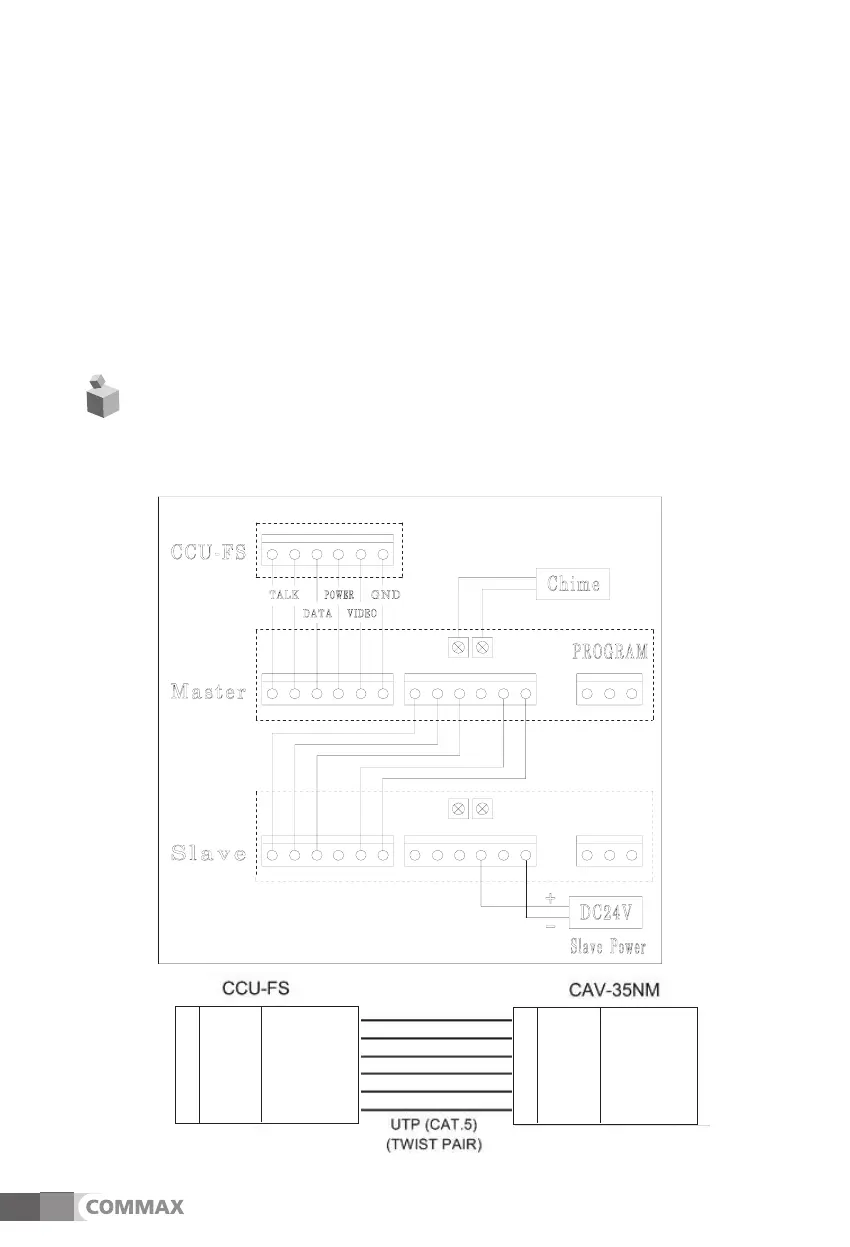
10. Wiring and System diagram
1) Wiring Diagram
1
2
3
4
5
6
BLACK Stripe Orange
BROWN Orange
RED Stripe Green
ORANGE
Green
YELLOW
Stripe Blue
Green Blue
1
2
3
4
5
6
BLACK Stripe Orange
BROWN Orange
RED Stripe Green
ORANGE
Green
YELLOW
Stripe Blue
Green Blue



 To Next Page