Important Precautions
Please keep this description in safe custody!
RANGE OF APPLICATION:
-
As stations for the intercom centrals GE 100
(only series 400 and 411), GE 200 and GE 700.
ATTENTION:
-
Never push objects of any kind into the station
through loudspeaker or microphone slots.
-
Mind that no liquid may enter the housing.
-
The station may be opened only by authorised
service engineers.
-
Avoid dropping the station.
-
Do not expose the station to extreme tempera-
ture (under -10°C or above + 60°C) or to direct
insolation.
-
The stations EE 411 and EE 211 contain a
mercury switch, therefore correct disposal pro-
cedures have to be followed.
CLEANING:
-
For cleaning a soft, lintfree cloth is recommen-
ded. Stubborn stains may be removed with a
cloth lightly dampened with a mild detergent
solvent.
-
Never use strong solvents, abrasive cleaners or
compressed air for cleaning.
CONNECTION:
-
Plug the station only to predefined sockets,
never to telephone- or computer sockets.
-
Use only the enclosed connector cable.
-
Never plug other equipment to the intercom
station sockets.
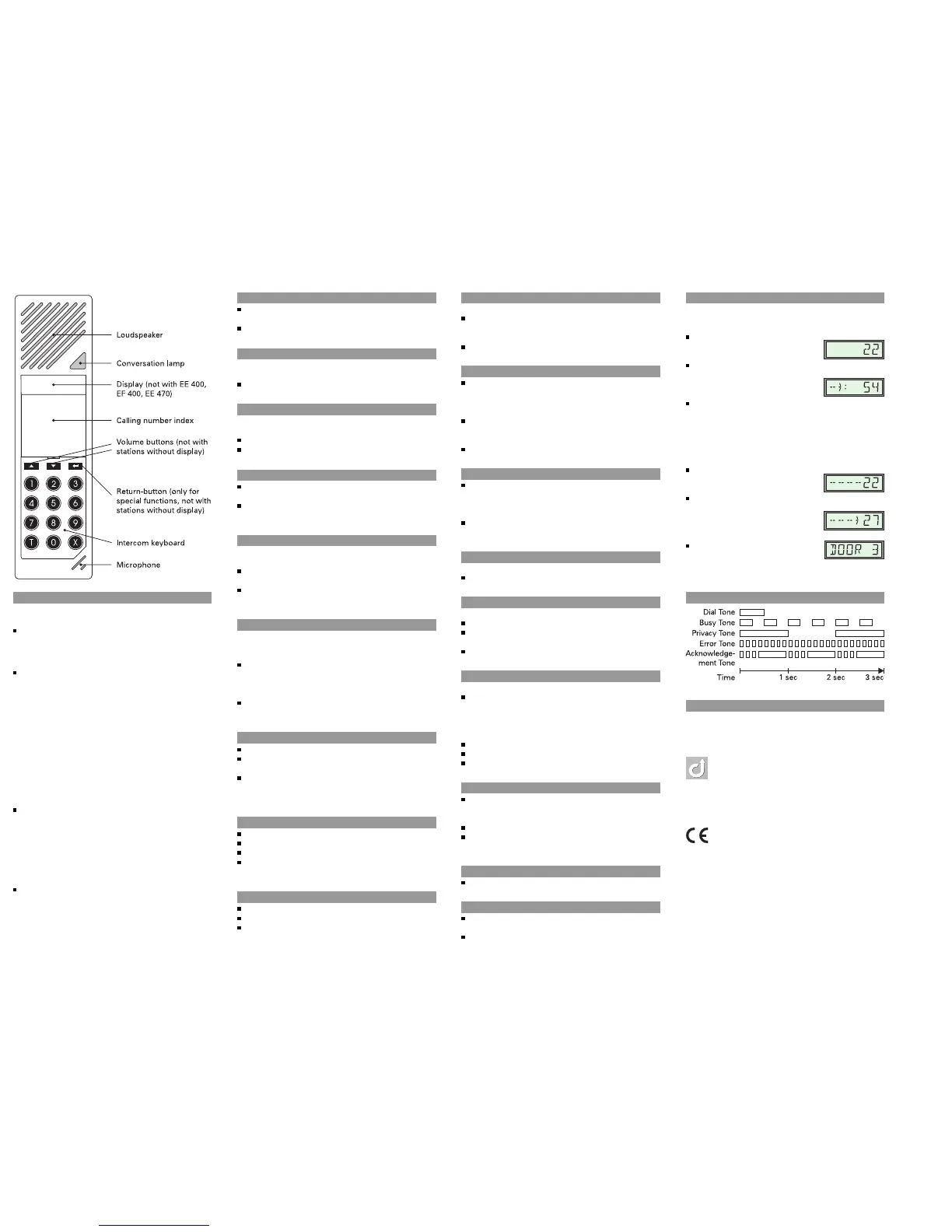
Make A Call
Dial the desired calling number - Talk after the
Dial Tone
Cancel the call: X
Handset Function
For private conversations (only EE 411, EE 420,
EE 211, EE 220):
Hold the loudspeaker grill to the ear
Control Of Speech Direction
Calls to noisy rooms may require manual control of
the speech direction (“Simplex“)
Talk: keep T pressed
Listen: release T
Called Number Busy
Wait for automatic re-call (Busy Tone can be
switched off with 0, or
Intrude with T (keep button pressed while
talking)
Send Re-call Request
*
Called subscriber is busy, in privacy mode or does
not answer
Send re-call request: 5 - Call is cancelled auto-
matically
Delete re-call request: call subscriber once again,
6 - Call is cancelled automatically
Receive Re-call Request
*
The number of the station that has called is indica-
ted blinking in the display, the Conversation Lamp
blinks
Answer re-call request: F or dial the calling
number (stations without function keys can also
answer with 5T) - Call is set up, re-call request is
cancelled automatically
Cancel re-call request without answer: press X
for at least one second
Minute Tone
Single Minute Tone: a call is running
Double Minute Tone: a call is holding for you or
your conversation partner
Triple Minute Tone: the conversation time ex-
pires in a few seconds, but you can extend it
with 77
Inquiry
*
0 - Tone Signal is heard
Dial the desired number - Talk after the Dial Tone
X: another number can be dialled, or
X once more: back to previous conversation
partner
Transfer
*
0 - Tone Signal is heard
Dial the desired number - Talk after the Dial Tone
Connect your conversation partner with your
previous conversation partner: 0
Microphone Cut-off
During a running call:
With 7 the call can be disconnected temporarily
- the waiting subscriber receives a Tone Signal
(Privacy Tone) and the Conversation Lamp blinks
Reconnect the call with 7
All Call / Group Call with Answer
Initiate All Call with 00 (Group Calls with 010
to 019, depending on the programming) - Talk
after Gong Signal, as soon as Conversation Lamp
lights
Terminate announcement:
T wait for answer, or
X cancel call without answer
Answer All Call/Group Call with TT
Secretary Transfer
Activate with 02 and the calling number of your
secretary station - Acknowledgement Tone
(EE 411/EE 211 can be turned to the side for acti-
vation)
Deactivate with 030 - Continuous Tone (or turn
back station)
Door Opener
During running call with the Door Station:
Open the door with 1
Follow Me
Only EE 411, EE 211
Own station: turn to the side to activate
Target station: 02 and your own calling number
- Acknowledgement Tone
Deactivate: turn back your own station
Conference
*
During a running call:
Invite further participants:
-
8 - Tone Signal is heard
-
Dial the desired number - Tal k after the Dial
Tone
Repeat for each participant
Start the conference: 8T
Participant who wants to talk: T
Terminate the conference: X
Privacy
Activate: 031 - Acknowledgement Tone
(EE 411/ EE 211 can be turned to the side for
activation)
Answer call: any button (or turn back station)
Deactivate: 030 - Continuous Tone (or turn back
station)
Reconnect Last Call
0T - Talk after the Dial Tone
Background Music
Switch on: 4T1 (up to 4T8 with several
music programs)
Switch off: 4T0
Display-Information
Not with EE 400, EF 400, EE 470.
Different functions depending on central type and
programming, but in general:
Idle Mode: If no call is running
the own calling number is dis-
played, e.g.:
Conversation: During a conver-
sation the calling number/name
of the conversation partner is
displayed, e.g.:
Waiting subscriber: A busy subscriber called by
another station gets the following indication:
-
Double Minute Tone
-
The calling number of the waiting station is
blinking in the display
-
Afterwards the conversation partner is indicated
again
Privacy Function: Activated Pri-
vacy is indicated in the display,
e.g.:
During an activated Call Trans-
fer (e.g. Secretary Transfer) the
target of the transfer is indica-
ted, e.g.:
Display Texts can be freely pro-
grammed, e.g.:
Tone Signals
Volume
During a conversation the volume can be adjusted
with
D and E
File: B_400DE.CHP
Version: 1.4/1100
Type: D-BA-400DE
This equipment fulfils the requirements of the EU-
standard 89/336/EWG (Electromagnetic Interferen-
ces, EN 55022/50082-1).
Therefore this station is CE-labelled.
The features depend on the type of subscriber card,
the software version and the programming.
*
For central GE 100 available from software Pro 03



 To Previous Page
 Loading...