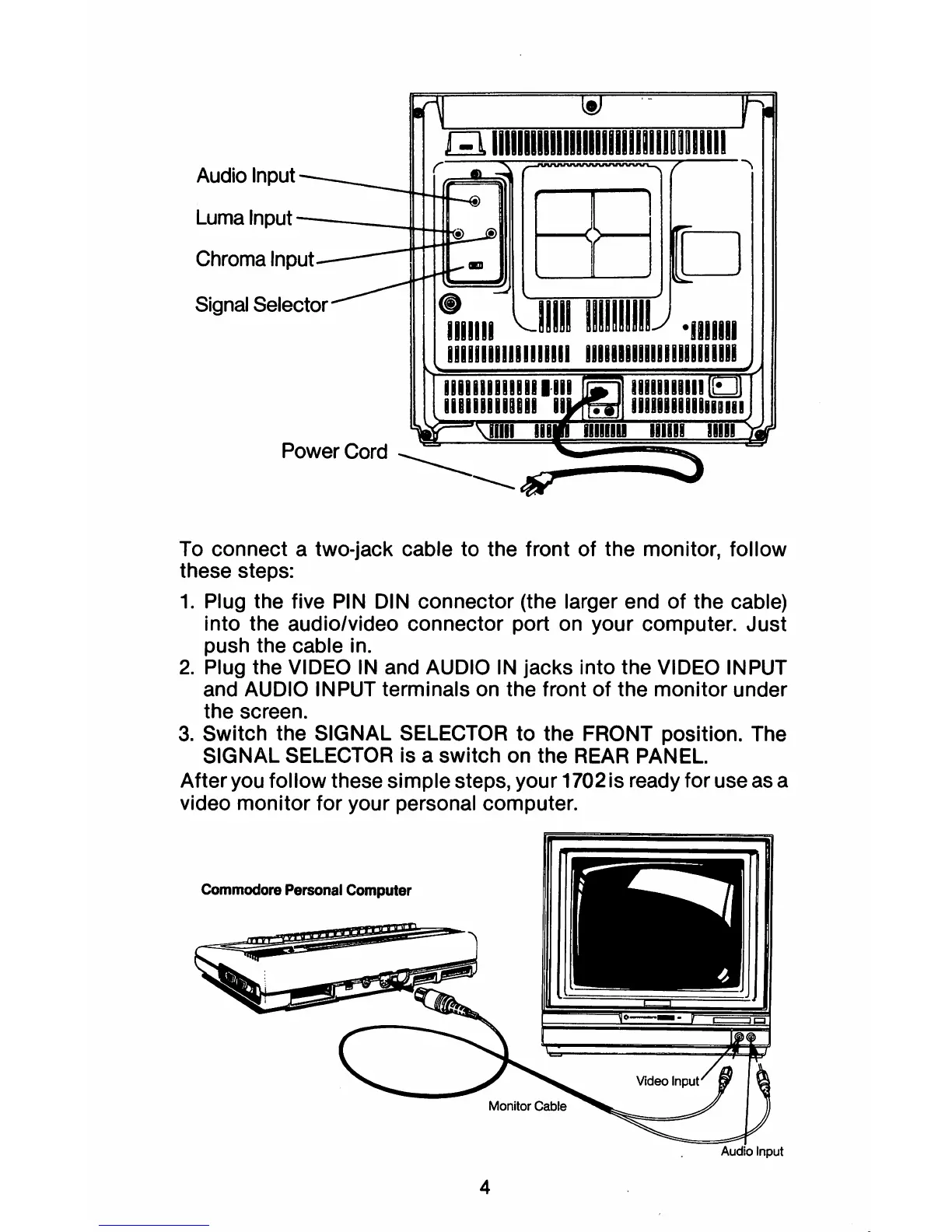
Audio Input
Luma
Input
-----IW-I.JL...
Chroma
Signal
Selector
Power Cord
____
--
To connect a two-jack cable to the front of the monitor, follow
these steps:
1.
Plug the five
PIN
DIN connector (the larger end
of
the cable)
into the audio/video connector port on your computer. Just
push the cable in.
2.
Plug the VIDEO
IN
and AUDIO
IN
jacks into the VIDEO INPUT
and AUDIO INPUT terminals on the front of the monitor under
the screen.
3.
Switch the SIGNAL SELECTOR
to
the FRONT position. The
SIGNAL SELECTOR is a switch on the
REAR
PANEL.
After you follow these simple steps, your 1702 is ready for use as a
video monitor for your personal computer.
Commodore
Personal
Computer
Audio
Input
4



 To Next Page