EasyManua.ls Logo

Commodore A 2091-40 - Connecting Additional SCSI Devices

Commodore A 2091-40
75 pages
Print Icon
To Next Page IconTo Next Page
To Previous Page IconTo Previous Page
Loading...
3-22
Installing
the
A2091-40/A2091
3.3
Connecting
Additional
SCSI
Devices
You
can
connect
up
to
seven
SCSI
devices
to
the
A2091,
using
the
Internal
connector
and
the
external
connector
at
the
back
of
the
A2091.
To
connect
the
first
external
SCSI
device,
gently
insert
the
device's
connector
into
the
A2091's
external
connector
and
secure
the
screws.
The
SCSI
device
will
need
to
have
its
own
power
supply.
Additional
SCS!
devices
can
be
connected
in
a
daisy-chain.
(The
first
peripheral
device
connects
to
the
A2091,
the
second
device
connects
to
the
first
device,
and
soon.)
When
connecting
internal
SCSI
devices
you
will
need
to
use
a
50-pin
ribbon
cable
with
as
many
connectors
as
SCSI
devices
to
be
connected
internally,
in
addition
to
the
connector
for
the
board,
Each
intemal
SCSI
device
must
be
connected
to
the
internal
power
supply.
Do
not
connect
more
than
one
device
to
the
A2091 power
connector.
Each
SCSI
device
must
be
jumpered
to
a
different
SCSI
address.
Please
note
that
the
A2091
is
set
to
SCSI
address
7.
if
multiple
SCS!
hard
disks
are
connected
to
the
A2091,
you
will
need
to
remove
the
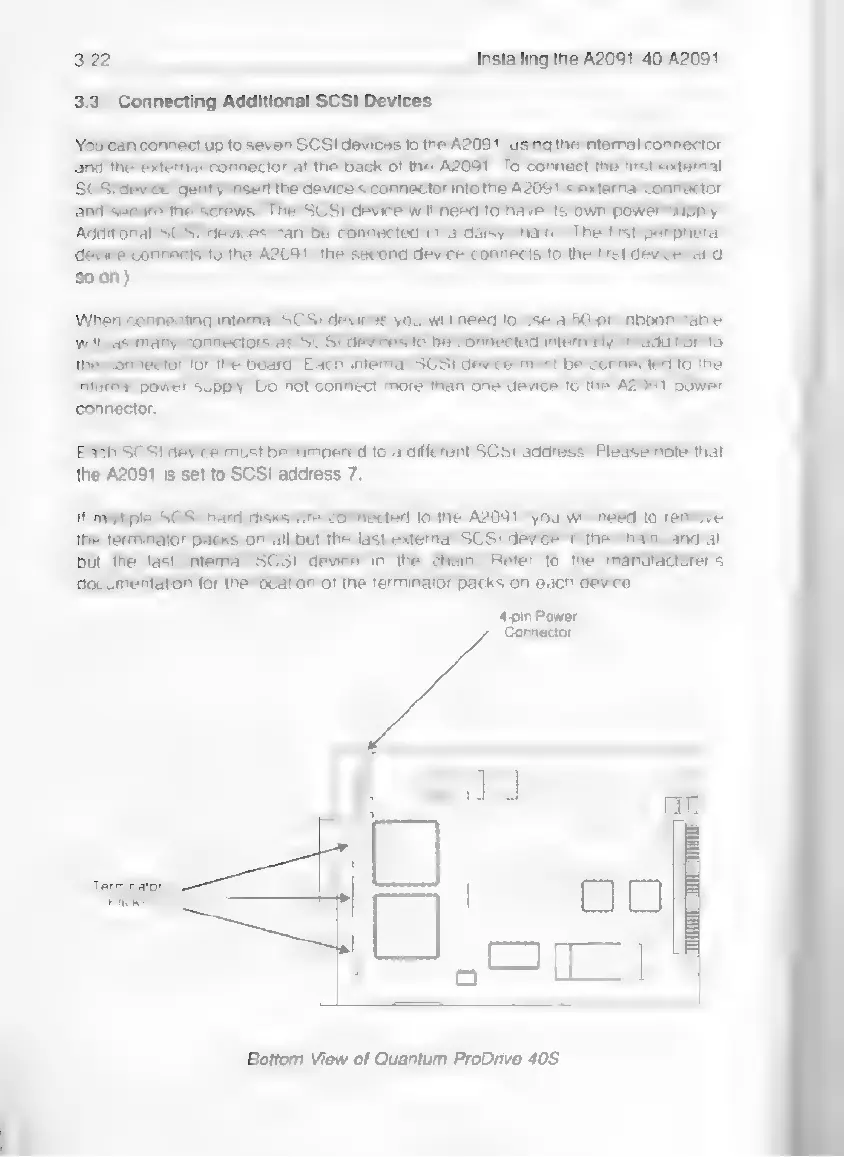
terminator
packs
on
all but
the
last
external
SCSI
device
in
the
chain,
and
all
but the
last
intemal
SCSI
device
in
the
chain.
Refer
to
the
manufacturer's
documentation
for the
location
of
the
terminator
packs
on
each
device.
4-pin
Power
Cannector
ooo
L
4
[|
a
|
EE
i
|
a
rka
Bottom
View
of
Quantum
ProDrive
40S