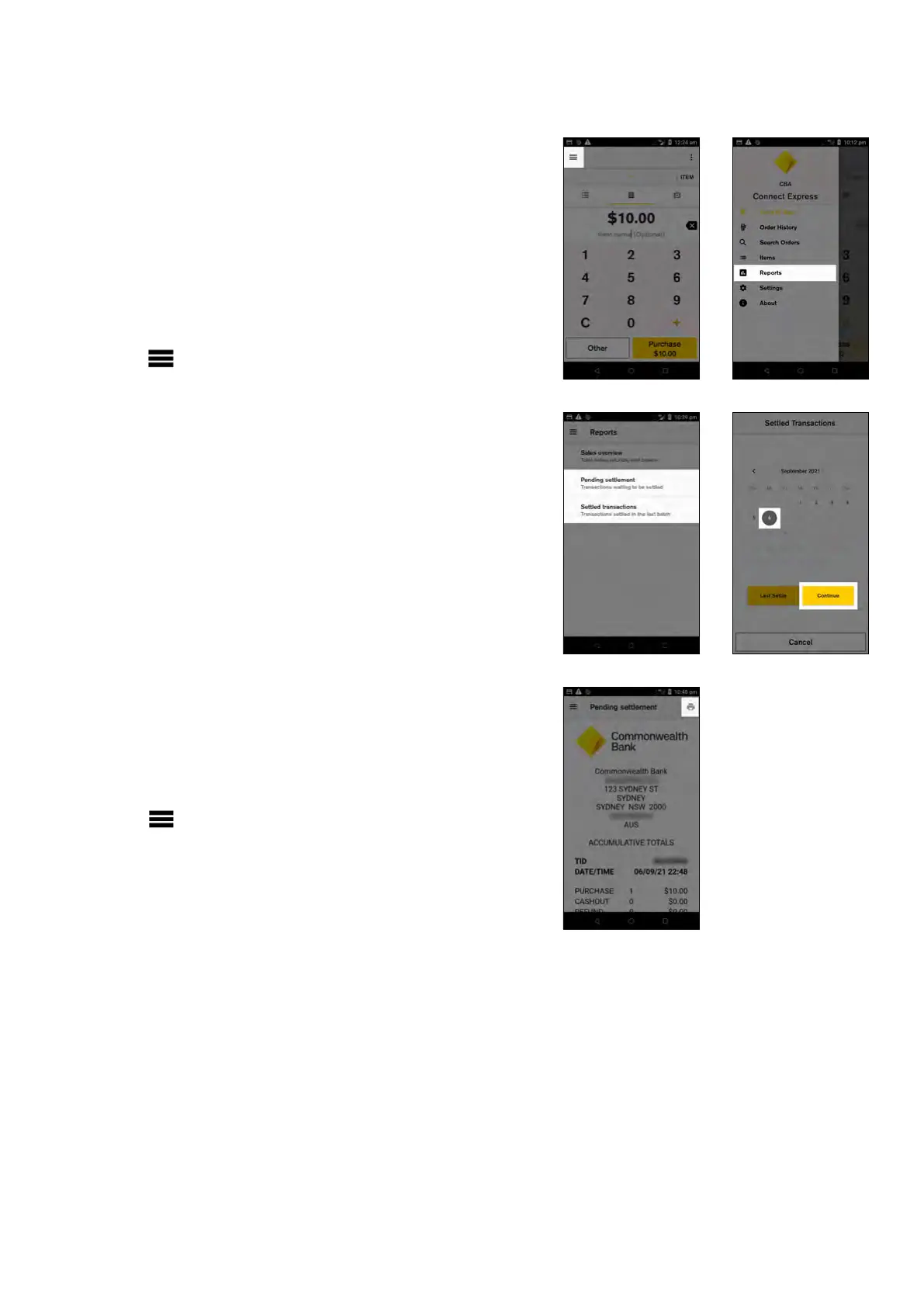
Settlement History (Settlement Enquiry)
Your detailed daily settlement report is available to view
and print directly from your terminal for 10 days after the
settlement period.
To access your Previous Settlement (Settled
Transaction report)
1. From the Payment screen, tap the hamburger
menu on the top left side of the screen
2. Tap ‘Reports’
3. Tap ‘Settled transactions’
4. Tap the date required and tap ‘Continue’
5. The settlement report will be generated
6. To print, tap the printer icon on the top right
7. Tap the Back button to go back to the ‘Reports’ menu
or the Payment screen key to go back to the Payment
screen
Pending Settlement (Cumulative Totals)
You can check on your transactions processed in the
current settlement period using the ‘Pending settlement’
report.
To access your Pending Settlement (Cumulative
Totals)
1. From the Payment screen, tap the hamburger
menu on the top left side of the screen
2. Tap ‘Reports’
3. Tap ‘Pending settlement’
4. To print, tap the printer icon on the top right
5. Tap the Back button to go back to the ‘Reports’ menu
or the Payment screen key to go back to the Payment
screen
Key functions
17 Commonwealth Bank of Australia | Smart User Guide



 To Next Page