B
Rev
RE
Status
Model Version
04
01
Version
01
A
Status
Rev
8 of 14
page
Bulletin
AE01B-A0599-001
Installation Instructions
MT050C
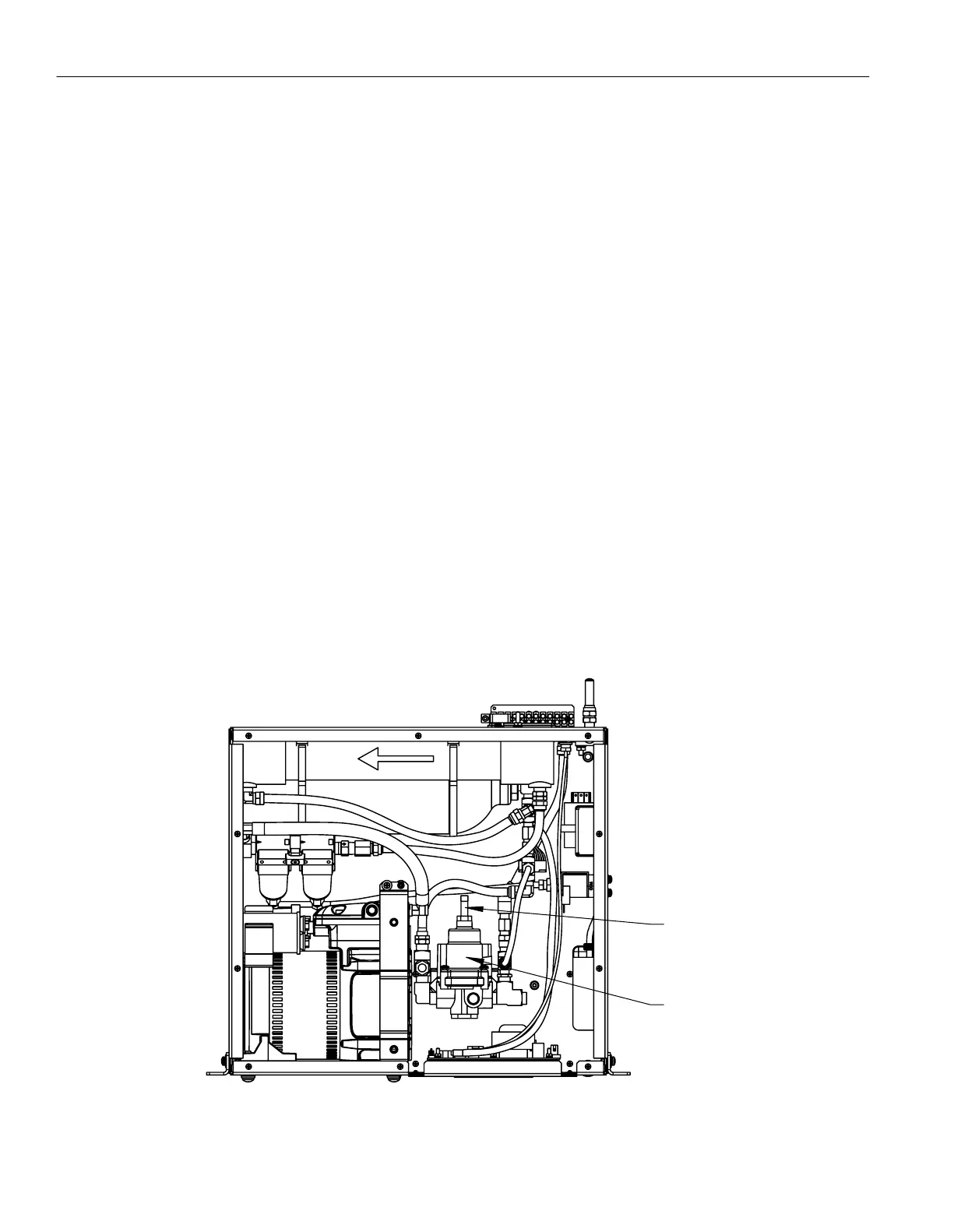
VIEW OF DEHYDRATOR WITH COVER REMOVED
RACK MOUNT CONFIGURATION TOP VIEW SHOWN
REGULATOR
PRESSURE ADJUSTMENT STEM
2.5 - Purging the Transmission Lines
Air in the transmission line system must be replaced with dry air to ensure satisfactory operation of the transmitted signal.
Determine the total system volume.
1.
Divide the system volume by the flow rate of the dehydrator 3.4 SLPM (0.12 SCFM) to determine the number of hours
2.
needed for the purge cycle.
Open the far end of the transmission line.
3.
Operate the dehydrator for a minimum three purge cycles. If possible, operate for 12 purge cycles to completely dry the line.
4.
If it is not possible to open the far end of the transmission line, follow these steps:
Connect the dehydrator to the transmission line and pressurize the system. The system pressure should reach 21 kPa (3.0 psig).
1.
Wait 15 minutes while the air absorbs moisture in the system, then disconnect the dehydrator from the transmission line and
2.
allow the air to vent.
Repeat steps 1 and 2 twelve times to purge the system.
3.
2.6 - Adjusting the Output Pressure
Output pressure can be adjusted between 2.0 psig and 6.0 psig - adjustment outside this range will have a negative impact on the
performance of the dehydrator.
Remove main cover.
1.
Locate the output air pressure regulator.
2.
Loosen lock nut on the pressure adjustment stem.
3.
With unit running turn stem CW to increase or CCW to decrease output pressure.
4.
Place finger over output and verify pressure setting on the front display.
5.
Repeat step 3 and 4 until desired pressure is set.
6.
Tighten lock nut and return unit to service.
7.


 To Next Page