EasyManua.ls Logo

commtech wireless 7950 - Pager Icons

Default Icon
16 pages
Print Icon
To Next Page IconTo Next Page
To Previous Page IconTo Previous Page
Loading...
7950 Pager Manual
Page 6 © CommtechWireless
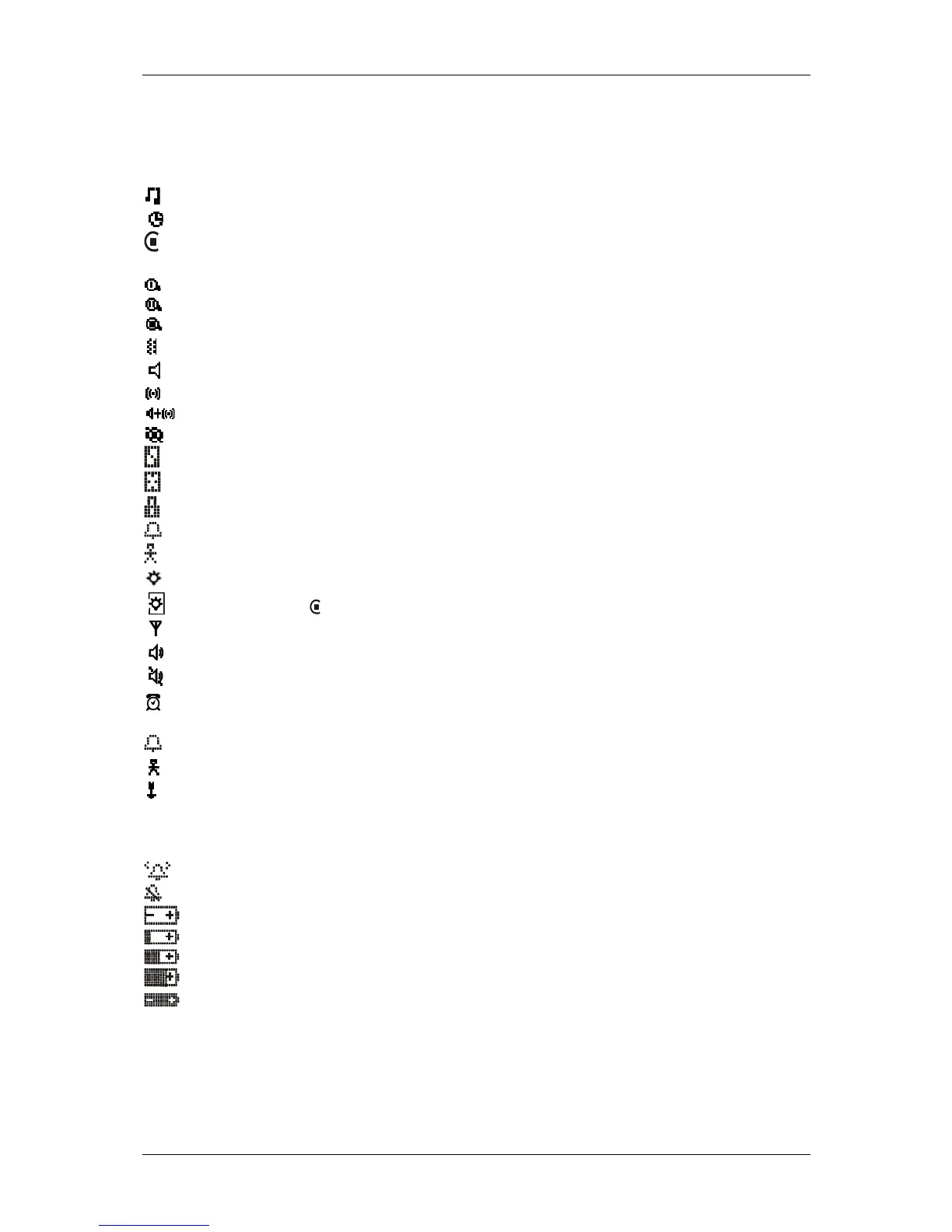
2.1.2 Pager Icons
The Commtech 7950 pager may display the following icons:
Choose Alert
Set Time and Alarm
Private Time Enabled
Private Time Disabled
Set Display Zoom 1
Set Display Zoom 2
Set Display Zoom 3
Set Audible alert
Audio Alert
Vibration Alert
Audio and Vibration Alert
Turn Pager Off
Delete Message
Delete All Messages
Lock Message
Alarmed Message
Notebook
Power On
Inputted Function, Received Call No Warning
Out of Range
Audio or Melody Alert
Vibration Alert
Alarm Enabled
Received Message
Set Message Alarm
Add to Notebook
Message Continues On Next Page
24hr 24 Hour Time
AM AM Time
PM PM Time
Enable Alarm
Disable Alarm
Low battery Indicator
¼ Battery Indicator
½ Battery Indicator
¾ Battery Indicator
Full Battery Indicator

Other manuals for commtech wireless 7950

Related product manuals