EasyManua.ls Logo

commtech wireless 7950 V2 - User Manual

Default Icon
18 pages
Print Icon
To Next Page IconTo Next Page
Loading...
User Guide for
7950 V2
Amcom Software, Inc.
Question and Answer IconNeed help?

Do you have a question about the commtech wireless 7950 V2 and is the answer not in the manual?

Summary

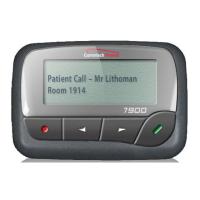
7950 V2 Pager

Case Layout

Overview of the 7950 V2 pager's physical buttons and their functions.

Pager Icons Explained

Explanation of various icons displayed on the 7950 V2 pager screen and their meanings.

Powering the Pager On and Off

Instructions for powering the 7950 V2 pager on and off.

Using the Function Menu

Guide on how to use the pager's function menu and navigate its options.

Message Status Screen Overview

Details on viewing the pager's message status, including unread and locked messages.

Receiving and Reading Messages

How to receive, read, and preview personal messages on the pager.

Automatic Message Deletion

How the pager automatically deletes messages when memory is full.

Locking and Unlocking Messages

Procedure for locking messages to prevent accidental deletion or overwriting.

Deleting Messages from Pager

Steps to delete individual or multiple unlocked, un-alarmed messages.

Setting Message Alarms

How to set one-time or daily alarms for specific personal messages.

Backlight Operation

Instructions for turning the pager's backlight on and off.

Low Battery Indicator

How the pager indicates a low battery level and alerts the user.

Out of Range Notifications

How the pager notifies the user when it is outside the transmission coverage area.

Display Zoom Functionality

How to adjust the pager's display zoom for larger characters.

Setting Time and Date

Instructions for setting the pager's current time and date.

Customizing Message Alerts

How to set audible alerts, alert patterns, and vibration alerts for messages.

Pager Alarm Setup

Steps to set one-time or daily alarms on the pager.

Private Time Mode Settings

How to set a silent period on the pager, allowing only priority alerts.

Using the Pager Notebook

Using the pager's notebook to store and manage personal messages.

Appendix

Safety Precautions

Important safety guidelines and warnings for using the pager.

Technical Specifications

Detailed technical specifications and operating parameters for the 7950 V2 pager.

Overview

The Amcom Software 7950 V2 Pager is a compact, alphanumeric POCSAG pager (FLEX available on request) designed for personal messaging and alerting. It features a dot matrix LCD with zoom function, capable of displaying messages in various formats: 2 lines x 20 characters, 2 lines x 15 characters (bold), or 4 lines x 20 characters per line. The pager is powered by a single AA 1.5-volt alkaline or Ni-MH rechargeable battery, offering a nominal battery life of approximately 20-80 days, depending on usage.

Function Description:

The 7950 V2 Pager is primarily used for receiving and managing personal messages. It supports up to 50 messages, each with a capacity of 512 characters. Key functions include:

  • Message Reception and Reading: The pager alerts the user upon receiving a new message, indicated by a flashing symbol. Messages can be read immediately or stored for later. A message preview feature allows users to scan the first line of messages.
  • Message Management: Users can lock up to 16 messages to prevent accidental deletion or overwriting when the pager's memory is full. Unlocked, un-alarmed, and previously read messages can be automatically deleted to free up space. Both single messages and all unlocked messages can be deleted.
  • Alerts and Alarms: The pager offers various alert types, including beep and vibrate. The beeper has a sound pressure level of 75dBc SPL at 30cm/12 inches. Users can set a one-time or daily message alarm for up to five personal messages. A general pager alarm can also be set for a specific time and date, or daily.
  • Private Time: This feature allows users to set a period during which the pager remains silent, receiving messages without alerting, unless an alarm expires or a priority message is received.
  • Notebook: The pager includes a personal notebook feature for storing important messages.
  • Display Zoom: The display can be toggled between a standard 4-line display and a 2-line display with enlarged characters for improved readability.
  • Backlight: A white LED backlight can be manually turned on/off or automatically turns off when the pager returns to the Standby screen.
  • Out of Range Indication: The pager notifies the user if it is outside the transmitter coverage area for more than five minutes, indicated by an antenna icon, beeps, vibrations, or an "OUT OF RANGE" message.
  • Low Battery Indication: The battery icon changes and an audio alert sounds when the battery level is low.

Important Technical Specifications:

  • Rx Frequency (MHz): 138-174, 278-284, 448-472, 989-932
  • Baud Rate: 512, 1200, 2400 bps selectable
  • Sensitivity: 512bps 5uV/m, 1200bps 7uV/m, 2400bps 9uV/m
  • Channel Spacing: 25kHz (UNB 6.25 kHz/NB 12.5kHz available on request)
  • Modulation: ±4.5kHz (UNB ±1.25kHz/NB ±2.5kHz available on request)
  • Selectivity: Better than 55dB
  • Spurious Rejection: Better than 55dB
  • Image Rejection: Better than 50dB
  • Frequency Stability: 10ppm
  • Operating Temperature Range: 0 to 50°C (20-90% RH non condensing)
  • Storage Temperature Range: -10 to 60°C (10-95% RH non condensing)
  • Dimensions: 70 x 49 x 19 mm / 2.7 x 1.9 x 0.7 inches (without holster)
  • Weight: 60 grams / 2.1 oz (without battery)
  • Approvals: CE / FCC / ACA C-tick / IC / ROHS

Usage Features:

The pager is operated using four buttons: Function/Escape, Left Directional, Right Directional, and Read/Select.

  • Function/Escape Button: Displays the Function menu and exits menus.
  • Left/Right Directional Buttons: Navigates through the Function menu and scrolls through messages.
  • Read/Select Button: Reads messages, activates selections, and turns on the pager.

The Function menu provides access to various settings, including:

  • Turning the pager on/off.
  • Setting the time and date.
  • Configuring message alerts (audible, vibration, or silent) and alert patterns.
  • Setting pager alarms.
  • Enabling/disabling private time.

Maintenance Features:

  • Battery Replacement: Replace the battery as soon as the low battery indication appears to prevent damage from leaking fluids. Remove the battery if the pager will not be used for an extended period.
  • Cleaning: Clean the pager with a soft, dry cloth or a cloth moistened with a weak solution of mild neutral detergent and water. Avoid using thinners, benzene, alcohol, or other volatile agents.
  • Environmental Precautions: Avoid extreme temperatures, direct sunlight, high humidity, and strong impacts. Do not expose batteries to direct sunlight or incinerate them. Do not attempt to charge or disassemble batteries.
  • Disassembly: Do not attempt to take the pager apart, as this can cause serious damage and malfunction.

commtech wireless 7950 V2 Specifications

General IconGeneral
Brandcommtech wireless
Model7950 V2
CategoryPager
LanguageEnglish

Related product manuals