Operation
Page 20
5.3 Using proAIS with your Mariner X2
The proAIS tool has a range of features to help monitor the
performance of your Mariner X2. To use the full range of features
your Mariner X2 must be installed as described in section 3 and
connected to a PC running the proAIS application.
proAIS menus
This section describes the functions available via the proAIS
menus.
The proAIS 'File' menu includes the following functions:
Open log file - this includes the ability to open a log file previously
captured using the log file capture tool.
The proAIS 'Options' menu includes the following functions:
Beep on AIS transmission - the PC will make an audible beep
when an AIS message is transmitted.
Force connection - fo
rces proAIS to make a connection with the
AIS unit even when no response is received from the unit.
The proAIS 'Help' menu includes the following functions:
About - de
tails of the version number of the proAIS software you
have installed.
proAIS GPS status page
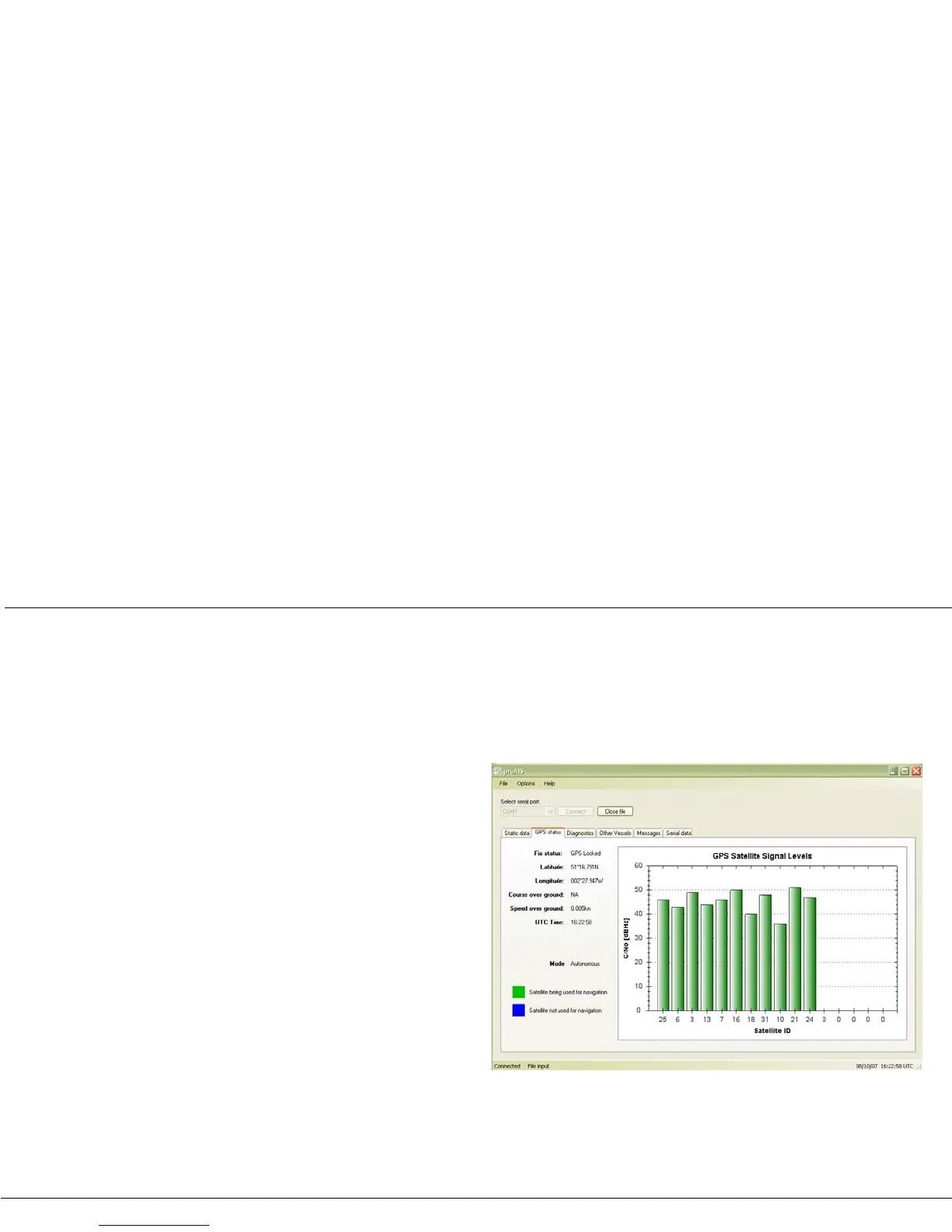
The 'GPS status' page shows the signal strength of each satellite
being received and the dynamic data of the vessel. Satellite signals
shown as green bars are actively being used to calculate a position
fix. If a position fix cannot be achieved then no dynamic data will be
shown and all signal strength bars will be blue.
Figure 15 proAIS GPS status page


 To Next Page