INS_CNGE11FX3TX8MS[POE][HO] Rev. 11.6.17 PAGE 302
INSTRUCTION MANUAL CNGE11FX3TX8MS[POE][HO]
TECH SUPPORT: 1.888.678.9427
Configuring ERPS on Switch 1
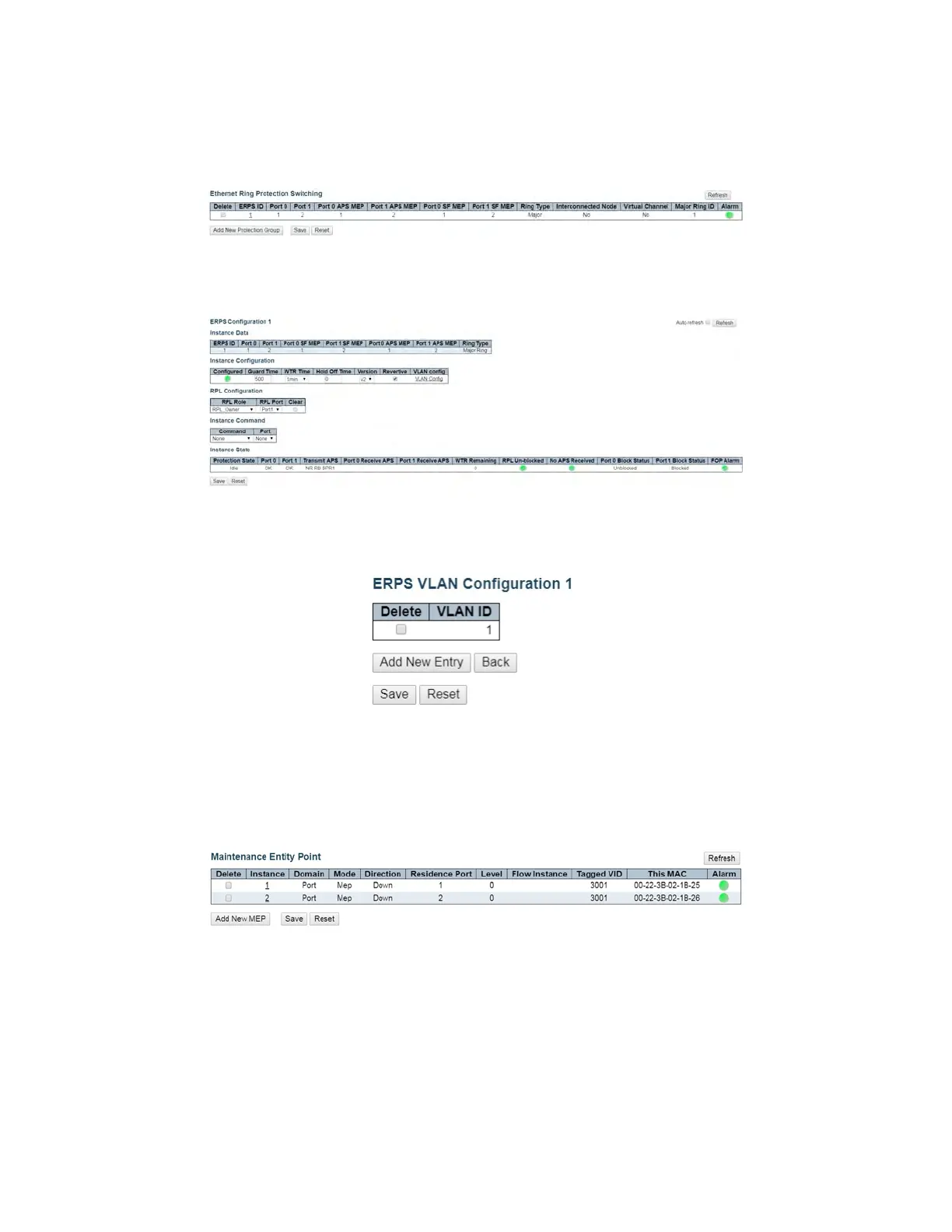
1. On switch 1, click ERPS to go to the Ethernet Ring Protection switching page. Add the Ring
Protection Link (RPL) owner as shown, and click Add New Protection Group.
Figure 11 – Add New Protection Group (Switch 1) Configuration
2. Edit ERPS1 by clicking 1. Set the configuration as shown, and click Save or Apply.
Figure 12 – ERPS 1 (Switch 1) Configuration
3. Click VLAN Config to edit the protected VLAN.
Figure 13 – Protected VLAN (Switch 1) Configuration
4. After clicking Save or Apply, remember to connect switch 2 and switch 3. Because the RPL is
disconnected, the user will not be able to access switch 2 from switch 1.
5. Check the MEP table on switch 1, switch 2, and switch 3. Alarms should show green.
Figure 14 – MEP Status



 To Next Page