FEATURE
LCD
READOUT
FUNCTION/DESCRIPTION
RPS
RPS - ON /
RPS - OFF
On or Off
Turns your RPS Touch paging feature
on or off.
Vibrate
VI - OFF /
VI - ON
On or Off Turns the silent mode on or off.
Temperature
TEMP - F /
TEMP - C
F or C
Changes the temperature readout
from Fahrenheit to Celsius.
Auxiliary
AUX - OFF /
AUX - ON
On or Off
Turns your Auxiliary Extender feature
on or off.
2 Way
Paging
Display
FULL / HALF
Full or
Half
Determines whether your remote
is used for Alarm or Starter Only
systems. Set to FULL for ALARM IT
and MAX IT features. Set to HALF for
START IT ONLY systems.
FEATURE
LCD
READOUT
FUNCTION/DESCRIPTION
Enter
Remote
Option
Menu
2.5 Seconds
Enter and Exit the Remote Option
Menu
Scroll
Through
Menu
Moves down the Remote Option
Menu
Scroll Up
Menu
Moves back up the Remote Option
Menu
Time
Adjusts
Hour
Adjusts
Minute
Sets the time on your remote
Remote
Start Time
Adjusts
Hour
Adjusts
Minute
Sets the time at which you want your
vehicle to start every day. Check with
your installer for additional info.
Alarm Clock
Time
Adjusts
Hour
Adjusts
Minute
Sets the time in which you would like
the remote’s alarm clock to alert you.
Alarm Clock
AL - OFF/
AL - ON
On of Off Turns the alarm clock on or off.
REMOTE OPTION MENU
Firstech, LLC. | 2
QUICK START CARD
2W901R-SS
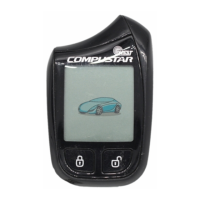
To reprogram your remote first cycle the key in the ignition 5 times
within 7 seconds. Parking lights will flash. After that tap the Lock
button on your remote. Repeat for any additional remotes. If you
receive two parking light flashes, your Compustar has exited remote
programming mode and you must retry.
Questions/comments? Contact us at 888-820-3690 from 8 AM
to 5PM PST. Also please visit www.compustar.com for a complete
user’s manual.
2W901R-SS_QuickCard line.indd 2 2019/3/16 10:11:15


 To Previous Page