26
COMUNELLO ®Copyright 2019 - All rights reserved
• The LED L3 starts to blink again to indicate that you have 10 additional sec.
to store a new code;
• On expiry of those 10 sec. the LED L3 will remain steady on.
Remote control code programming of the partial / pedestrian opening :
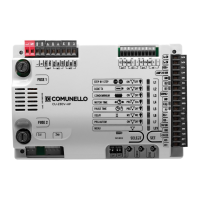
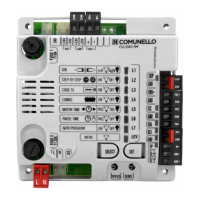
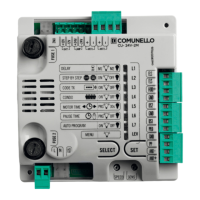
• By the key SELECT, position yourself on the blinking LED L3 “CODE TX”;
• Press key SET twice to memorize the PPED channel;
• Send the selected code with the remote control;
• The LED L3 will remain steady on for a second to indicate that programming
has been completed. The extra time of 10 sec. to store a new PPED channel
is then preview as for the PP channel.
Important note: If a code has already been entered or all 120 codes have
been memorized, by repeating the programming operation, all the programming
LEDs will start to ash, indicating that no further storing is possible.
Deletion of remote control codes:
• By the key SELECT, position yourself on the blinking LED L3 “CODE TX”;
• Activate the blinking of the code to be deleted (P.P. or PED., indicated by the
respective blinking);
• Press and hold down key SET for more than 5 sec.;
• The LED switches off for 2 sec. and the procedure is completed;
Important note: If both channels codes are deleted, the LED will remain off, by
the contrary if only PEDESTRIAN codes remain stored, the LED blinking mode
will change (1 1 1 1 0 1 1 1 1 0).
Rule of the rst saved Remote control:
When programming remotes the following rule is applied: if the rst remote to
be saved is a rolling code type, the receiver will subsequently accept only rolling
code remotes (thus providing enhanced anti-intrusion security); if the rst remote
to be saved is a xed code type, the receiver will subsequently accept both
xed code remotes and rolling code remotes, although only the xed part of
the latter will be controlled (thus effectively relinquishing the security of the rolling
code system).
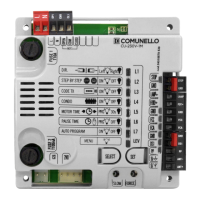
7.1.4. LED L4 - CONDO: “Condominium” logic:
The enabling of the Condominium function means that during the opening
movement or during the pause time the control unit will not respond to
commands sent by Pushbuttons or remotes. In contrast, during the closing
movement a command sent by the Pushbuttons or the remotes will reverse the
direction of movement. This operating mode is invaluable when the automation
includes a loop detector.
In the default conguration the control unit is set with the Condominium function
disabled; if the Condominium function is required, proceed as follows:
• By the key SELECT, position yourself on the blinking LED no.4;
• Press the SET key;
• LED L4 becomes steady on and programming will be completed.
Repeat the procedure if you wish to restore the previous conguration.
7.1.5 LED L5 - MOTOR TIME: Programming of the motors stroke (max 4
min.)
The control unit is factory set with a motor time of 30 seconds without
deceleration.
To set a new stroke, programming must be carried out with the leaf in closed
position as follows:
• By the key SELECT, position yourself on the blinking LED no.5;
• Press the SET key; The motor starts the opening phase;
• In correspondence with the desired initial point of deceleration, once again
press the SET button, LED L5 will start to ash slowly and the Motor will begin
the deceleration phase;
• Press SET key to determinate the opening end stop;
• Once programming of the motor time in Opening has been completed,
the Motor immediately restarts in Closing: repeat the above procedures
for the Closing phase of the Motor, the deceleration phase and that of the
determination of the limit switch in closing.
Notes:
- If you do not want the control unit to perform the deceleration, during
programming, at the completion of the opening and closing cycles, press the
SET button twice consecutively;
- During programming, the remote control button (only if previously programmed)
may be used instead of the control unit SET button.
- If the CU power supply was disconnected before programming, the manoeuvre
after programming will be in opening at the deceleration speed
7.1.6. LED L6 - PAUSE TIME Automatic closing time programming
The control unit is factory set with automatic closing disabled.
If you wish to enable automatic closing proceed as follows:
• By the key SELECT, position yourself on the blinking LED no.6;
• Press the SET key;
• Wait for a time equivalent to the desired time interval (from 1 sec. up to 4
min.);
• Press the SET key again momentarily and at the same time the automatic
closing time will be saved and LED L6 will remain steady on;
If you wish to restore the initial condition (no automatic closing) select blinking
LED L6 and then press the SET key twice consecutively in a time period of 2
seconds. The LED will switch off and the operation will be completed.
During programming, instead of the SET key on the control unit you can use the
button on the remote, providing the remote has been saved beforehand.
7.1.7. LED L7 - AUTOMATIC PROGRAMMING:
The control unit allows Automatic Programming (SIMPLIFIED ONLY WITH
ELECTRONIC LIMIT SWITCH) to automatically regulate the stroke and
decelerations of the door. To carry out the programming, proceed as
follows:
• By the key SELECT, position yourself on the blinking LED no.7;
• Press the SET key;
• To determine its zero position, the motor performs its closure until it reaches
the limit switch or mechanical stop;
• The control unit executes the Auto programming procedure by performing
a complete opening and closing cycle and the Deceleration cycle is set
automatically too at approximately 15% of the complete cycle;
• Press the SET button to memorize the motor stroke.
During Automatic Programming, instead of the SET key on the control unit
you can use the button on the remote, providing the remote has been saved
beforehand.
Important notes:
• In the event that the motors move in a manner other than that described:
• Disconnect the power supply to the control unit.
• Modify the direction parameter and repeat programming.
During Automatic Programming, the remote control button (if previously
programmed) may be used instead of the control unit SET button.
Note: Automatic Programming is not possible in the absence of the
limit switches.


 To Next Page
 Loading...