26
COMUNELLO ®Copyright 2019 - All rights reserved
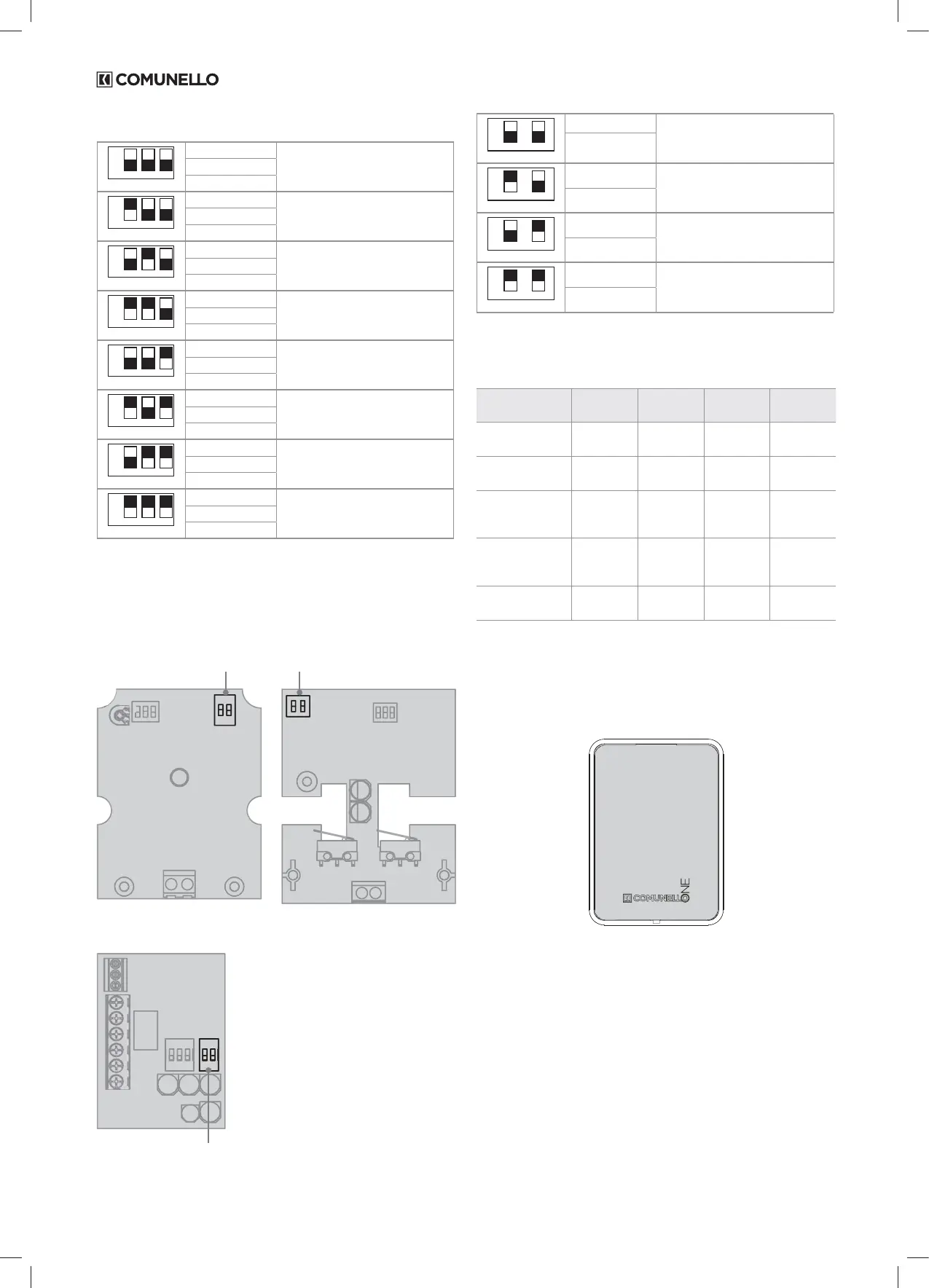
The ID assignment logic is as follows:
ON
123
DIP1 DIP2 DIP3
DIP1 = OFF
ID = Accessory no. 1DIP2 = OFF
DIP3 = OFF
ON
123
DIP1 DIP2 DIP3
DIP1 = ON
ID = Accessory no. 2DIP2 = OFF
DIP3 = OFF
ON
123
DIP1 DIP2 DIP3
DIP1 = OFF
ID = Accessory no. 3DIP2 = ON
DIP3 = OFF
ON
123
DIP1
DIP2
DIP3
DIP1 = ON
ID = Accessory no. 4DIP2 = ON
DIP3 = OFF
ON
123
DIP1 DIP2 DIP3
DIP1 = OFF
ID = Accessory no. 5DIP2 = OFF
DIP3 = ON
ON
123
DIP1 DIP2 DIP3
DIP1 = ON
ID = Accessory no. 6DIP2 = OFF
DIP3 = ON
ON
123
DIP1 DIP2 DIP3
DIP1 = OFF
ID = Accessory no. 7
DIP2 = ON
DIP3 = ON
ON
123
DIP1 DIP2 DIP3
DIP1 = ON
ID = Accessory no. 8DIP2 = ON
DIP3 = ON
SETTING THE OPERATION (MODE) OF THE ACCESSORIES
All accessories can be set to its type of OPERATION (e.g.: photocell
enabled on closing, I/O board with INDICATOR LIGHT output, etc.); this
type of conguration can be done directly on the board by setting the
corresponding DIP-SWITCH:
Dip switch MODE Dip switch MODE
Dip switch MODE
DART INDEX
INTERFACE I/O
ON
12
DIP1 DIP2
DIP1 = OFF
OPERATION TYPE 1
DIP2 = OFF
ON
12
DIP1 DIP2
DIP1 = ON
OPERATION TYPE 2
DIP2 = OFF
ON
12
DIP1 DIP2
DIP1 = OFF
OPERATION TYPE 3
DIP2 = ON
ON
12
DIP1 DIP2
DIP1 = ON
OPERATION TYPE 4
DIP2 = ON
The operating mode depends on the particular accessory.
TABLE OF OPERATION (MODE) OF THE ACCESSORIES
OPER.
TYPE 1
OPER.
TYPE 2
OPER.
TYPE 3
OPER.
TYPE 4
PHOTOCELL RX ON CLOSE ON OPEN ON OPEN +
CLOSE
IN STOP
KEY SWITCH [AUTO-PP]
[PED]
[OPEN]
[CLOSE]
[AUTO-PP]
[STOP]
-
INTERFACE I/O In =
[AUTO-PP]
[PED]
In =
[OPEN]
[CLOSE]
In =
[AUTO-PP]
[STOP]
In =
[AUTO-PP]
[PED]
Out = AUX Out = AUX Out =
INDICATOR
LIGHT
Out =
INDICATOR
LIGHT
FLASHING LIGHT Dened by
Control unit
---
NOTE: For use and setup made by the Comunello One App please
set all MODE dip-switches into OFF position.
NB: the INPUT/OUTPUT interface set as input [OPEN] disables the
authomatic closure if the input stay closed (TIMER FUNCTION).
In the re-opening of the input [OPEN] the authomatic closure is
cleared.
PHOTOCELL
RX PHOTOCELL TYPE 1 “ON CLOSE”:
If the photocell is engaged during closing, it runs a full inversion (opening)
cycle. The photocell is not activated during opening.
RX PHOTOCELL TYPE 2 “ON OPEN”:
If the photocell is engaged during opening, it stops the gate until
disengagement (re-starts opening). The photocell is not activated during
closing.
RX PHOTOCELL TYPE 3 “ON OPEN+CLOSE”:
If the photocell is engaged during opening, it stops the gate until
disengagement (re-starts opening). If the photocell is engaged during
closing, it runs a full inversion (opening) cycle.
RX PHOTOCELL TYPE 4 “IN STOP”:
If the photocell is engaged during opening or closing, it permanently stops
the gate (also with automatic closing enabled). The user will have to send a
subsequent command to restore operation of the automation.
DART


 To Next Page