The Input Test verifies the function of inputs available on
models with TW-1 or TW-2 controls. Not all inputs are used
on all models. The performance evaluation of the inputs is
based on the voltage sensing device (VSD).
Connect all inputs to the system.
Press any key to display the first test menus.
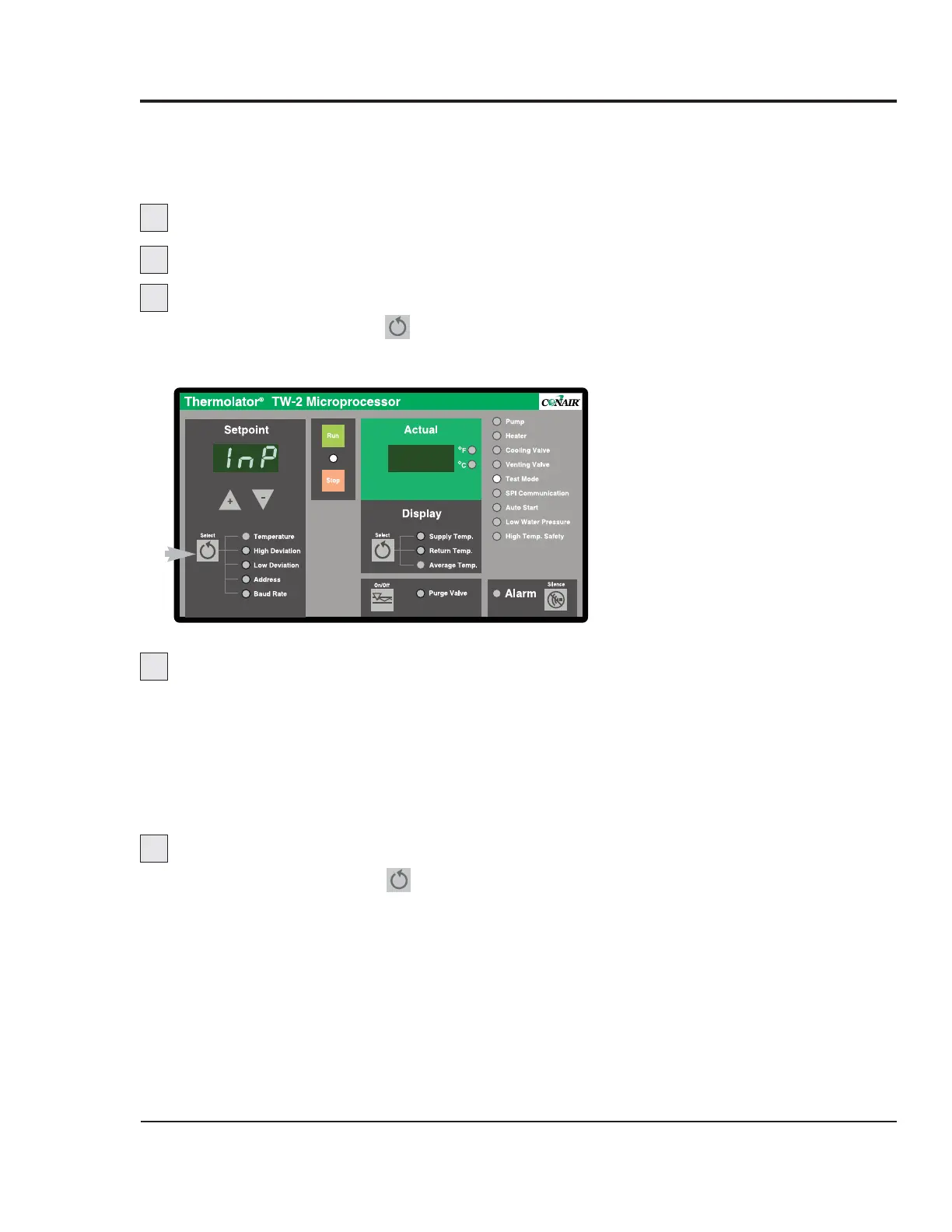
Select the Input Test menu.
Press and hold the Setpoint key for 3 seconds to
index to each test menu until the controller displays
“InP”.
Repeatedly press and release any key to test.
With each key press and release, the left display will indi-
cate the number of the input being tested (v1, v2, v3,
etc.). The right display indicates either “1” for voltage
present or “O” for an absence of voltage.
Only inputs that are actually used by the particular model
will be tested.
Exit the test and enter the next test.
Press and hold the Setpoint key for 3 seconds to exit
and index to the next test.
TW-1, TW-2
C
ONTROL INPUT
TEST
UGH025-0504 Thermolator TW Series
MAINTENANCE 5-7
1
2
3
4
5


 To Next Page
 Loading...