MEASUREMENTS
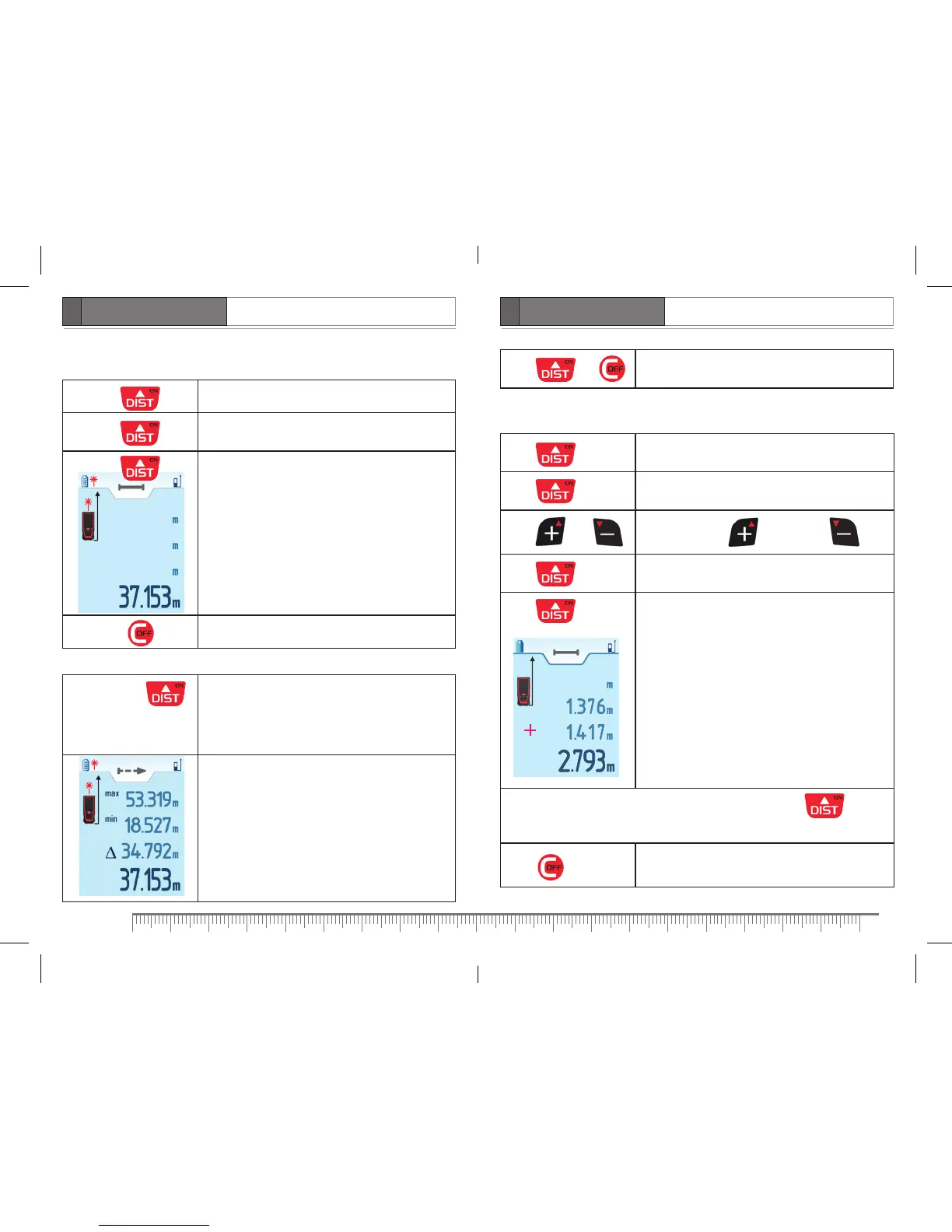
Single distance measurement
Press Turn on the product.
Press
Turn on laser beam. Aim the product at measured
object.
Press
Take measurement.
– measuring result
Press Delete the last measuring result.
Continuous measurement (tracking)
Press and hold
for 1 sec.
Activate continuous measurement (tracking)
function. Laser beam turns on simultaneously.
The product will take measurements one after
another, showing the last measured value. Besides it
will show maximal and minimal measured values.
– maximal value
– minimal value
– difference between maximal and minimal values
– current value
Addition/Subtraction
Press
Turn on laser beam.
Aim the product at measured object.
Press
Take first measurement.
Measuring result appears in the main line.
Press or Activate addition / subtraction .
Press
Turn on laser beam. First measuring result moves to
the line 2 on the display.
Press
Take the second measurement.
– first measurement
– second measurement
– result of addition/subtraction of 2
measurements
To do addition/subtraction of more than 2 measurements press
and perform the above mentioned operations required number of times.
Press Exit the mode.
Press or
Stop taking measurements. The last measured values
are shown on the display.


 To Next Page