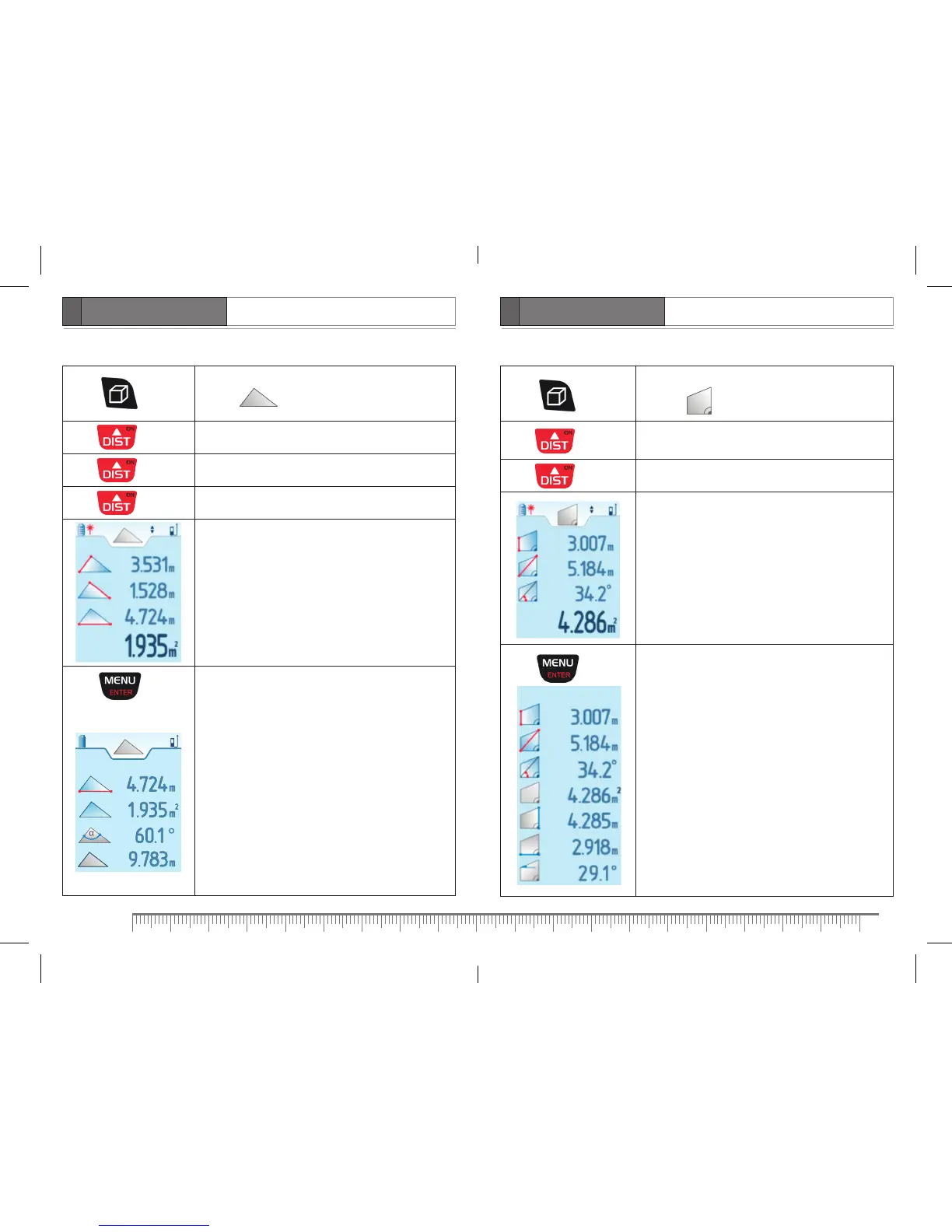
Area of triangle
Press 3 times
Activate function of triangle area calculation.
Symbol appears on the display. Laser beam
is on.
Press
Take first measurement (first side of triangle).
Press Take second measurement (second side of triangle).
Press Take third measurement (third side of triangle).
– first side of triangle
– second side of triangle
– third side of triangle
– area of triangle
Press
Scroll down to view additional information:
- area of triangle
- angle between sides of triangle
- perimeter of triangle
Area of trapezium
Press 4 times
Activate function of trapezium area calculation.
Symbol appears on the display. Laser beam
is on.
Press
Take first measurement (smaller side of trapezium).
Value of tilt angle appears in line 3.
Press Take second measurement (diagonal of trapezium).
– smaller side of trapezium
– diagonal of trapezium
– tilt angle of trapezium diagonal
– area of trapezium
Press
Scroll down to view additional information:
- area of trapezium
- bigger side of trapezium
- bottom side of trapezium
- tilt angle of top side of trapezium


 To Next Page