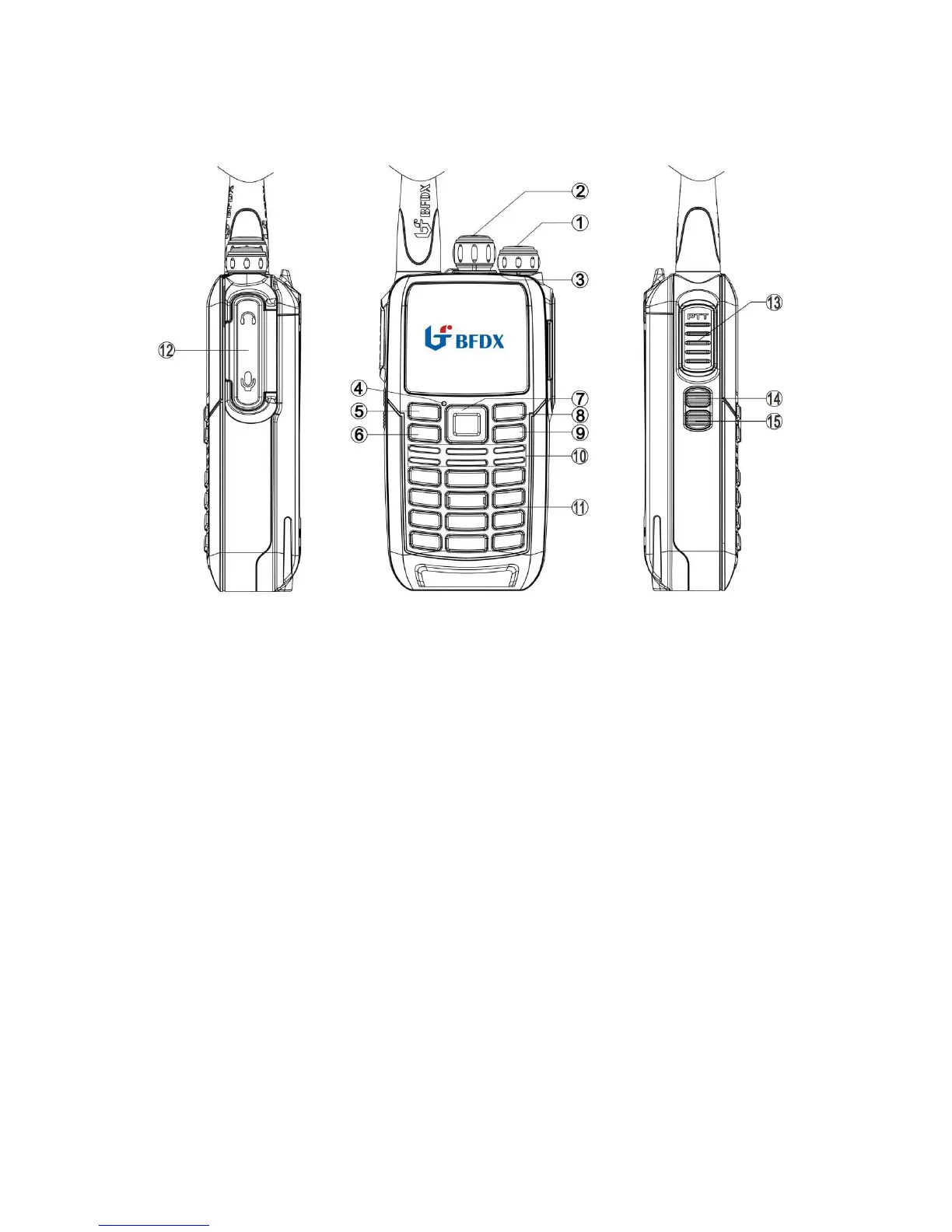
Getting Acquainted
① Power switch/volume adjust keys
Turn clockwise to switch the radio power on, when the radio is turned on, rotate
clockwise to increased volume, counter- clockwise to decrease the volume. Turn
counterclockwise fully to switch the radio off.
② Channel Selector Knob
Turn the knob to select channel 1-16.
③ LED Indicator
1. When transmitting LED glows red;
2. When receiving LED glows green;
3. When un-programmed LED glows red;
4. When scanning LED flashes orange.
④ MIC
⑤ Left key
Press to move to the next step or store the setting.
⑥ MENU
Press to enter menu mode, you can select the desired menu item.
⑦ Selection Key
Press up or down/left or right to select the menu function item
⑧ Right key
Press to move back to the previous menu.



 To Next Page