●
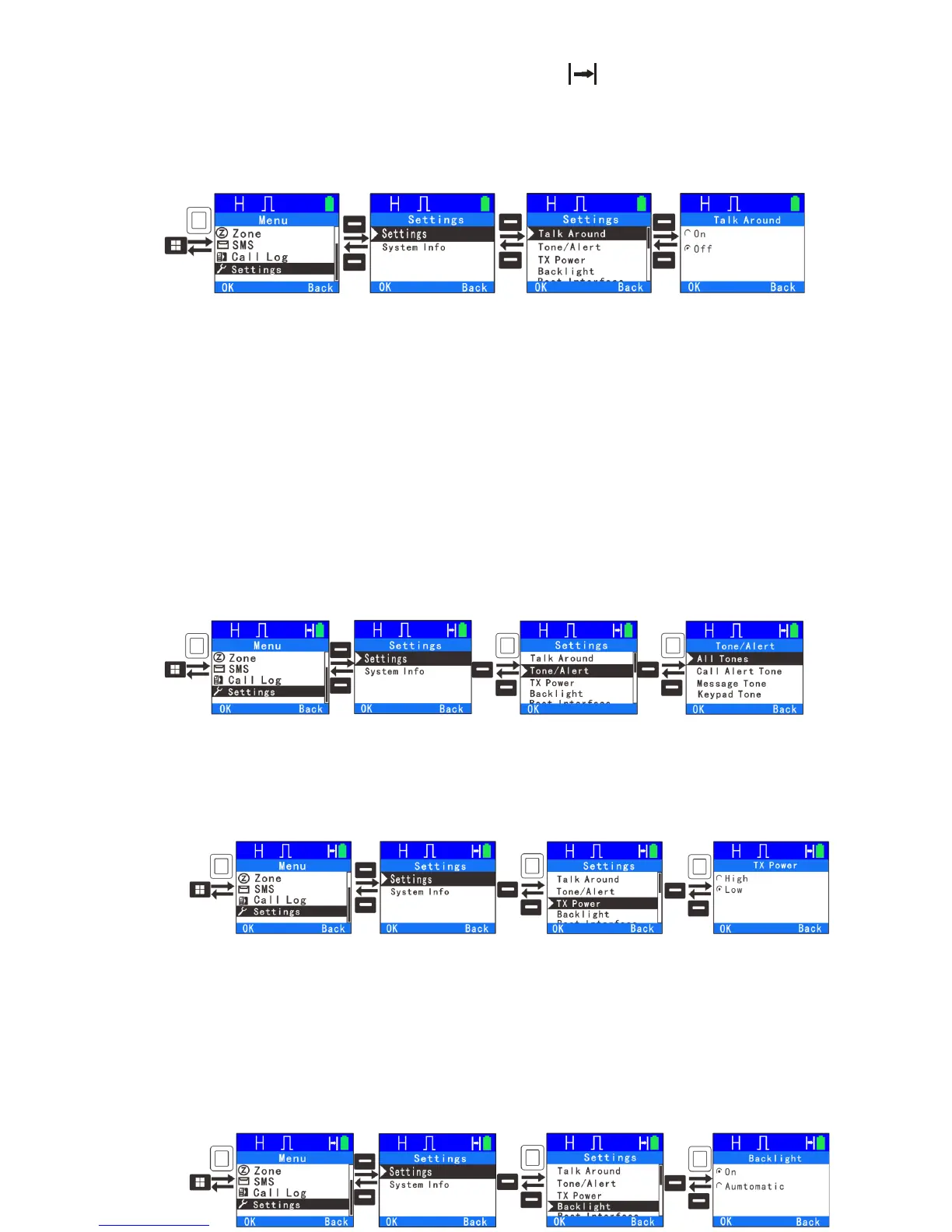
Talk Around: When your repeater malfunctions or when the radio is out of
repeater’s range, you can continue to communicate in talk around mode. With
the enable talk around feature, the screen displays: and the TX frequency
will be the same as the RX frequency. If the channel is switched, the scan is
enabled, or the radio was restarted, the feature will be disabled.
Note:To enable this function, TX frequency should be different from RX
frequency, and the channel will set as allow talk around on the programming
software.
●Tone/Alerts: To sets alert tones for your radio. Tone alerts include settings of
all tones, call alert tone, message tone and keypad tone. If disabled, all alert
tones will be off except emergency tone.
●TX Power : Allow a user to change the power level between high and low
indicated by H and L on the display.
28
●Backlight: To set the backlight parameters, you can select on or automatic.
When you select automatic, the light will stay on for 5 seconds after a key is
pressed. If you select on, the light will stay on as long as the power is on.



 To Next Page