23
• Press [OK] to confirm and go into TLS Mode "Start Time"
setting.
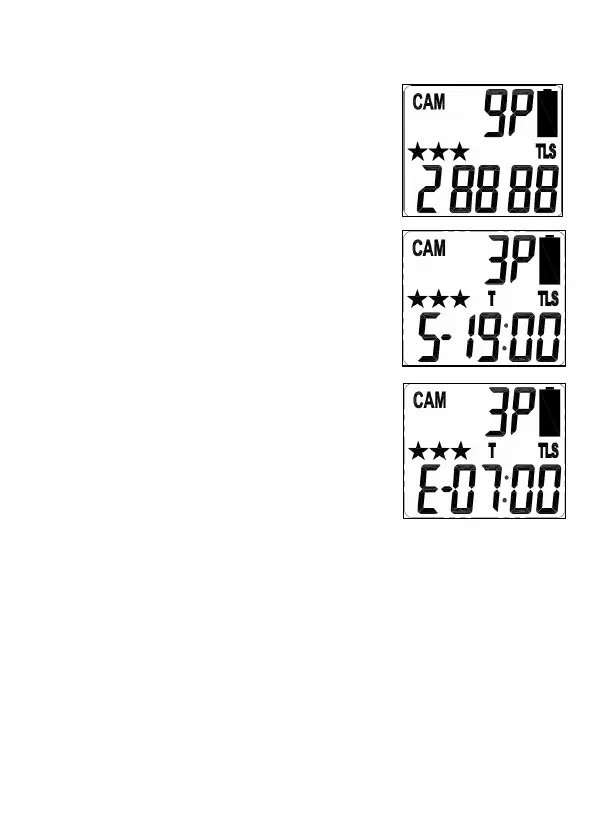
• The display will show T + S-88:88
(S = Start, 88:88 = time in HH:MM).
• Press [OK] to set the “Start Time”
setting. At this point you can adjust
the time from 00:00 to 23:59.
• The MINUTE digits will be blinking.
• Press [UP] or [DN] to increase or
decrease the minute value (00 –
59).
• Press [OK] to save your selection
and enter Hour setting.
• The HOUR digits will be blinking.
• Press [UP] or [DN] to increase or
decrease the hour value (00 – 23).
• Press [OK] to save the “Start Time”
setting and move to the “End Time” setting.
• After completing the start time setting, camera will go
into TLS Mode "End Time" setting.
• The display will show T + E-88:88
• (E = End, 88:88 = time in HH:MM)
• At this point you can adjust the time from 00:00 to 23:59
by pressing the [UP/DN/OK] buttons same as Start Time
settings.


 To Next Page