60 61
MUSIC
From the home screen, select Menu > Media center > Music to play audio
files stored on your phone or microSDHC card (if one is installed.)
VIEWING YOUR MUSIC LIBRARY
Open Music and your music library is displayed. Press left/right on the 4-way
Navigation Key to switch among lists of songs, playlists, artists, albums,
genres, folders, and favorites.
If an audio file is being played, you can select Player to open the playback
screen.
MANAGING PLAYLISTS
Create playlists to organize your music files into sets of songs, so that you can
play the songs you like in the order you prefer.
• From any music library category, highlight a song and select Options > Add
to playlist to add the song to a playlist or create a new playlist.
• From the music library, press left/right on the 4-way Navigation Key to
switch to the Playlist view.
- Highlight a playlist you have added, and then select Options > Delete >
OK to delete the playlist.
- Highlight a playlist you have added, and then select Options > Rename
to rename the playlist.
PLAYING MUSIC
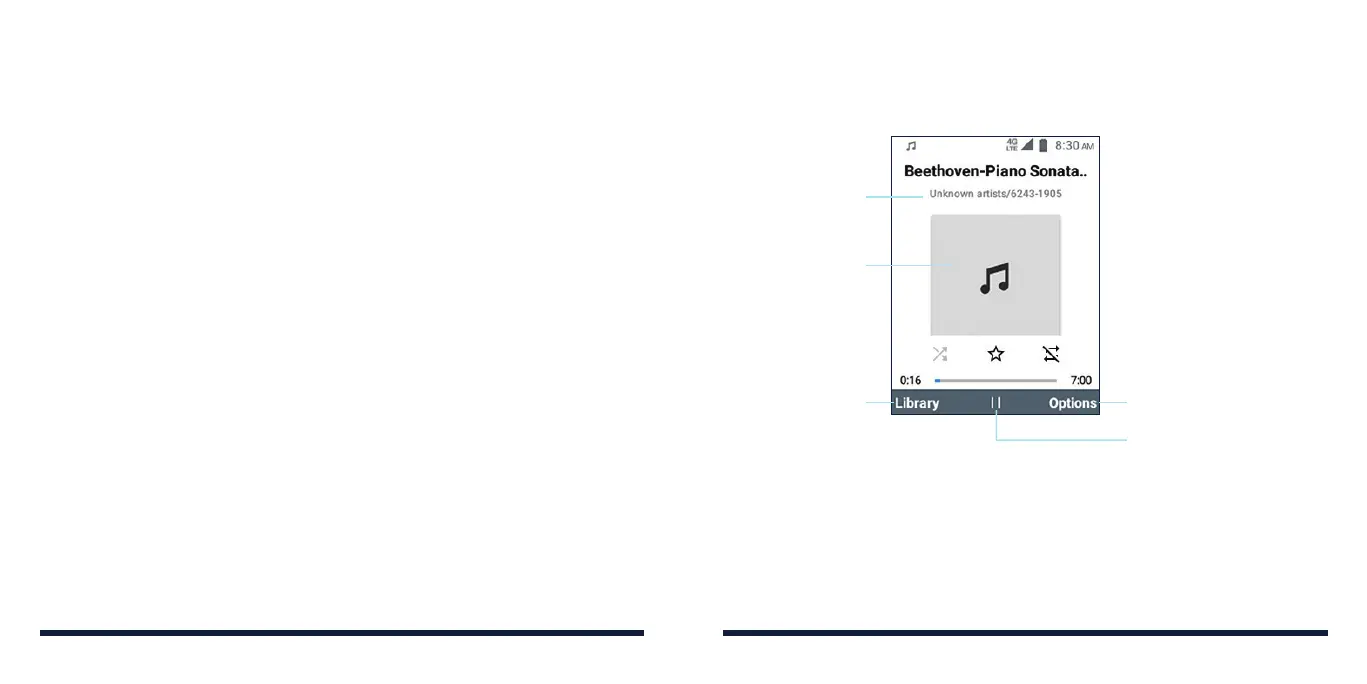
Select a song in the music library to listen to it. The following playback screen
will appear.
Press the Right Soft Key
for more options: shue
all, play next song, add to
playlist or as favorite, share,
delete, set as ringtone,
view file details, configure
player settings, or exit
Press the OK Key
to pause or resume
Press the Left Soft
Key to return to
the music library
Song, album and
artist information
Album artwork
(if available)
• To play the previous song, press left on the 4-way Navigation Key.
• To skip to the next song, press right on the 4-way Navigation Key.
• To rewind, press and hold left on the 4-way Navigation Key.
• To fast-forward, press and hold right on the 4-way Navigation Key.
MUSIC



 To Next Page