Need help?
Do you have a question about the Contec ABPM 50 and is the answer not in the manual?
Adjust inflation intervals, sleep, and wake times via the ABPM setup menu before activating the sequence.
Understand the 'Finishing download!' message, saved file path, and 'OK' confirmation.
Access downloaded ABPM data, edit patient details, and generate PDF reports.
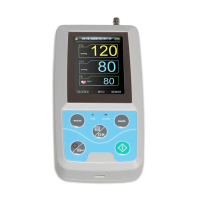
The Contec ABPM 50 is an Ambulatory Blood Pressure Monitoring (ABPM) device designed for continuous blood pressure measurement over an extended period. It is intended for use in clinical settings to provide a comprehensive view of a patient's blood pressure profile, aiding in the diagnosis and management of hypertension. The device is compact and can be worn by the patient during their daily activities, allowing for real-world blood pressure readings that are often more accurate than single in-office measurements.
The primary function of the Contec ABPM 50 is to automatically measure and record a patient's blood pressure at predefined intervals over a 24-hour period or longer. This allows healthcare professionals to assess blood pressure variations throughout the day and night, identify nocturnal hypertension, and evaluate the effectiveness of antihypertensive medications. The device stores these measurements internally, which can then be downloaded to a personal computer for analysis and report generation.
The ABPM 50 operates by inflating a cuff placed on the patient's arm at programmed times, taking a blood pressure reading, and then deflating. The device is capable of storing patient-specific data, including their name, which can be pre-programmed before the monitoring period begins. It features an intuitive menu system that allows for configuration of measurement intervals, sleep and wake times, and other operational parameters. Once activated, it operates autonomously, requiring minimal patient interaction during the monitoring period.
The Contec ABPM 50 offers several user-friendly features to streamline its operation. Before initiating monitoring, the device needs to be connected to a PC with the accompanying software. This allows for the download of the software and the pre-programming of patient details, such as their name, directly onto the device. This step ensures that the downloaded data is correctly associated with the patient.
To begin a monitoring session, fresh batteries must be inserted into the ABPM 50. The device is then attached to the patient, typically with a cuff on the arm. The "On" button is pressed and held for a few seconds to power on the unit. Users can navigate through the menu using "Menu/OK" and up/down keys. To activate the ABPM mode, users select "ABPM" from the menu, then navigate to "ABPM on-off" and change its status from "END" to "BEGIN." The device will prompt whether to delete existing ABPM data, offering flexibility to either retain or clear previous records.
By default, the unit is programmed to inflate every 30 minutes from 07:00 to 19:00 and every 60 minutes from 19:00 to 07:00. These inflation intervals, along with sleep and wake times, can be customized through the "ABPM Set" menu, which is accessible via "System Set" under the "System" menu. This customization should be performed before activating the ABPM sequence to ensure the monitoring schedule aligns with the patient's routine.
After the monitoring period concludes, the device is removed from the patient. To deactivate the ABPM mode, any button can be pressed to wake the unit, and then the "OK" button must be long-pressed as prompted. The device will guide the user through the steps to finish the sequence. To review the measurements directly on the device, users can press "Menu/OK," navigate to "ABPM," then "ABPM data," and press "OK/Menu" to enter. This displays the data from the last monitoring sequence.
For comprehensive analysis, the measurements are downloaded to a PC. After connecting the device to the PC, the software will display "USB Connecting." Clicking "Download" initiates the transfer of data. If a patient name was entered during the initial setup, the data will be associated with that name; otherwise, it will be linked to the current patient record. Patient data can be edited through the "Edit" option in the software. Finally, a PDF report can be generated by clicking "Report."
The Contec ABPM 50 emphasizes ease of use and reliability through straightforward maintenance practices. The most critical maintenance aspect is the regular use of fresh batteries. The manual explicitly states to "Insert fresh batteries in ABPM – Always!" This ensures consistent and accurate operation throughout the entire monitoring period, preventing interruptions due to power loss.
The device's software plays a crucial role in its maintenance and functionality. Users are instructed to download the software to their PC, which facilitates the initial setup, patient data entry, and subsequent data download and analysis. Keeping the software updated, although not explicitly detailed in the provided text, is generally good practice for any medical device to ensure optimal performance and compatibility.
Cleaning instructions are not provided in the given text, but typically, medical devices like the ABPM 50 require routine cleaning of the exterior surfaces and the cuff with appropriate disinfectants to maintain hygiene, especially between different patients. Proper storage of the device and its accessories, such as the cuff, is also important to prevent damage and ensure longevity.
The manual also implicitly suggests a form of user-level maintenance through familiarization: "We strongly suggest you wear the unit yourself and go through the steps to familiarise yourself with the unit and its operations." This practice allows users to understand the device's behavior, menu navigation, and potential issues, which can help in troubleshooting minor problems and ensuring correct operation for patients. This proactive approach to understanding the device contributes to its effective maintenance and reliable performance.
 General
| Model | ABPM 50 |
|---|---|
| Device Type | Ambulatory Blood Pressure Monitor |
| Measurement Method | Oscillometric |
| Cuff Size Range | 22-32 cm |
| Accuracy (Pressure) | ±3 mmHg |
| Resolution | 1 mmHg |
| Overpressure Protection | Yes |
| Data Storage | Yes |
| Interface | USB |
| Cuff Size | Adult |
| Measurement Range (Pressure) | 0-280 mmHg |
| Measurement Range (Pulse Rate) | 40-200 bpm |
| Accuracy (Pulse Rate) | ±5% of reading |
| Display | LCD |
| Power Supply | 2 x AA batteries |
| Battery Type | AA Alkaline batteries |
| Software | PC software for data analysis |
| Operating Temperature | 10-40 °C |
| Storage Temperature | -20 to 60 °C |

 To Next Page