Rev:03/21
© 2021 Continal Group Ltd. All rights reserved. E & OE.
UNDERFLOOR HEATING
4
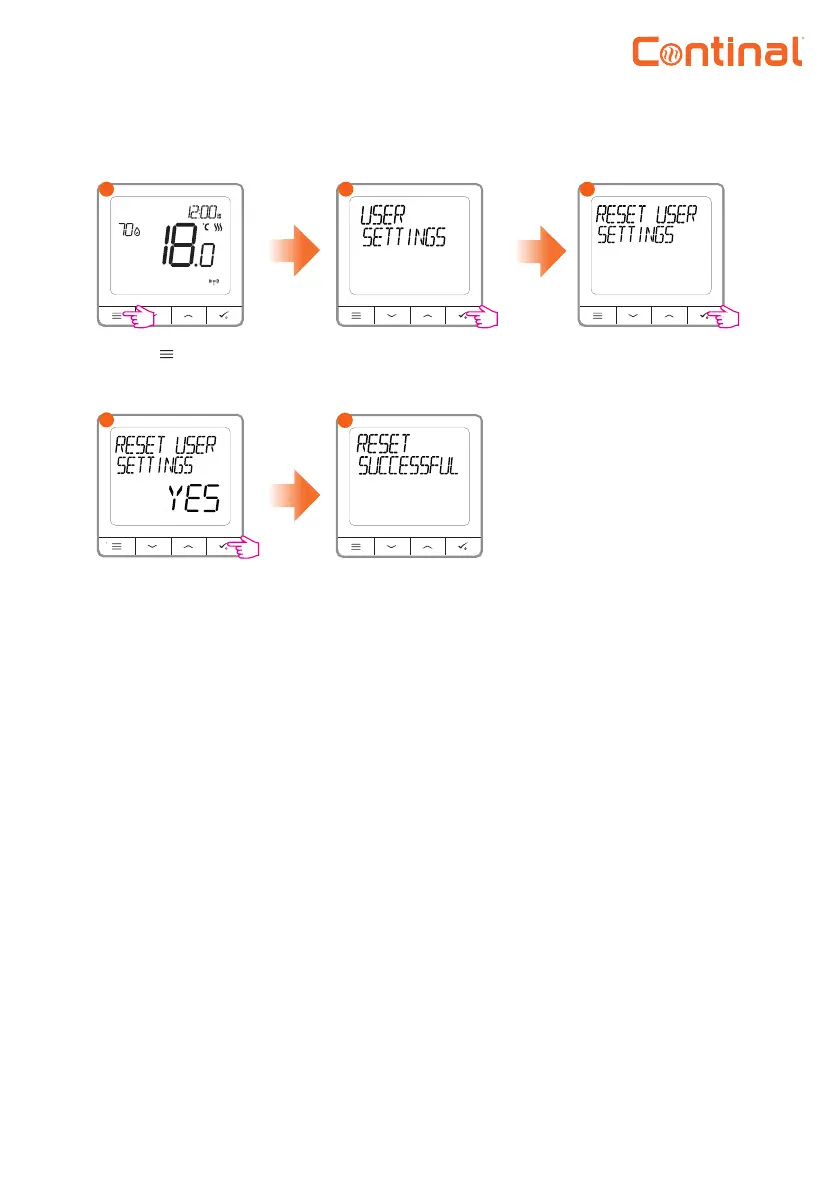
Reset user settings (back to default)
The user settings has
been successfully
reset.
Go to the user
settings.
Press the button to
enter the main menu.
1
2
3
Choose the reset
user setting.
Conrm the reset by
selecting yes.
45
Temperature scale: Set the temperature scale to Celsius or Fahrenheit.
Display temperature resolution: Determines the resolution of the displayed temperature
(0.5°C or 0.1°C).
Heat control algorithm: This function defines how to control the room temperature. Choose ITLC for
underfloor heating.
S1 / S2 input: An external temperature sensor or an occupancy sensor can be connected to the S1 / S2
input of the Quantum digital thermostat-RF. Additionally, by connecting a NO type of ON / OFF voltage-
free contact, you can use this input as a one-touch rules trigger (programmed in the Salus Smart Home
app).
Valve protection: This function activates all actuators once a week for 5 minutes (in summer, this
function helps to prevent the actuators sticking).
Min turn-off time: Minimum switch-off time (the thermostat will not send the signal for heating more
often than specified in this parameter).
9. Short description of admin settings


 To Next Page