Rev:03/21
© 2021 Continal Group Ltd. All rights reserved. E & OE.
UNDERFLOOR HEATING
5. First power-up sequence
6. Linking
Please note: For easy installation, please make sure you have already added your other devices to
the ZigBee network, such as wiring centres etc.
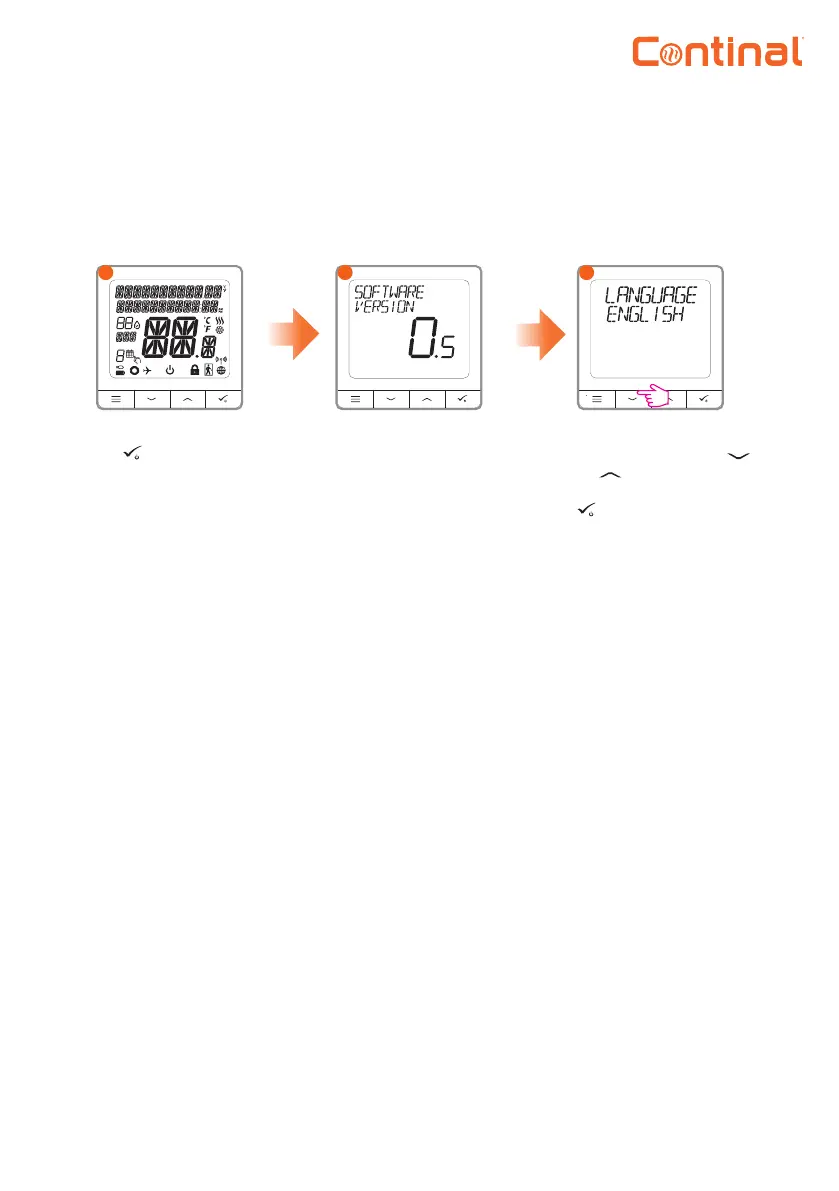
To power on, hold
the button for 3
seconds. The display
will show all icons.
The thermostat will
display the software
version.
Now, choose your
language by using the
or buttons. Conrm
your language using the
button.
1
2
3
Refer to the Quantum digital thermostat-RF linking quick guide for instructions on how to link the
Quantum digital thermostat-RF. This can be found at www.continal.eu/quantum
7. Full menu structure
Admin settings:
• Temperature scale
• Display temperature resolution
• Heat control algorithm
• Cool control algorithm
• S1 / S2 input
• Minimum setpoint
• Maximum setpoint
• Valve protection
• Minimum turn-o time
• Optimisation feature
• Comfort warm oor
• Pin code
• Device information
• Factory reset
Schedule settings:
• Disable
• MO-FR+SA-SU
• MO-SU
• Single days
User settings:
• Time / date
• Holiday mode
• Thermostat calibration
• Show / hide display humidity
• Show / hide display floor
• Standby temperature setpoint
• Heat / cool
• Reset user settings


 To Next Page