The Continal Quantum digital thermostat-RF is a stylish, modern, and wireless device designed for underfloor heating systems. It offers a range of app-controlled features and can be operated remotely via a smart device or manually through its intuitive interface. Recharging is simple via a micro USB port.
Function Description
The Quantum digital thermostat-RF serves as a central control unit for underfloor heating, allowing users to manage room temperature, set schedules, and monitor various environmental parameters. It can operate in both online and offline modes, offering flexibility in how it integrates with a smart home system.
In online mode, the thermostat connects to a Quantum hub, enabling full configuration and control of all connected devices through the Salus Smart Home app. This mode leverages the ZigBee network for communication.
In offline mode, the thermostat functions locally without a Quantum hub, using the ZigBee network to control devices directly. This allows for basic operation even without an internet connection.
Key Features and Usage:
- Temperature Control: Users can set and adjust the desired temperature, with options for different control algorithms (e.g., ITLC for underfloor heating). The display shows the current temperature and setpoint, with selectable resolution (0.5°C or 0.1°C).
- Scheduling: The thermostat supports various scheduling programs, including:
- MO-FR+SA-SU: Separate schedules for weekdays and weekends.
- MO-SU: One schedule for the entire week.
- Single days: Seven separate schedules for individual days.
Users can define up to three time periods within a schedule, setting specific temperatures for each.
- Holiday Mode: This feature allows users to maintain a specific temperature setpoint for a defined duration (in days) while away. The display indicates the remaining days in holiday mode.
- Humidity Display: Equipped with a built-in hygrometer (humidity sensor), the thermostat can display the current humidity value. Users have the option to show or hide this information.
- Floor Temperature Display: When connected to a Quantum floor sensor, the thermostat can display the floor temperature with one degree of accuracy. This feature can also be shown or hidden.
- Key Lock Function: To prevent accidental changes, the thermostat keypad can be locked/unlocked by pressing and holding the "up" and "down" buttons simultaneously for 3 seconds.
- Standby Mode: The thermostat can be put into standby mode, which is indicated by a specific icon.
- Optimisation Feature: This energy-saving feature includes Optimum Start and Optimum Stop functions, which work in conjunction with the ITCL control algorithm to make the thermostat more cost-effective.
- Comfort Warm Floor: This function helps maintain a warm floor even when there is no heating demand from the room thermostat. Users can select three levels of warmth. It's important to note that this is not an economy feature and may result in the heating system being on even if the room is already warm.
- Valve Protection: To prevent actuators from sticking, this function activates all actuators once a week for 5 minutes (especially useful in summer).
- Minimum Turn-Off Time: This parameter specifies the minimum switch-off time, ensuring the thermostat does not send heating signals more often than specified.
- S1 / S2 Input: An external temperature sensor or an occupancy sensor can be connected to the S1/S2 input. This input can also be used as a one-touch rules trigger (programmable in the Salus Smart Home app) by connecting a NO type of ON/OFF voltage-free contact.
- Admin Settings: A comprehensive menu allows for advanced configuration, including:
- Temperature scale (Celsius or Fahrenheit)
- Display temperature resolution
- Heat and cool control algorithms
- S1/S2 input configuration
- Minimum and maximum setpoints
- Valve protection settings
- Minimum turn-off time
- Optimisation feature
- Comfort warm floor settings
- Pin code protection
- Device information (software version, RF range, paired devices)
- Factory reset
- User Settings: Users can adjust personal preferences such as:
- Time / date
- Holiday mode
- Thermostat calibration
- Show/hide display humidity and floor temperature
- Standby temperature setpoint
- Heat/cool mode selection
- Reset user settings
Technical Specifications:
- RF Frequency: 868.0-868.6MHz
- RF Power: <13dBm
- Connectivity: ZigBee network
- Power: Recharged via micro USB port.
- Sensors: Built-in hygrometer (humidity sensor), compatible with external floor temperature sensors.
Installation and Mounting:
The thermostat should be mounted 1.5m above floor level, away from heat sources, direct sunlight, or extreme conditions (including draughts). The wall plate can be mounted using either self-adhesive tape or screws. The thermostat then attaches to the plate via built-in magnets.
Maintenance Features:
- Factory Reset: The device can be reset to factory settings, which removes it from the ZigBee network and requires re-pairing.
- Error Codes: The manual provides a comprehensive list of error codes and corresponding troubleshooting steps for issues such as TRV hardware problems, floor sensor defects, connectivity loss (coordinator, wiring centre, TRV, boiler receiver), low battery, and pairing errors. These instructions guide users through checking wiring, replacing components, re-pairing devices, and contacting support if necessary.
- Cleaning: The device should be kept dry and cleaned with a dry cloth after disconnecting it from any power source.
Compliance:
The Quantum digital thermostat-RF complies with essential requirements and relevant provisions of Directives 2014/30/EU, 2014/35/EU, 2014/53/EU, and 2011/65/EU. Installation must be carried out by a qualified person in accordance with national and EU regulations.

 Need help?
 General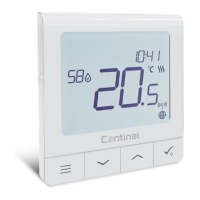

 To Next Page