EasyManua.ls Logo

Continal 39003-tsrf - Programming mode

Continal 39003-tsrf
16 pages
Print Icon
To Next Page IconTo Next Page
To Previous Page IconTo Previous Page
Loading...
Rev:03/21
© 2021 Continal Group Ltd. All rights reserved. E & OE.
UNDERFLOOR HEATING
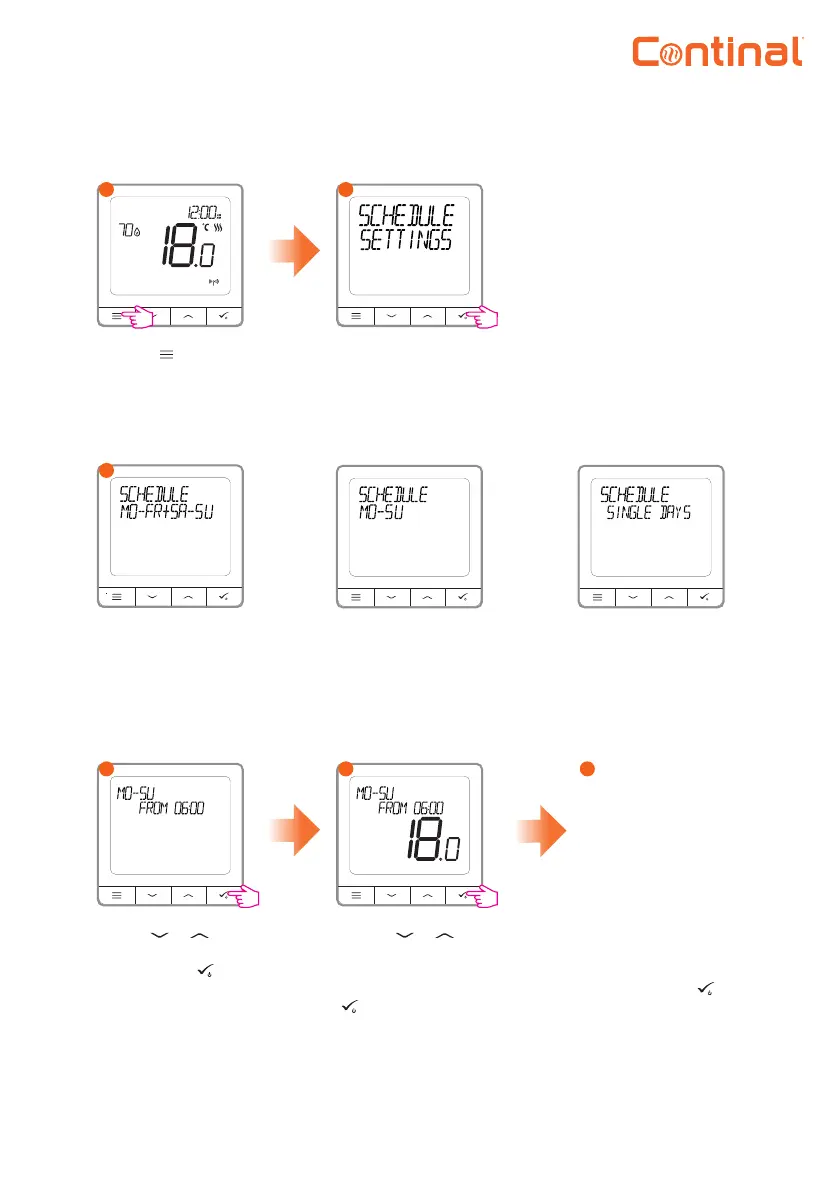
Enter the schedule
settings.
1
2
3
Programming mode
Separate schedules
for weekdays and
weekends.
There are 3 possible schedules to choose from.
4
5
6
The next programme
will appear, this will
be the lower comfort
temperature. Repeat
steps 4 and 5 for the
next schedules required.
There can be 3 time
periods set within the
schedule. To skip set
periods use --:--. Once
the nal schedule has
been added hold for 3
seconds to save and exit.
Press the button to
enter the main menu.
Seven separate
schedules for single
days.
One schedule for the
whole week.
Programming example shown is for the whole week.
Use the or
buttons to set the
time. Press the
button to conrm.
Use the or
buttons to set
the temperature
setpoint. Press the
button to conrm.
After setting the program, the calendar icon will show on the display.