EasyManua.ls Logo

Continal 39003-tsrf - Holiday mode

Continal 39003-tsrf
16 pages
Print Icon
To Next Page IconTo Next Page
To Previous Page IconTo Previous Page
Loading...
Rev:03/21
© 2021 Continal Group Ltd. All rights reserved. E & OE.
UNDERFLOOR HEATING
4
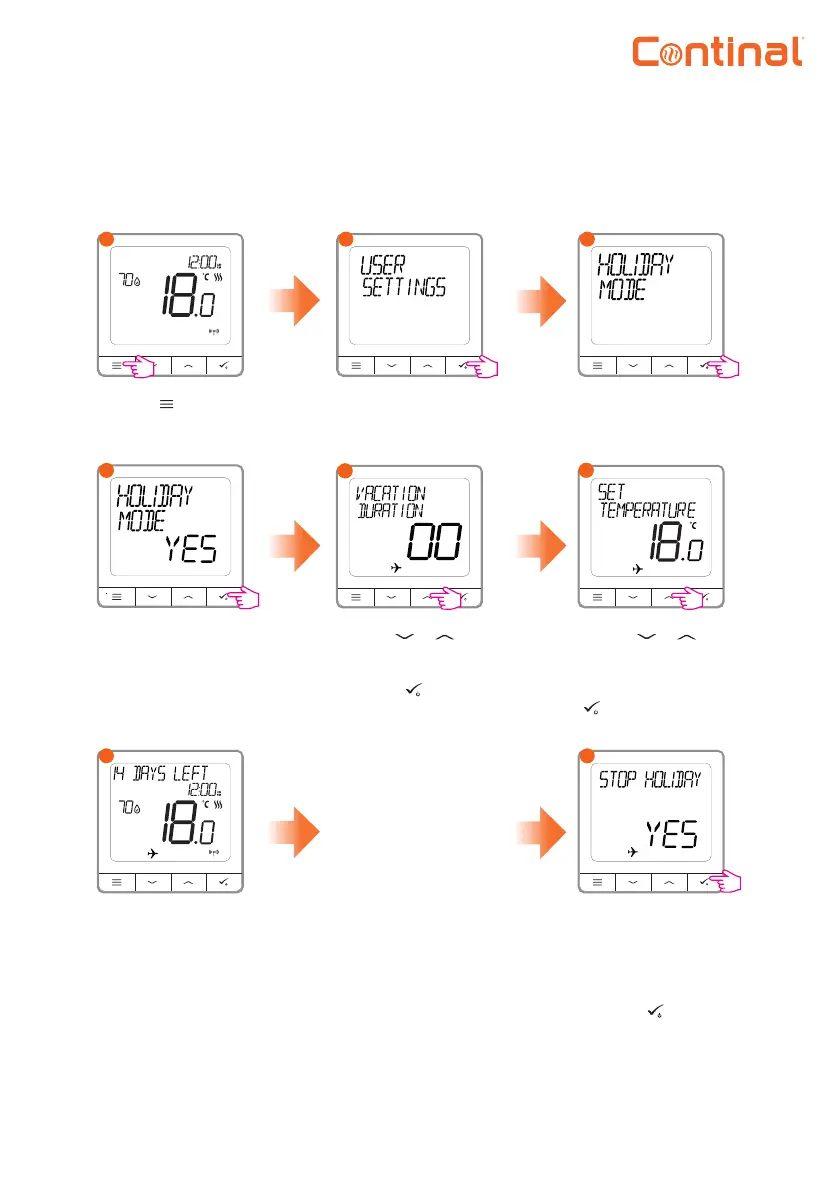
Holiday mode
Select yes to activate
holiday mode.
Holiday mode will maintain a temperature setpoint for a specic amount of time.
8
Press any button
while in holiday
mode.
To disable holiday
mode, select yes and
press the button
to conrm.
Go to the user
settings.
Press the button to
enter the main menu.
1
2
3
Choose the holiday
mode option.
Use the or
buttons to set the
duration (in days).
Press the button
to conrm.
Use the or
buttons to set
the temperature
setpoint. Press the
button to conrm.
7
When holiday mode
is active, this is
shown by the plane.
The thermostat will
show how long is
left on the top of the
display.
To turn o holiday
mode.
45
56