EN-13
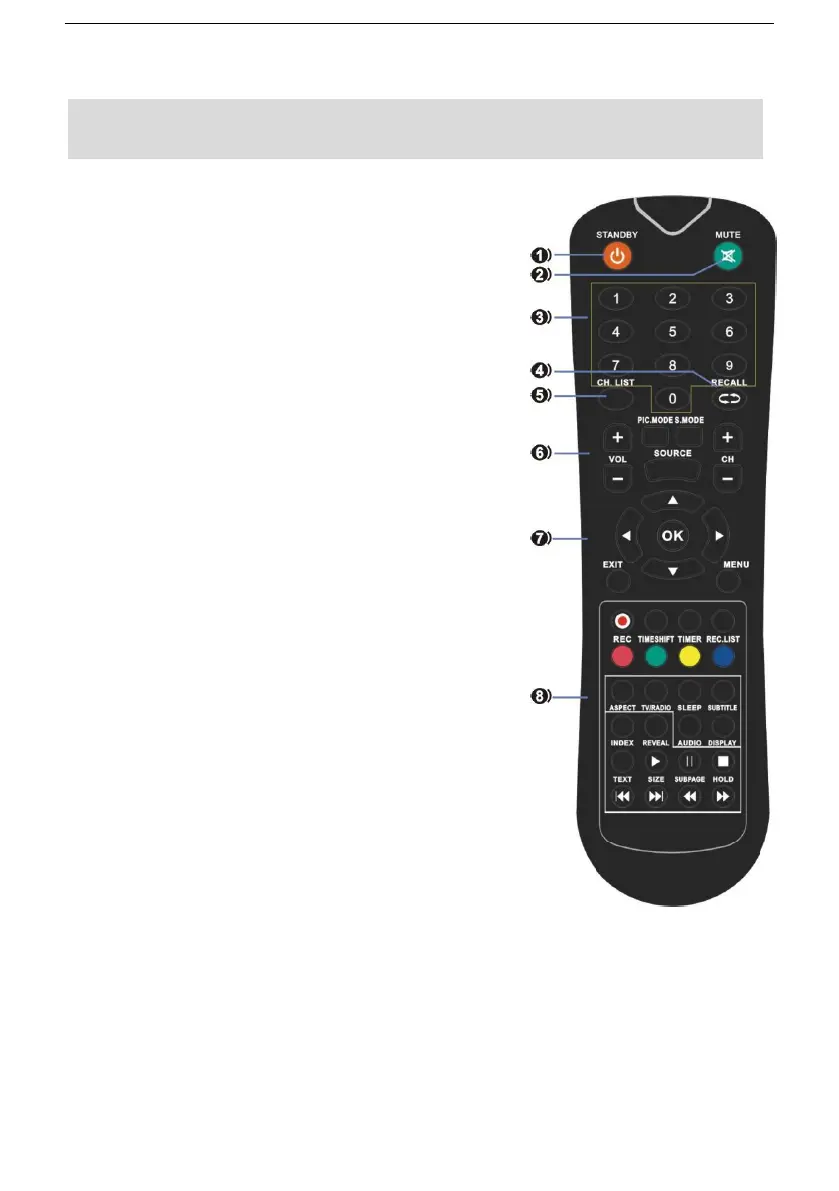
1.STANDBY: Switch the set between ON and
STANDBY.
2. MUTE: Switch the sound on or off.
3.0~9: Figures 0-9 are used to directly input channel
number.
4.RECALL: Return to the channel selected last time
5.CH.LIST : Press to show the channel list program.
6. VOL +/- : Increase/decrease the sound level.
PIC.MODE: Select the different picture mode directly.
S.MODE: Select the different sound mode directly.
SOURCE : Display the source list of input signal.
CH +/- : Select a program.
7.▲/▼/◄/► : Navigation buttons
OK : Confirm selection.
EXIT : Return to TV viewing from any menu.
MENU : Select a menu.
8. REC: Start recording of the current digital channel.
TIMESHIFT: Press the TIMESHIFT button when you
want to pause; press the button again to resume
playback of the TV program.
TIMER: Enter the setup menu of time recorder.
REC.LIST: Display the list of recorded programs.
RED / GREEN / YELLOW / CYAN:
Available in the following modes: teletext, DTV and TV.
ASPECT : Select available format.
TV/RADIO : Switch the unit between TV and
Radio.(Digital radio is not available in countries such
as France.)
SLEEP : Sleep time setting.
SUBTITLE : Recall your preferred subtitle in digital
mode.
INDEX: Ask for the list of main TV letter broadcast page number.
REVEAL: Display the characters hidden.
AUDIO: Press AUDIO to change audio mode.
DISPLAY: Display the system state information on set by active user.
TEXT: Display the teletext on screen.
SIZE: Change the size of current page.
SUBPAGE: Display the current subpage.



 To Next Page