EN-21
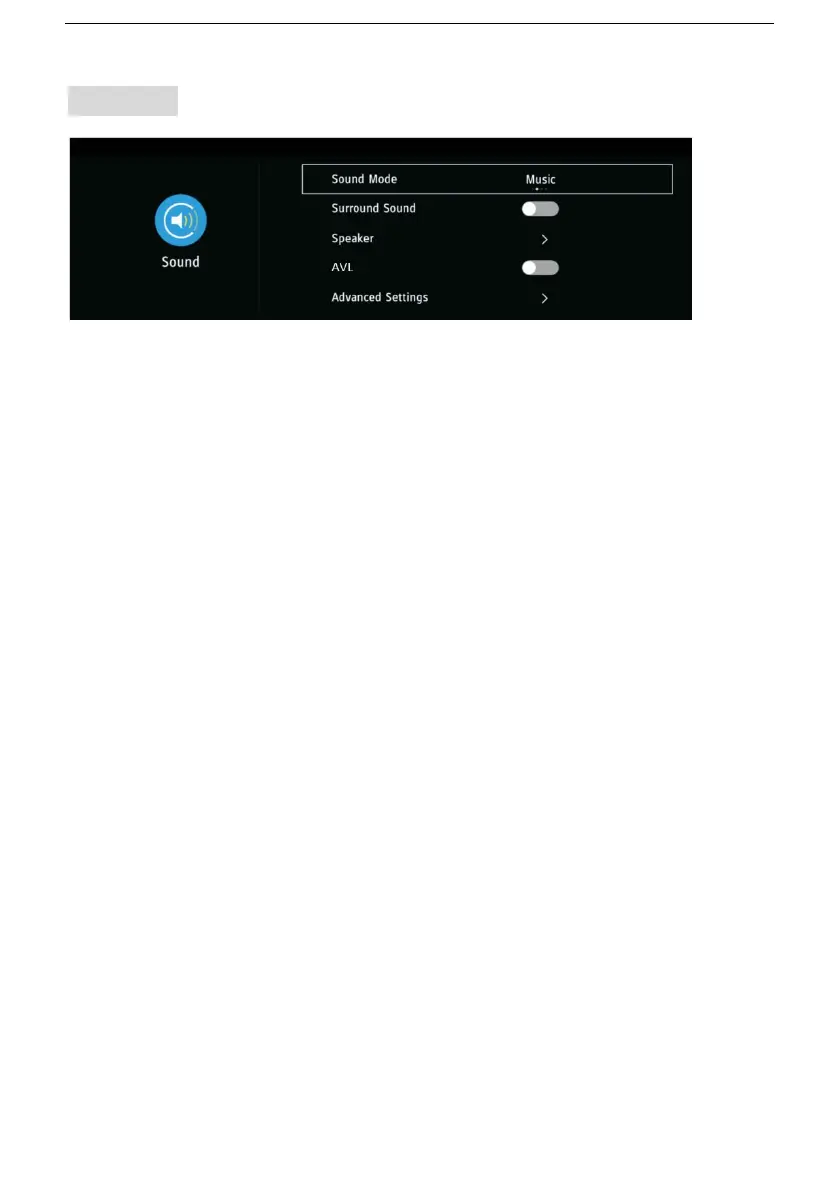
3. Sound
3.1 Sound Mode
- Press the LEFT/RIGHT navigation buttons to select an option.
Picture Mode: available options: Standard, Music, Theater, User.
3.2 Surround Sound
- Turn on/off surround sound.
3.3 Speaker
Digital Audio Output: Auto, PCM, RAW.
Digital Audio Delay: adjust this item if Digital Output and TV picture are
not simultaneous.
Lip Sync: adjust the lip synchronization.
3.4 AVL (Auto Volume Level)
- Turn on/off Auto Volume Level.
3.5 Advanced Settings
Note: Only when Sound Mode is Personal, you can see and adjust
Balance and Equalizer.
Balance: adjust the balance of audio left and right.
Equalizer: adjust different frequency to get the most satisfied sound.
Audio Description: For Visually Impaired users, this function enables a
user to know a certain scene or action through the narration, instead of
seeing it. (AD Switch function works only when you are viewing
programs that contain related narration information.)


 To Next Page