7
SETTING UP YOUR APPLIANCE AND SWITCHING IT ON
Setting Up your appliance
Place your Cook Expert on a flat worktop, away from sources of heat and water splashes�
Give it plenty of room so that you do not have to move it each time you want to use it�
The steam it releases could damage your kitchen units over time, so avoid installing your
appliance directly underneath a shelf or cupboard�
Before using your appliance for the first time, clean all the parts with hot water and washing-
up liquid (see Cleaning p�26)�
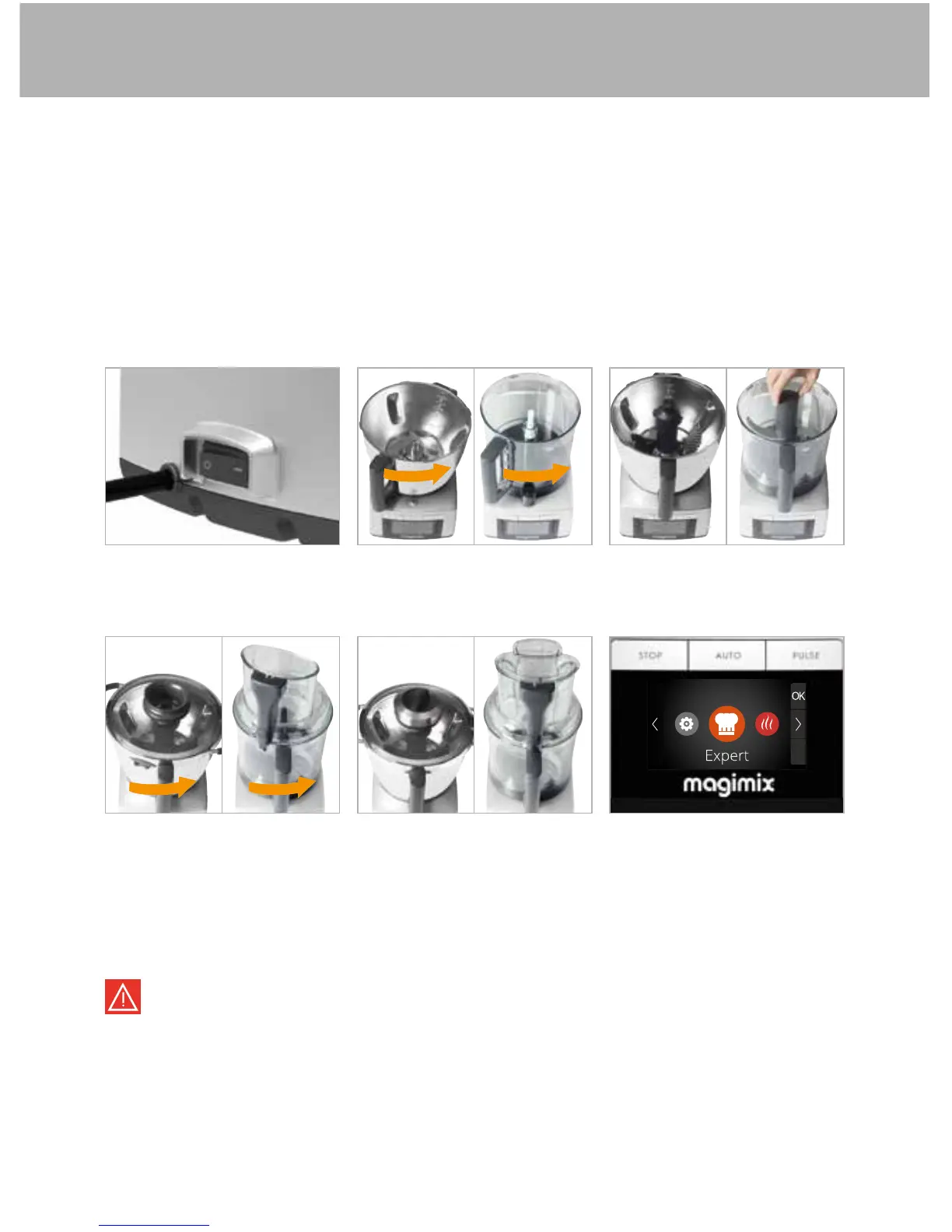
Switching your appliance on
Connect your appliance to
the mains supply and flip the
switch to 1�
Add the ingredients and
close the lid by turning it to
the right�
If you fit the food processor bowls (clear bowl(s) + lid + pushers), your appliance will
automatically select the Food Processor programme�
Before opening the lid, press STOP, and always check that the blades have stopped
turning. Your appliance will only work if the bowl, lid (and pusher when using the
Food Processor attachment) are correctly locked into place.
Fit the bowl you have
selected and turn it to the
right�
Position the cap or pusher
(unless stated otherwise in
the recipe)�
If necessary, attach the
accessory�
Select the programme and
start it by pressing AUTO�


 To Next Page