Installation
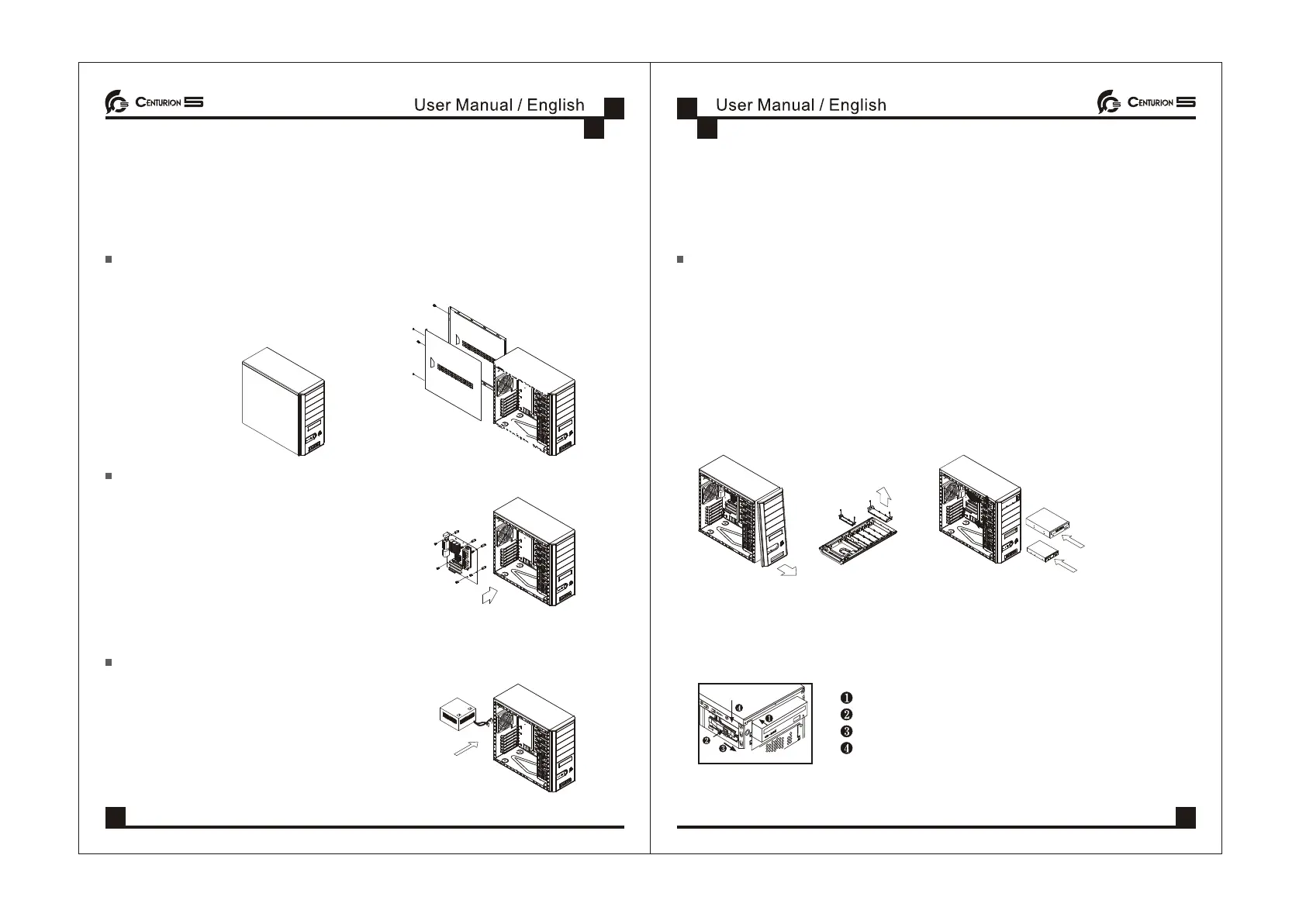
Removing the Side Panels
Step: Unscrew the side panel and remove it.
Installing the Motherboard
Step:
1.Unscrew the side panel and remove it.
2.Lay the chassis
3.Locate the motherboard with the location of
motherboard screw location.
4.Secure the motherboard with suitable screws.
To install/ replace the Power Supply Unit (PSU):
Step:
1.Locate the PSU at chassis PSU rack.
2.Secure PSU with available screws.
3.You finished installing the PSU.
Installing Drives (CD-ROM, HDD, FDD, etc.)
Step:
1. Remove the side panel and chassis front plate.
2. Choose a 5.25 drive bay, unscrew the drive bay plate.
3.Secure the chassis front plate.
4.Place your device into it.
Slide CD-ROM, HDD, FDD into the 5.25 and 3.5 bay
Push plastic rail to the front part
Press plastic lock down to lock
Fit the holder's hole complely
04 05



 To Next Page