2FT
1-4-55
1-4-2 Management mode
In addition to a maintenance function for service, the machine is equipped with a management function which can be oper-
ated by users (mainly by the machine administrator). In this management mode, settings such as default settings can be
changed.
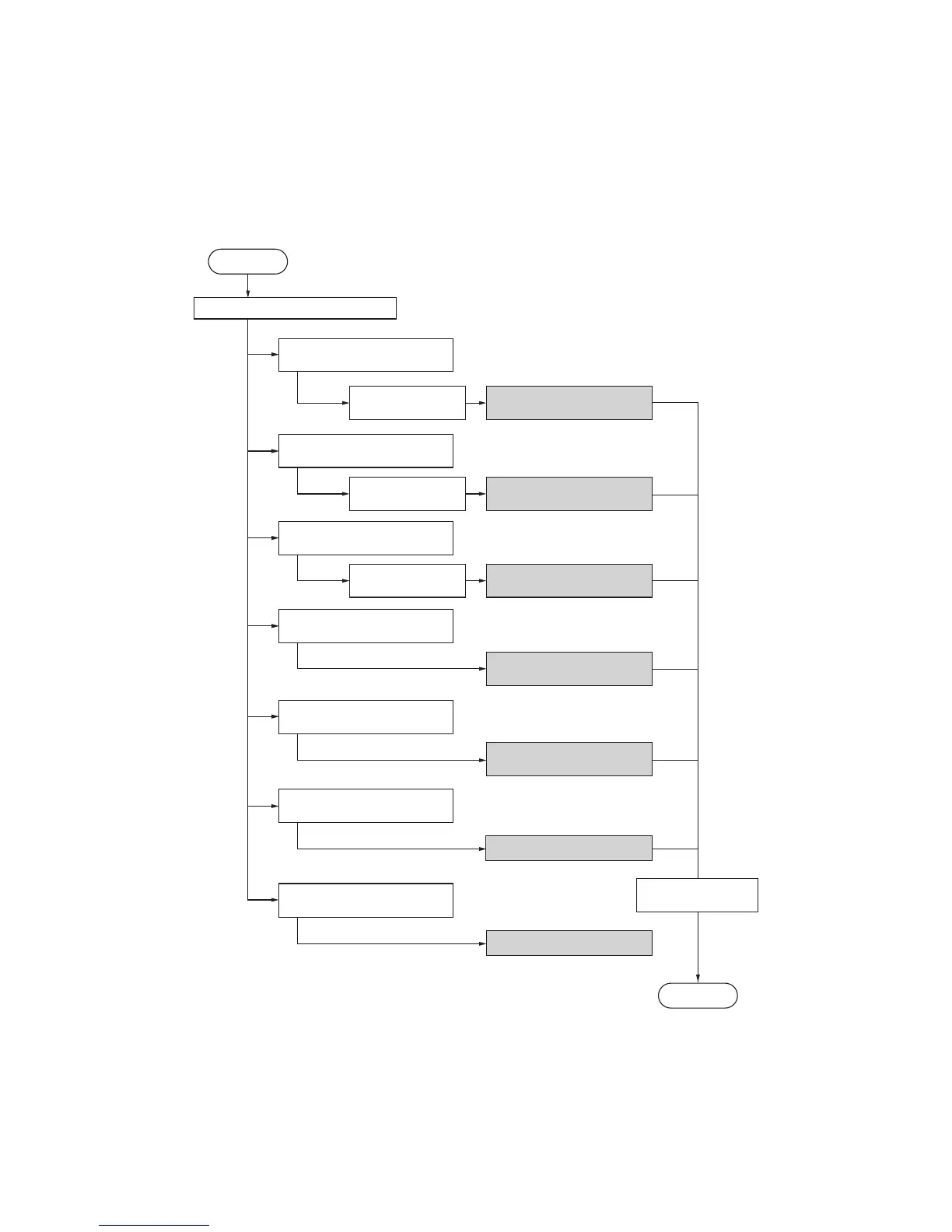
(1) Using the management mode
Select [Job Accounting] and
then press the enter key.
Enter the
management code.
Press the system menu/counter key.
Execute job accounting items
(page 1-4-56).
Select [Copy default] and then
press the enter key.
Enter the
management code.
Make copy default settings
(page 1-4-57).
Select [Machine default] and
then press the enter key.
Enter the
management code.
Make machine default settings
(page 1-4-59).
Select [Counter check] and
then press the enter key.
Check the counter
(page 1-4-61).
Select [Bypass setting] and
then press the enter key.
Make bypass settings
(page 1-4-61).
Select [Print report] and then
press the enter key.
Select the [End] and
press the enter key.
Output the report (page 1-4-61).
Set the language (page 1-4-61).
Start
End
Select [Language] and then
press the enter key.



 To Next Page