2FT-3.0
1-4-13
U053 MAIN MOTOR
Increasing the setting makes the image longer in the auxiliary scanning direction, and decreasing it
makes the image shorter in the auxiliary scanning direction.
POLYGON MOTOR
Increasing the setting makes the image longer in the main scanning direction and shorter in the auxil-
iary scanning direction; decreasing the setting makes the image shorter in the main scanning direction
and longer in the auxiliary scanning direction.
3. Press the start key. The value is set.
Interrupt copy mode
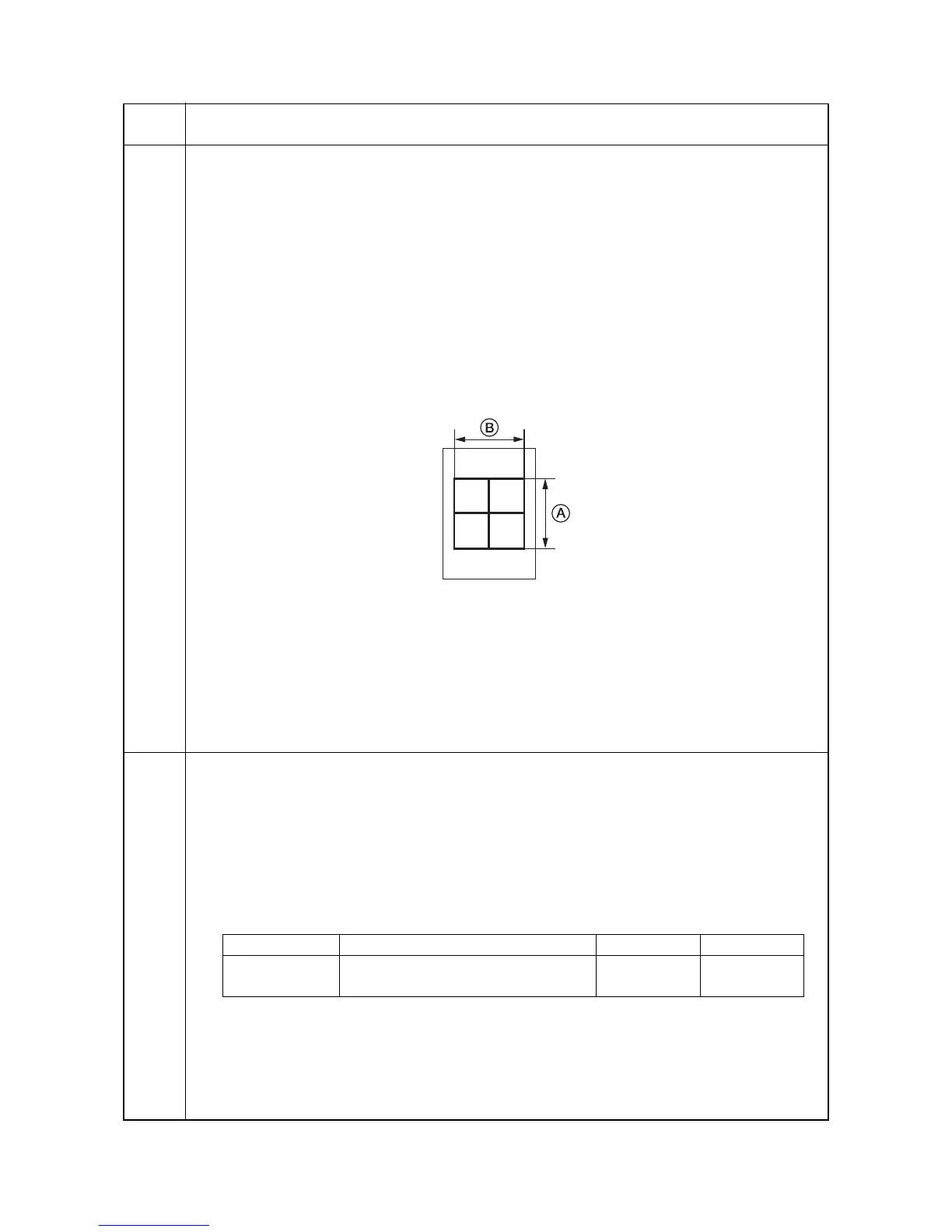
While this maintenance item is being performed, a VTC pattern shown below is output in interrupt copy mode.
1. Press the interrupt key. The machine enters the interrupt copy mode.
2. Press the start key. A VTC pattern is output.
To return to the screen for setting, press the interrupt key.
Correct values for an A3/11" x 17" output are:
A = 300
± 1.5 mm
B = 270
± 1.35 mm
Figure 1-4-1
Adjustment
1. Output an A3/11" x 17" VTC pattern in interrupt copy mode.
2. Measure A and B on the VTC pattern (Figure 1-4-1), and perform the following adjustments if they are
different from the correct sizes:
A: Drive motor speed adjustment
B: Polygon motor speed adjustment
Completion
Press the stop/clear key at the screen for setting. The screen for selecting a maintenance item No. is dis-
played.
U055
Setting the motor periodic drive
Description
Specifies ON/OFF the drum small rotation mode. Also changes the drum drive overtime after displaying
Ready and/or returning from the sleep mode.
Purpose
To be set according to user request.
Method
Press the start key. The screen for setting is displayed.
Setting
1. Select the item to be set using the up/down cursor keys.
2. Change the setting using the left/right cursor keys.
3. Press the start key. The value is set.
Completion
Press the stop/clear key. The screen for selecting a maintenance item No. is displayed.
Maintenance
item No.
Description
Display Description
Setting range Initial setting
DRIVE Drum small rotation mode ON/OFF
0 (OFF)/1 (ON) 1
TIME Drum drive overtime
10 to 60 (s) 30



 To Next Page