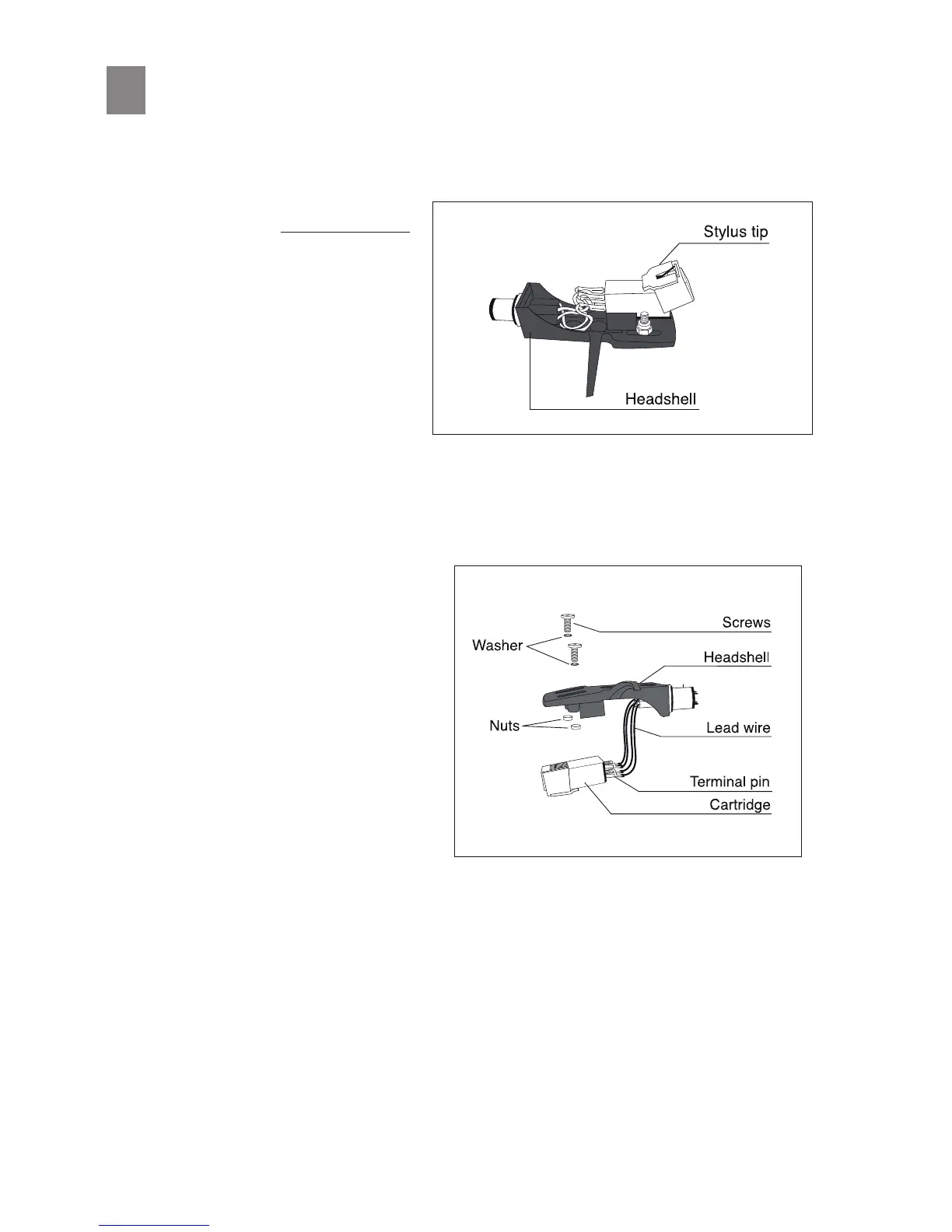
Stylus Replacement
The life expectancy of the stylus p is ap-
proximately 500 hours when used properly.
In the interest of maximum sound quality
reproducon, we recommend replacement
within this period.
The stylus p is replaced by gripping the sty-
lus holder and pulling it away from the body
of the cartridge in a downwards moon.
The new stylus p is then inserted by
pushing it into the cartridge in an upwards
moon.
Cartridge Replacement
Remove the headshell from the tonearm.
Remove the screws, nuts and washers that
hold the cartridge to the headshell.
Disconnect the four lead wires from the
back of the cartridge, taking care to remove
the terminals with small pliers or the p of a
small screwdriver to prevent separang the
connectors from the lead wires. Never pull
by the wires alone.
The terminals on the headshell are con-
gured in a specic way according to the
arrangement below. Check the locaon and
polarity of each of the cartridge’s terminal
pins and then connect the lead wires, taking
care not to get the polaries mixed up:
Once connecons are properly made, re-fasten the cartridge to the headshell using the screws, washers
and nuts that you previously removed.
Red : Right channel +
White : Le channel +
Green : Right channel -
Blue : Le channel -
13


 To Next Page