02
WPS - Method:
You can also use the WPS function as an alternative
Set-up method, if you have a WPS button available on your
primary router.
Hold the WPS button of your Primary Router/WiFi AP till
the WPS LED starts blinking.
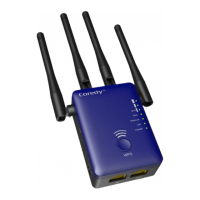
Press and hold the WPS 3 seconds on the Rear Panel.
Once WPS light starts blinking on it as well, please wait for
a minute for The primary router/AP and the Extender E300
to pair up and then connect to the "Coredy E300_EXT"
SSID in your Smart Phone using your primary router's WIFI
password.
6.
Enter your Router's/AP's WIFI password in the
Password/WIFI Key/Security key column and click on
"Apply"
7.
In the next window, you'll see the reboot process with a
Bar. When the Bar reaches 100%, (Leave the device for
1 minute to let it reboot itself).
8.
Open the list of available networks again using your
smartphone. Find out the New SSID "Coredy
E300_EXT" and connect with it using the same
password as of your primary router/AP.
9.
If the internet works, unplug Coredy E300 and plug it
halfway between your Router and the Device intended
for the internet usage/dead zones in your home where
you were getting low to no WIFI signals.


 To Next Page